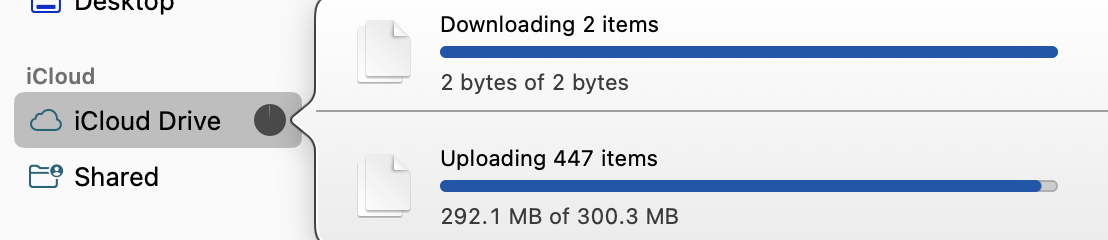
My MBA M1 (macOS Sequoia 15.7.4) sometimes seems to stop syncing with iCloud Drive. (In case anyone wants to get a similar status indicator but doesn’t know how, click on the circle to the right of “iCloud Drive” in the sidebar of a Finder window in column display while iCloud Drive is syncing.)
The status in the image persisted for well over a minute. During that time, I was able to load web pages, so it seemed that my internet connection had not gone down. It was not an isolated instance; this seems to happen a couple times per week. Any ideas? If I ignore it, the sync has always completed eventually, but I wish there were a simple way for me to tell the Mac to pick up the pace.
There is another oddity, related to what I understand is sync status for items in iCloud Drive. (I got this screenshot from the right side of a Finder window column showing iCloud Drive in column display.)
I took the above screenshot when iCloud Drive appeared to be fully synced. If I entered a folder that had the cloud with the arrow rather than the circle with the arrow, all files had the circle with the arrow. Some nested folders had the cloud with the arrow, but again, all enclosed files had the circle with the arrow. This pattern continued through the tree; all files claimed to be synced. What is going on? Thanks.
I took the above screenshot after about two minutes of no change.
I don’t know how it would be related, but Activity Monitor says I’m sending and receiving around 0.5 to 5 MB per second. Since this is nowhere near my bandwidth, I wish iCloud Drive would synchronize.
No real help here but I wonder if it is hidden files (e.g., .DS_Store) that are currently open by the OS and so the sync is waiting form them to close before continuing.
I have restarted a couple times (for other reasons) and I still get the slow synchronization sometimes but not always. And now the issue has started affecting my MBA M3 (macOS Sequoia 15.7.5).
To see hidden files in Finder, the keyboard shortcut is command-shift-period. It acts like a toggle. The files that are waiting likely have a dashed cloud next to them.
Just to note, the circle with the arrow means you told iCloud to sync and keep the entire file on the local drive no matter what.
The cloud with the arrow below it means that the file has synched to iCloud and that it has put a link to the iCloud file on your local drive but the file is only in iCloud and you need the internet to get to the file. When you start working on one of these files, iCloud will download it and the icon will turn into just a cloud without the arrow.
All that, I still find it a bit wonky in that the icons usually mirror reality but not always. I have never had an issue working on a file when I needed to.
I have found that the iCloud sync process fairly often crashes or freezes or something. I read somewhere the the deamon responsible is called bird. (I don’t know what the name means. I suppose it is bir daemon, but I don’t know what bir means. But I digress.)
Open Activity Monitor, search for bird, and quit it (X in the toolbar). The deamon will instantly restart, so you might not notice that it quit. Sometimes it takes several tries with Quit, but Force Quit always works, and the sync process finishes quickly. In my experience.
There are other ways to restart the deamon, but this is the easiest.
This thread reminded me of an Eclectic Light Company article about how macOS throttles some I/O operations (I wanted to make Time Machine faster but it’s been so long since I used the Terminal command in the article I don’t remember how much effect it had):
Thank you. I had known that, but like so much else, I had forgotten. But now that you reminded me, I seem to recall that there was some method of telling the Finder to show hidden files by default and always, perhaps by a Terminal command.
After showing hidden files, I see “20260420-1-default.filter.delta” and “crlite.filter”. Do these mean anything to anyone here? Am I safe in deleting them and seeing if that makes any improvement?
I remember something like that, and I believe I changed the setting. My recollection (perhaps faulty) is that it seemed to make a minor improvement. But I don’t think that’s the issue here. After my post yesterday, iCloud stayed stuck at something like 220 of 223 MB for over two hours. In an image I posted above, it showed 2 bytes of 2 bytes for over a minute.
Before quitting, I asked for information (the i in a circle). My takeaway was that it claimed to have zero recent hangs and it had many Open Files and Ports, most of them in ~/Library and most of the rest in /System/Library, in case that means something to someone. Then I asked for a Sample (Sample Process from the dropdown menu by the circle with the ellipsis) and got nothing that meant anything to me. Then I quit (not force quit) bird, and it did not come back, even after a minute. Should I worry about that? If I had been clever enough to note the Executable Path (I wasn’t), could I have restarted bird by typing the path into Terminal?
Edited to add that bird is once again in the list of processes, with no specific action on my part. Also, iCloud now claims to have synced almost an hour earlier, certainly before I quit bird. And one folder that I marked Keep Downloaded has an indicator that it is not synced.