Good info all, thanks.
Yeah I noticed this price thing I think, as before Sep '23 the Corsair’s were hitting £700/$800 on Ebay, now they’re circa £900/$1000 again, or more. Weird supply/demand thing currently happening.
Good info all, thanks.
Yeah I noticed this price thing I think, as before Sep '23 the Corsair’s were hitting £700/$800 on Ebay, now they’re circa £900/$1000 again, or more. Weird supply/demand thing currently happening.
About a year ago I got an OWC Envoy Express (which is TB3) fitted with a 1 TB (they come pre-fitted up to 8 TB) Aura P12 Pro. It seems to be almost as fast as the SSD in my M2 MBAir; I can even make bootable clones on it. They may even have something similar by now which is even faster.
I also have an OWC Envoy Express. It’s not bad (apart from its firmly attached cable, which is a bad idea), but it’s definitely been surpassed in performance. IIRC it uses an Intel JHL7440 controller, but only 2 lanes which means it’s limited to about 1.6 GB/s. Newer TB4/USB4 enclosures with ASM2464PD chipset using 4 lanes will see clearly better throughput (if you equip them with good NVMe flash).
I’m not surprised that the Envoy Express has been surpassed, and I imagine today’s fastest will be surpassed again; the limit’s probably the speed of light. However, it seems to me that the question would ultimately be decided by the user’s needs and budget. Some, who, regardless what they actually use their computers for, simply want to be the fastest kid on the block and have unlimited resources, can have that, but it means that they’ll upgrade their stuff often, and are willing to pay top dollar. I imagine there are few such users. Most, however, probably think about what they actually use their computers for and how well their stuff can do it; budget plays a role here, too, but is a secondary limitation.
I imagine I’m probably a more typical Mac user, pretty low-end needs: fast-enough WiFi, email, browsing, writing documents (including patient records), occasionally editing photos, making Keynotes (often many animations), and occasionally doing something with iMovie. Since, especially regarding patient records, I’m a belt-and-suspenders guy, I maintain 4 back-ups: the bootable clone on the Envoy, a WiFi Time Capsule, and a wired HD for another clone (not bootable) and a Time Machine. My M2 MBAir with 16GB RAM and 512GB storage is actually even more than I really need, but I feel I’m future-proofed for a while, and it didn’t break my budget. I got the Envoy Express for 2 reasons. I’d like to have a bootable clone (for which, I believe, most HD’s are too slow), and I wanted to do a little gaming, for which I needed space and capacity for Parallels Desktop and Windows. My stuff is good enough.
High-end needs are a whole different story, culminating in Hollywood film-makers and such. They probably need the most, fastest oomph they can get, and have deep pockets. More typical semi-high-end users don’t need quite that level, just enough for stuff like Photoshop.
Getting back to fast external SSDs: there’s a huge speed difference between those and spinning disks. Making a new clone on my HD can often take at least 2 hours, but the one on the Envoy rarely takes longer that 15 minutes. That’s meaningful. But I imagine the difference, say, opening, using, and saving a Word document might be noticeable, but even the slower would be quite fast enough. So yes, you can always get “faster”, but will you notice the difference, and, given that less-than-the-fastest will always be less expensive than the fastest, is it worth it?
I agree. That OWC was fine back in the day, but these days anybody looking for a TB4 enclosure is well advised to get something else, something with more bang for the buck. It just makes very little sense to pay $80 for an old OWC product which will kneecap your fancy NVMe stick to 1.6 GB/s when you can get a modern TB4 NVMe enclosure that will exploit the full 3.2 GB/s bandwidth for just $67.
If OTOH you’re willing to give up performance because that’s not important (and indeed for many tasks [TM backups for example] it isn’t), then it also probably doesn’t make much sense to spend big bucks on TB4 over USB 3.2 Gen2 or on fancy NVMe sticks (what this thread is about) over some inexpensive QLC.
Just to put this in perspective: a modern M* Mac will easily see 5+ GB/s to/from its internal flash. So even the very best external TB4 is going to be a hit, however, settling for half of that external bandwidth (because for example your enclosure is crummy) really only makes sense if you know ahead of time your task is not going to be limited by that and you have bought your NVMe accordingly. Good examples for that are TM backups (because macOS i/o throttles TM anyway) or pure media consumption (playing even super high res video at 60 Hz amounts to nothing close to that). That said, even the very best HDDs are in an entirely different performance class (about an order of magnitude lower performance) so unless you have very good reason to remain entrenched in HDD land, any SSD you buy will likely be the overall much better choice. The bottom line here I guess is to buy enclosure (bridge chip) matched to NVMe flash matched to requirements. Don’t splurge on one only to skimp on the other.
Thanks for the link. I hadn’t realized that TB enclosures had come down in price that far. A USB 3 enclosure costs only $20, but this is close enough to easily justify the performance boost, even for occasional use.
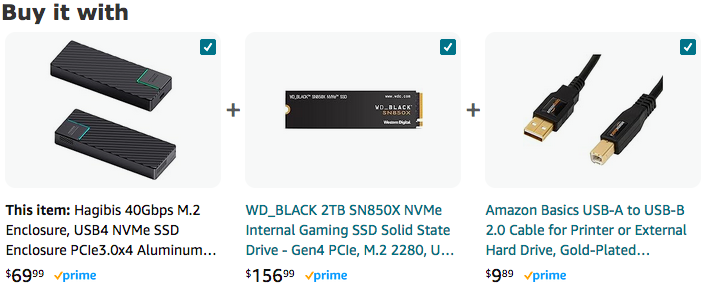
But Amazon’s “Buy it with” algorithm is on crack:
I can easily see people buying the enclosure with an SSD, but with a USB 2.0 cable? That doesn’t even fit the enclosure? I don’t think so.
These days, that’s only going to be due to the much lower price. For applications that involve a lot of data and where performance truly doesn’t matter. I use them for backup media. I would also consider using them for a media playback (not editing) application.
Read the Amazon reviews on that enclosure, though: they’re NOT generally positive on its reliability and build quality.
I’m really behind the times here but a year ago Feb I got the itch to look at how an SSD drive works. Two of these three articles discuss how to choose an SSD and the other looks at SSD SMART codes.
A white paper “What you should know about solid state drives (SSDs)”
SSD 220064-Solidigm-SSDBuyerConsiderations-WP-Final-v2.pdf (448.7 KB)
A graphic comparison chart for choosing an SSD drive
SSD a Quick-Guide-Infographic.pdf (2.3 MB)
A BackBlaze article on the expanded list of SMART codes
SSD SMARTStatsComparisonTable.pdf (36.1 KB)
HTH, Mike
Oh, and here’s how an SSD drive really works from Ars Technica Circa 2012 but still relevant.
SSD Solid-state revolution: in-depth on how SSDs really work | Ars Technica.pdf (3.2 MB)
There’s plenty more ASM2464PD enclosures if you’re not comfortable with that particular one. The one good thing about Amazon is that they make returns very easy and no hassle to get your money back should you not be satisfied.
https://www.amazon.com/dp/B0CQWXD2QT/
https://www.amazon.com/dp/B0CKFPJC1T/