Hello: I recently was asked to edit a website that I had not touched for more than 4 years. What is your recommendation to upload and download files to the server?
Transmit It’s the best. Period.
Dave
5 Likes
Lot of good discussion in this older thread:
2 Likes
I have used Transmit for years. Can recommend it.
2 Likes
Another option is FileZilla. It’s a cross-platform app (macOS, Windows and Linux). Not quite as friendly as Transmit, but if you use lots of different computers, you may find it useful to use the same app on all platforms.
2 Likes
I also use Transmit. The user interface reminds me of Xtree for file managing on PCs in the DOS days.
I use MountainDuck for Dropbox access on computers running OS versions that Dropbox has stopped supporting.
I still use Fetch. It was on the floppy sent me by NSTN, the first public (non-university) internet access provider in Canada, with whom I was customer #17. It’s had a few upgrades since then, but is the only survivor of the software that was used back then (MacPPP, Eudora and Gopher were the others: this was pre-WWW.)
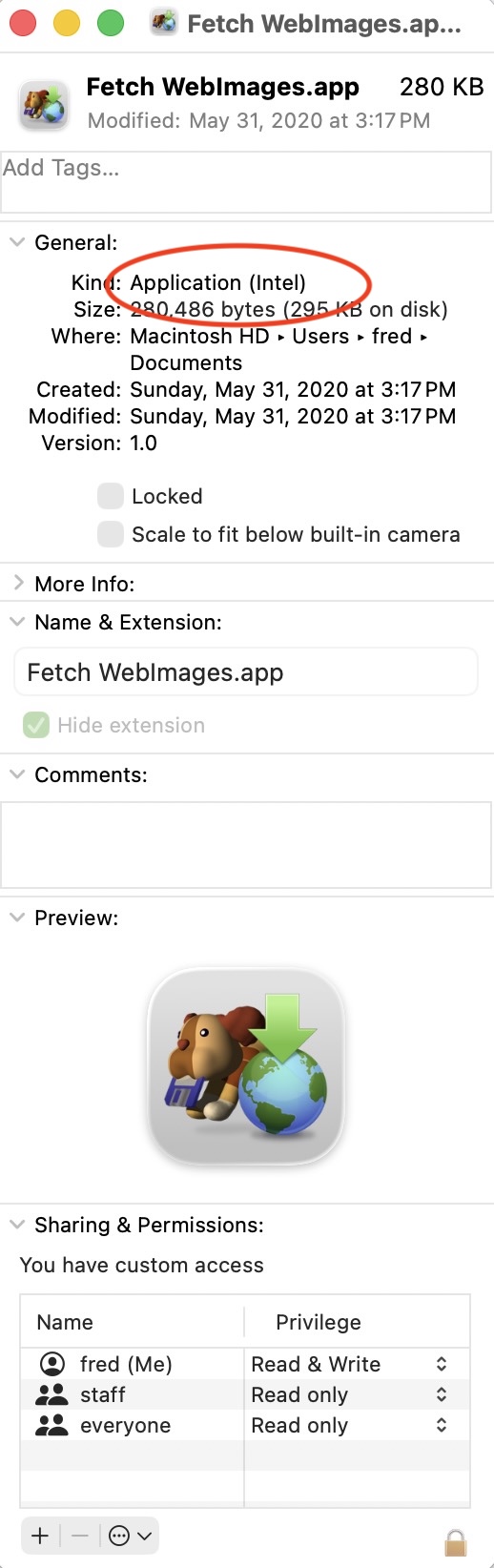
Now I have Transmit too, as Fetch isn’t updated often and I see the applets it creates are Intel (the app itself is universal) so unless it is updated again it may not work for me when we lose Rosetta 2.
1 Like
Another happy Cyberduck and Mountain Duck user here.
Another one for Transmit. I use FTP a lot – for running web sites and for file exchange – and have tried several apps. Transmit works like the Finder, and the creation of droplets makes using it extremely efficient. I even use it instead of the Finder for some things, particularly changing permissions on files or showing invisible files (for example, the stray files left behind when MS-Word crashes).
Thank you. That’s what I am going to use.
Thanks for the information about Fetch. Where and what are the Intel applets it creates? I emailed the author to ask if he’s updating Fetch again, but haven’t heard back.
You can save a connection to an FTP server using File>Save Droplet Shortcut, then pick where to save it. I have a couple in the dock that are for quick access to a couple of forums I run. I click on them and Fetch opens the folder on the server that I want, without asking me for details or to enter passwords (all saved in the droplet). I can drag a file onto the droplet and it will be automatically uploaded.
Transmit has the same feature. In the server list (centre pane of the default window) right click on a server and select Save as Droplet from the drop down menu. Transmit’s droplets are Universal, and when you save one you have the option of saving the password or not.
1 Like
I’m fairly certain that the droplets Fetch creates are standard AppleScript droplets (with appropriate code created by Fetch). It would hopefully be simple for the developer to update to create Universal AppleScript droplets. It is also probably possible to recompile what Fetch creates using Script Debugger or Script Editor. A manual process that may be more hassle than it’s worth, but at least an option.
1 Like
I use a venerable Fetch occasionally, and it is probably the only 3-rd party app on my Mac in 2026 which I first used almost 30 years ago. It is still alive and Apple Silicon native, however it is not in active development since 2023 and I have a strong feeling it will hardly be updated ever again. Message Board on Jim’s site is dead.
Cyberduck is good and free, but I am not a big fan of its UI.
Transmit is, to my taste, a gold standard, if you are willing to pay.
In the meantime, a built-in FTP client in the ForkLift helps me a lot from time to time. It is quite convenient exactly in syncing files between local folder and remote server.
1 Like
As @jzw suggested, it may not be too hard to modify the Fetch applets to run natively on Apple Silicon. Nonetheless, it may be more work for someone unfamiliar with AppleScript to be worthwhile, especially if there are other alternatives available.
Unless it is password protected, you can access the underlying script in a Fetch applet by right-clicking on the applet and choosing “Show Package Contents” from the pop-up menu. If you navigate through the result, you should be able to open the underlying script by double-clicking on it, though you might want to work on copy of the applet before exploring. Here is what you should see when you run the “Show Package Contents” menu item:

Once you open the script, you can edit it in Script Editor (in the Utilities folder) and save it as a universal application, though you may need to do some fiddling to get the resulting app to work.
If you’re not familiar with AppleScript or other languages, you might be better off simply saving new applets in another app, like Transmit, though I’d try to contact Fetch support first to see if they can provide better guidance.