Just updated my M4 Mini to 27. Maybe big mistake, I notice that all my previous flagged emails have been deleted. About 20 or so. Or I should say the flag that I applied was deleted. Anyone else?
My flagged emails remain intact after upgrade to Golden Gate 27.0.
Perhaps the View → Filter settings in Apple Mail is hiding your flagged emails?
The filter for Flagged may be triggered along with Unread emails Flagged which is hiding your Flagged and Read emails?
On my MacBook Pro M1, using the built in trackpad, I can long press on the the filter icon in the Mail Toolbar to invoke the contextual menu. I’m unsure if that was there prior to GG27.0
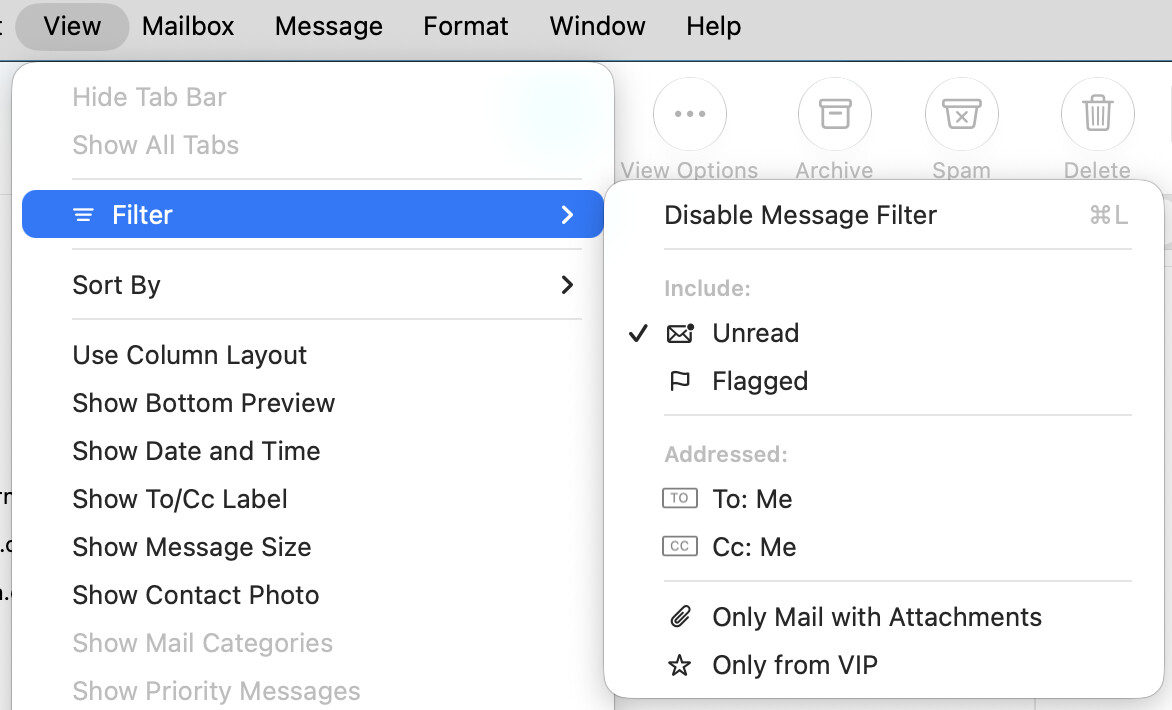
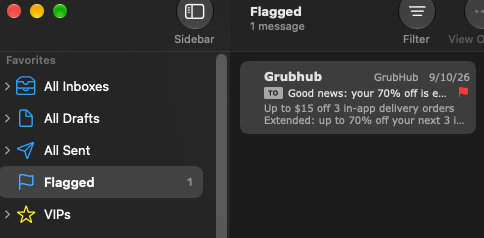
There used to be 20 some odd listed there. No I don’t use message filters, but even trying them, same as the image above.
Maybe try rebuilding the Mailbox - there might have been some corruption in the database during the update (but backup first).
1 Like
I found my smart mailbox didn’t update for the first few hours or so after my update. It is all working now.
1 Like
select a mailbox, hit “Rebuild” and nothing happens. I tried All Mailboxes and what happened was it re-downloaded messages I already had gotten… after 2 tries, back to nothing.
Oh, it gets worse. All of a sudden I see 2 flagged messages. I look at the second one, I know what it is. Go to another mailbox and to wipes that second flagged item. AND I can not seem to find that second via searching. Even tried looking in the trash, not in there.
I am furious.
Even more furious now… decided to contact the fruit. Went through a long process with the first guy, got sent to a Senior Advisor. After a long time with him, he wanted to look at my backups (CCC). I didn’t know off hand how to access my snapshots, so he gave me a case number and asked me to call back. THEN it dawned on me how ,to do it so I called back. Went though the whole routine with her.
NOW she refuses to help me… because I used a third party program. Keeps telling me I have to call CCC to find out where my missing shit is. I mean, yeah they know where the wormy fruit keeps all it’s shit. I even showed her the mounted volume from my snapshot and asked, where to go to find it… and she brushes it off giving me this 3rd party crap line.
It gets more interesting… and all of it points to a major frakup in their lame software. So here’s the picture, Mail shows on only 1 flagged message. I had even tried searching for flagged mails which generally showed zero results (except the one it showed in Flagged). Made me think they were summarily deleted. So I was casually scrolling through my main mailbox and I spot a flagged mail. 20 seconds after it shows up, so now I have 2. Kept scrolling and I find 3 more, so now there are 5.
So it seems my flagged mails ARE still in there, it’s just the software that forgot about them. I have hundreds of mailboxes, no way I can scroll all through them to find them. BIG mistake was updating to golden crap, then again, if I had done it 3 weeks from now, probably get the same result. So I am stuck.
Sorry for what looks like an angry rant… because it WAS such a thing! I’ve called apple support many times, never got treated the way I was. Big black mark.
Since upgrading to macOS 27 all flagged emails have disappeared from my MacBook Pro. While they remain on my Mac Studio I cannot unflag any of them. As a test I deleted a flagged email and it is no longer in my flagged mailbox but now the count is incorrect as if the deleted message remains. I am able to add new flagged email on both machines which do sync via iCloud.
I have restarted Mail, macs, run Clean My Mac and Onyx to no avail. I assume this is a bug in macOS 27 that will hopefully be fixed before I grow too much older. Fortunately, the flagging of my email is not really essential but I’d appreciate any insights.
Think I posted this in another thread, but 3-4 weeks post upgrade to 27, they all showed up. There was a remark I had come across that said it would take some time to update the mail DB and searchlight. Guess there mighty M4 chip is lame enough to stretch out what should never, ever take that long to actually happen.
Bottom line, there is some reason to think that in the next month or two, all your fagged mail will mysteriously re-appear.
It used to be that:
- Flagged mail is setting a metadata attribute
- The attribute was indexed by Spotlight, when it indexed the .eml files in the mailboxes
- Mail consulted Spotlight to show items in the Flagged Smart Folder
- Sidebar counts are maintained in MailData\FlagMailboxes.plst
But that’s no longer true; I think it changed in macOS 12 Monterey. At that point I no longer could find the flagged messages using mdfind.
And I don’t know how it works in Golden Gate. That being said, I’d generally think that the flagged messages aren’t gone, they’re just not being found by Mail.
My suggestion would be:
- Mailbox > Rebuild on Inbox and any other mailbox that are having a problem.
- If that doesn’t fix it completely, then in Mail > Preferences > Accounts > Account Information, disable the account, then re-enable it again. Then rebuild the mailboxes again.
It may be that if you’re in step 2, it will fix all of the mailboxes when you rebuild any of them.
I tried several times to rebuild both the Inbox and other mailboxes, nothing happened when I chose the command. Like I said, it eventually found all mine 2-3 weeks later.