Originally published at: Firefox 159 - TidBITS
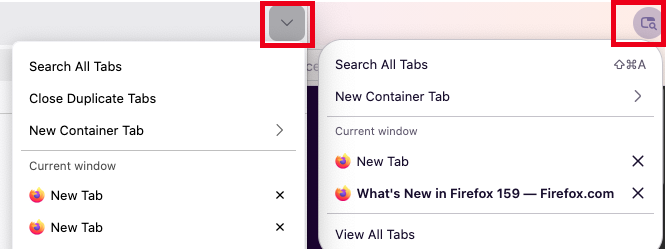
Mozilla has released Firefox 159 with a few updates for macOS users. The Web browser now uses the native macOS share picker (which shows recent contacts alongside AirDrop, Messages, and other apps), enables you to search open tabs using Command-Shift-A, resolves an issue where quick gamepad button presses were being missed in Web games, and stops the Replace button in Apple Intelligence’s Writing Tools from inserting the clipboard contents instead of the rewritten text on some sites. The update also makes saved passwords available from the sidebar by default and addresses a rapid growth in memory usage when sites such as the Zoom Web app were left open in a minimized window. Firefox’s Smart Window beta can now watch Web pages for changes such as price drops or restocks (type /watch in the chat to set one up), though that beta feature is rolling out gradually to English-language users in the US and Canada. (Free, 164.8 MB, release notes, macOS 10.15+)