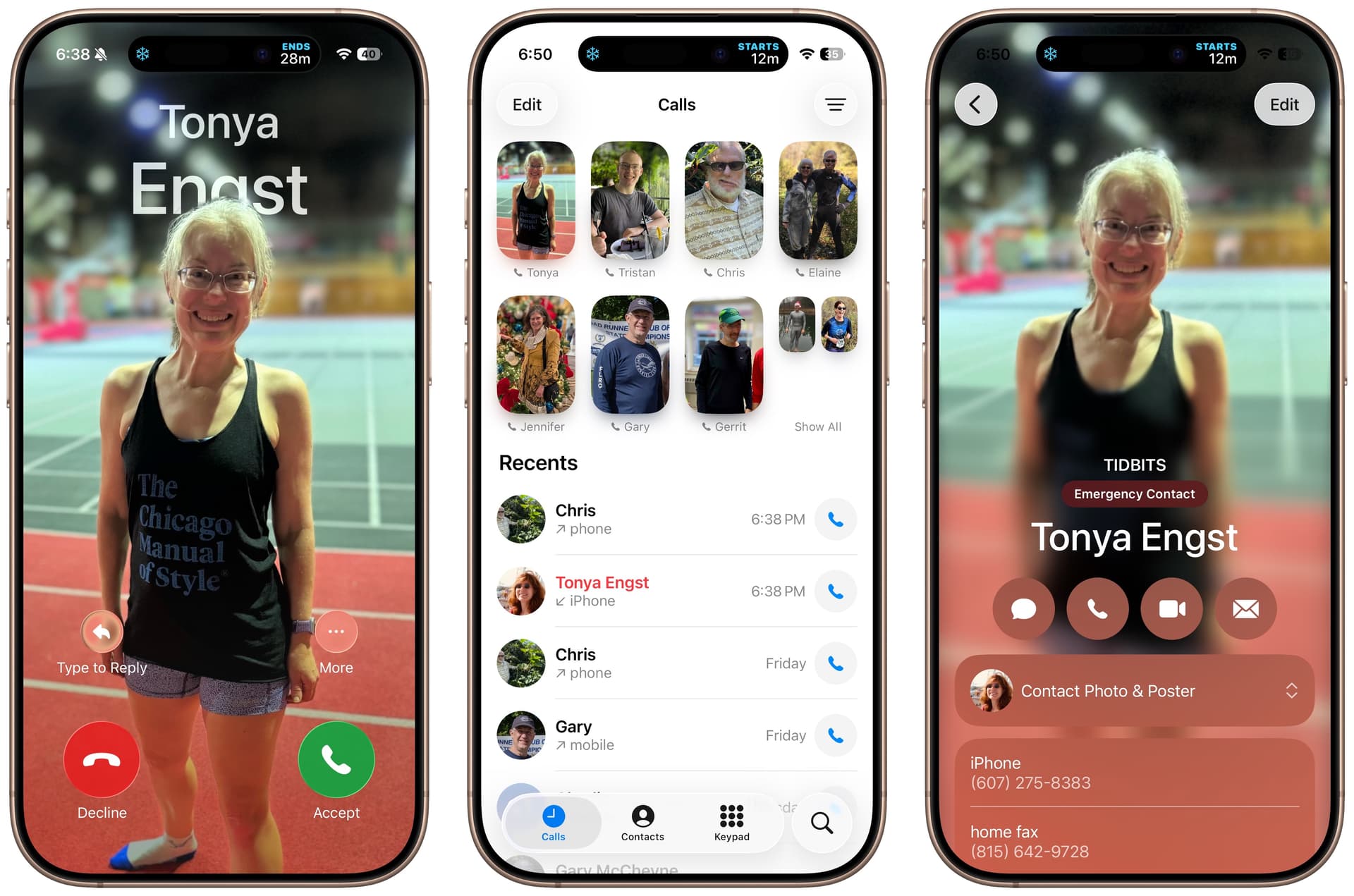
Apple introduced the full-screen contact posters two years ago in iOS 17, but even in iOS 26, they appear in only a few places: incoming calls, contact cards, and the Phone app’s Calls screen when using Unified view, which I wrote about in “Comparing the Classic and Unified Views in iOS 26’s Phone App.”
Because Unified view looks markedly better when your favorites have posters, I started creating them myself for an upcoming article on the process. In practice, poster creation is surprisingly fussy and feels underdesigned, which may explain my perception that contact posters have seen weak adoption. But am I right? Or do most TidBITS readers regularly set contact posters for their family and friends?
For how many people, including yourself, have you set a contact poster?
0
1
2
3–5
6–10
11+
0voters
My reasoning for these ranges is that 0 maps to people who haven’t used the feature at all. Those who answer 1 have probably created a contact poster for themselves, but no one else. 2 suggests creating one for yourself and your spouse or another key person in your life. 3–5 says to me that you’re aware of the feature and like seeing contact posters for a few regular callers. 6–10 suggests that you like making contact posters enough to go beyond your closest friends and family. Those who have set 11+ are probably super users who really like the feature.
I have more than 11 photos in my contact list, but I have created only a few. I believe that most of them were derived from profiles of friends in social media apps or from identified people in my photos. So, should I count those in answering the poll?
I’ll often add avatar-sized photos to my contacts, but I strongly dislike Posters for privacy reasons. There are many circumstances where I don’t want a “poster-sized” photo to be visible to everyone around me when I get an incoming call, e.g., business meetings, the train, etc.
I strongly suspect you’re seeing avatars, not posters. There’s no way I could find to count posters other than tapping each contact card with an avatar in the list and seeing if you get a full-screen poster view (like the rightmost screenshot above). It took me quite some time to find the four or five people in my contacts who have set posters of themselves.
Because it’s so hard to count received contact posters, I’m only asking about how many you have manually set for yourself and your contacts.
I used to set Avatars based on Emoji with phone numbers in Contacts as a clue to who it is (I don’t put names or any other data in there), but recent iOSes don’t allow Emoji, so I gave up.
That’s why I applied a polarizing glass screen protector to my iPhone this past summer. It was cheap, and while it marginally affects screen brightness it is mostly a help.
These come in a wide variety of sizes and should fit any screen, although who knows about Apple’s current crop of laptops, since they can apparently be damaged by a piece of paper between the screen and keyboard.
Some organizations I’ve worked with require the use of polarized “privacy screens” on all of their devices, including laptops, for security reasons. It’s definitely a “best practice”.
I had never heard of this feature and having examined it I can see very little value. I did set one up after voting so I’m not sure whether my 0 vote should be changed to 1. I found the set up process as poorly thought through as Adam said and do not expect to use this again.