Discourse in Safari 18.2 on Sequoia 15.2 no longer lets me quote from previous posts. I have to copy and paste.
It used to offer me a “quote” option if I selected part of a previous post and it would insert that quote into the reply for me. Since whatever upgrade was done to Discourse, that feature is broken.
That’s a somewhat unusual version to be still using in the Sequoia cycle—what’s the appeal of Safari 15.2 in particular? I presume quoting relies on some JavaScript fanciness; could there be a setting that got flipped? Quoting works fine with Safari 15.6.1 with macOS 15.6.1.
If you can get a good reproducible test case (such as showing that it also fails on meta.discourse.org), the best approach would be to submit it here:
That’s a somewhat unusual version to be still using in the Sequoia cycle
Is it? I rarely update this machine as it’s my main work machine. I bought this Mac late last year and I don’t know if I’ve ever updated. Maybe once. The OS keeps nagging me to update, but I never do. I don’t even know how to update Safari separate from the OS, so this is the Safari that ships with the OS. As I am concerned, this is the most current OS and browser I have (not counting my iPhone, which I always keep up-to-date), so I find it odd that something wouldn’t work with it.
Quoting in discourse worked until its latest update; I haven’t changed any settings on my machine. I guess I could toggle javascript on and off and see if that resets it.
I am probably going to upgrade this Mac to 26 soon, as there are some features I want, so it’s not a huge deal. I just thought I’d mention the problem.
When a brand new macOS is publicly released you must update Safari separately.
I never knew that! Interesting. I always thought they were a package deal.
But in this case, this is the OS that shipped with this new Mac. If I updated it, it was only a minor .1 update maybe last spring. I wouldn’t think the Safari that came pre-installed with the OS would be that out of date from missing a couple .1 updates.
It also doesn’t explain why this version of Safari worked perfectly with Discourse until the recent Discourse update last week. I haven’t rebooted or restarted Safari in the interim, or changed any settings, so it seems unlikely that it’s an issue on my end. A bug in Discourse sounds most likely.
This tread has a few confusing aspects, starting with the title! The OP is using and commenting on Safari 18.2in macOS 15.2.
Al Varnell’s comment describing the separate updating of Safari within System Preferences seems out of date—in Sequoia that would be System Settings and my experience and understanding is that there is no longer a separate install for Safari with it only being updated as a component of an OS update/upgrade. I used to archive each Safari install .pkg and Safari 18.2 for Sonoma (Dec. 2024) was the last one to land on my Intel Mac Mini 2018. The Mr Macintosh website does have links for Safari standalone install packages that expire once they are one or two versions behind. Caveats there strongly advise using the Software Update panel in System Settings.
All that said, I am replying in this post using Safari 18.2 in Sequoia 15.6.1.
There have been quite a few releases with both feature enhancements and bug fixes, plus numerous security fixes, including at least a few zero-days. Personally, I’d be leery of running an unpatched mid-cycle system, and the fact that you’re having a problem that no one else can even test is just one of the negatives.
Al Varnell’s comment describing the separate updating of Safari within System Preferences seems out of date—in Sequoia that would be System Settings and my experience and understanding is that there is no longer a separate install for Safari with it only being updated as a component of an OS update/upgrade.
An hour or so after my post Safari 26.0.1 surfaced in System Settings > Software Update as an individual install option, as Al had described. The update staging folder where Safari used to be downloaded has changed as of Sequoia 15.0 to somewhere or something more cryptic. All of my updates to Safari came as a result of OS updates which reinforced the idea they were wholly contained in them.
Yes, while you are running the current release of macOS, safari updates are almost always delivered with full os updates. However, generally the next two most recent macOS versions are not updated as frequently, so Safari will more often get discrete updates for these older macOS versions.
It’s worth noting that Safari and some other Apple tech are now installed as “cryptexes”, which allow them to be loaded “on top of” the System volume during the pre-boot process. By the time macOS actually loads, it appears to macOS that Safari is part of the System volume, even though it is more complicated than that behind the scenes. The basic idea is that you don’t have to recreate an entire System volume and recalculate security checksums for the whole thing just to add an update that is only perhaps a hundred or so megabytes in size.
It turns out that there are two possibilities for why you might not get the Quote pop-up in Safari:
You’re not logged in. When I reproduced the bug, I wasn’t and didn’t realize, but the Discourse team member set me straight. Doh!
There is a known bug with Safari (multiple versions) that if you triple-click to select the last paragraph in a post, the selection won’t trigger the Quote button. Triple-clicking to select any other paragraph works, as does manual selection of the last paragraph.
Funny - I am logged in, I am simply selecting text, and I am still not getting the pop-up for quoting. Triple-clicking any but the last paragraph does not do so, either. Tahoe 26.0,1, Safari 26.0.1, reloading with no content blockers.
iOS since 26.0 has been as bad - the quote popup appears, but behind the iOS system selected text tools (copy, etc.) - but turning the screen landscape and then portrait helps with that one. That happens on iPadOS 26 as well, but the quote button is visible on iPadOS Safari.
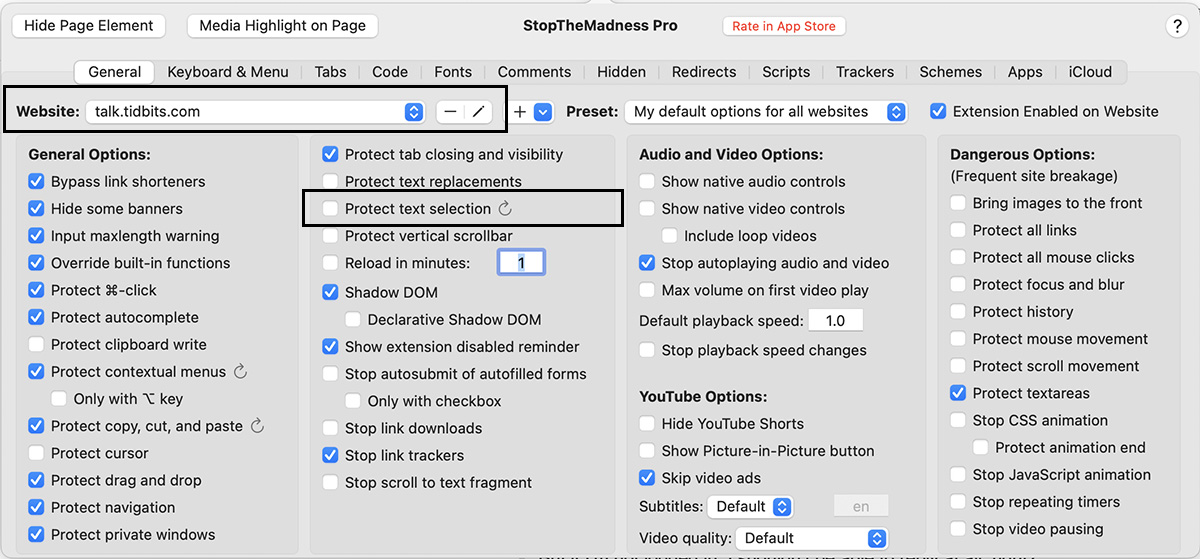
[edit - Never mind. It turned out to be an issue with Stop The Madness Pro, which should have been disabled when I reloaded without content blockers, and for which I had created an exception for tidbits long ago, but that setting seemed to disappear.]
But if I’m not logged in, I shouldn’t be able to reply at all, right?
And the Discourse menu with my ID on it shows “log out” as the option, not log in, and it lets me see my replies and other features that require log-in, so I think I must be logged in.
Well, what do you know! I have that installed on my Mac and it’s never been an issue with Tidbits, as far as I know. I haven’t updated it recently, since the #1 reason I don’t reboot my Mac often is because of all the Safari tabs I have open. So AFAIK, I haven’t updated or changed Stop the Madness Pro recently.
But on Doug’s comment I just set up a new profile for Tidbits with STMP essentially turned off for Tidbits… and suddenly quoting is working again!
I still have no idea why this would have changed – but maybe something in the new Discourse and STMP are interfering with each other and they used to get along. At any rate, it’s fixed now with the new setting, so I’m happy.
Exactly the same with me! Disabled STMP and lo! Quotes! Would be nice to know which madness it was stopping so some of the other things would still be working.There are so many of them you just have no idea where to start looking.
That’s true, but you’ll be prompted to log in when you click the blue Reply button at the bottom of a topic. Presumably, the Quote button doesn’t make sense because you’d lose the context while logging in.
Regardless, it seems that Stop the Madness Pro is the issue here. I must admit difficulty reading STMP as shorthand for it because my eyes see it as SMTP and I start wondering how email is involved.