Not to mention, I just realized I had raised this in 2025 with regard to Safari 18.xx with some confirmations of the issue.
I just found an old article on Howard Oakley’s Eclectic Light blog, who also references Michael Tsai who seems to have written on the subject. I will spend some time looking at those resources.
I will link it here, but to be honest, I cannot recall the rules about linking to other sites
I have no clue as to why some folks run into this vs other having no issues. I have seen some posts dating back to 2021 or so on the Apple boards
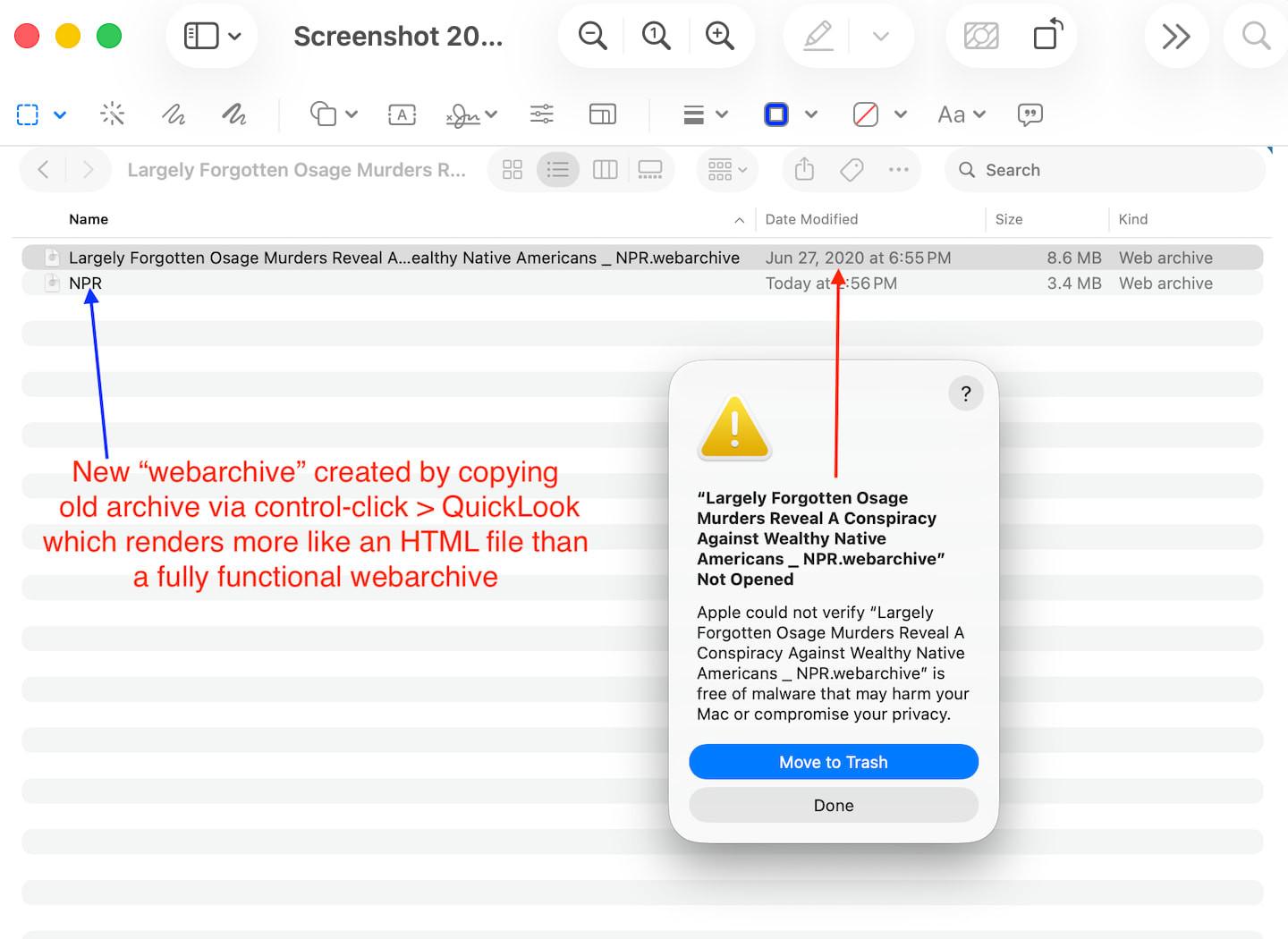
Here is a screenshot that is sort of self explanatory, but I will explain it.
I have a webarchive circa 2020 (interestingly the content/article predates a popular film that came out in 2023 I think). In the screenshot is illustrated my recent experiment. Mac OS 26.5.1/Safari could not open the archive even with javascript disabled. Granted, system settings does offer the security option to “open anyway” but that is not really the point at the moment.
I am able to copy the content of the web archive in QuickLook, and paste it into text edit and create a version of a webarchive from that. The formatting of the new archive is not like the original. On one level, to be sure, there are workarounds on all this. But there are many questions left unanswered. One of which is why few people are having this issue, … perhaps like Howard Oakley mentioned, utilizing webarchive protocols may not be that common ?
Is Gatekeeper sort of dis-regulated on some systems, while on other systems very nonchalant about things?
p.s. I hope it’s ok to keep uploading all this bandwidth eating stuff
I think we understand the situation you’re seeing but given how many other people are not seeing the same thing, it seems like it’s an issue with your system rather than a larger Apple-level change.
While I was being a bit lazy on that, the other reason is that the symptom seemed noticable amongst any number of recent Mac OS iterations, including 26.5.1 etc backwards into various Sequoia versions
I’m curious, what do you feel the benefits of using webarchive files for information you want access to? My understanding is that these have to connect to the internet to view the data. How does it differ from a website URL? I don’t know the history of the format or how fixed it is.
jmhbpc wrote: “Can you clarify, please.
Are you indicating that something like DuckDuck Go will open the Safari webarchive?”
I’ve got an m4 Mini, the OS is Sequoia.
I opened the URL I mentioned above using Safari.
I then went to the File menu, chose Save As, and saved to a web archive.
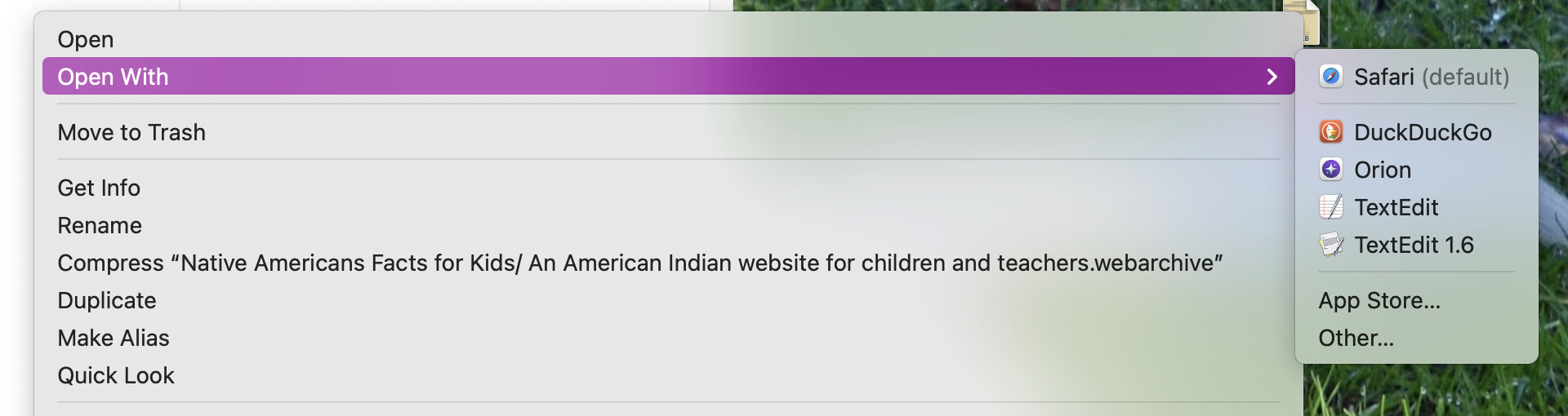
Next, I right-clicked on the web archive, causing a contextual menu to appear:
As you can see, there are several choices other than Safari by which to open it.
I tried Orion - the archive opened.
I tried DuckDuckGo - the archive opened.
In theory a .webarchive simply saves that web page (text, media, etc.) in a consolidated package file for future viewing offline (or if the source moves/vanishes).
I don’t know about Apple deliberately breaking the format they created, but have they done much to support it?
I remember there was an exploit published in 2013 and discussion indicated Apple did not consider it a priority and may not have fixed anything. Any info on this?
I would admit that the modifier deliberately could be taken as a bit … … passive aggressive LOL
But it has become somewhat clear that Apple (engineers) often move in directions clear only to them leaving to others to sort out what the ramifications are, or became archeologists to see where they have hidden legacy features, or create fixes.
In a sense, for my purposes, the utility of the webarchive is relegated to a broken feature if it is now to be rendered inconsistent. Sure there there are workarounds. I am not sure this all came about, however, by diligence in thinking different… but just moving on.
I know some engineers consider Gatekeeper changes have created what might be construed as unwarranted “glitches” even if only somewhat narrowly defined …
I thought everyone was deep into webarchives as a useful LOL
Also, to mention, the article is certainly a worthy consideration on the notion, espcecially moving forward.
Sort of raises the notion that Gatekeeper is mainly saying, that on a 5 year old webarchive, it simply cannot verify it, not that it has discovered a heretofore undetected malware.
Perhaps also leads one to the conclusion that the feature should be sunsetted. Clearly there are potential vulnerabilities…
Which is not to say that alternative workarounds such as PDF protocols are not vulnerable too
If I ever save a web page (which I did this morning, after paying estimated taxes, just to have a record of it), I am storing a PDF. I can open that in a lot more places, using a lot more apps, than using Apple’s webarchive format.
But I assume it is saving more than just text and media. If there are scripts (as nearly all pages today have), they are going to be saved as well. Which makes them more like an app than a PDF. So it may not be surprising that Gatekeeper is getting involved.
But if the page was permitted in a browser, the corresponding archive should also be permitted.
Deliberately implies that they intended to break web archives. I highly doubt that. If they wanted to stop supporting them, they would just modify Safari such that they can’t be loaded at all.
But a critical bug? That sounds very likely. Apple, like all major OS vendors, has some annoying bugs that may not get fixed unless a large number of customers complain.
(To everybody reading this): If you are personally experiencing this, please file a bug report via Apple’s Feedback system. I’d suggest Safari Feedback. Maybe provide a link to this thread so the person at Apple triaging the reports can get more information. The more reports Apple receives, the higher priority the bug will have on the development queue.
I use the PDF method, although it is not always a simple thing depending on the browser and other variables (I often use the Print Edit WE add-on). Firefox has a “screenshot” feature that can take the visible portion or entire page, but this creates a long, vertical image file that is not always easy to view (it also retains the WIDTH of the source browser window vs. using a standard width such as a Letter size document). Chrome seems to have a better PDF output but you cannot count on them retaining that feature.
One thing I will say about PDF captures… always check the resulting PDF file to see if there are missing elements. This includes not just static media, but also web links.
DevonTHINK has a convert to webarchive option. I tend to collect links and if worth keeping I convert. Never had an issue but I’ve only ever used DT with them.