I get that. But what I’m saying is that perhaps such a website operator also has very little incentive because they are not being held liable.
If, to use your example, The New York Times got busted because their ad company had sold ads to a scammer, they might be more selective of their ad company and likewise the ad company would be forced to vet their customers more closely because of the threat of loss of business and/or punitive damages. But since, as it is, nobody is held accountable for any of these scamming attempts, nobody really cares and regular users are just left to fend for themselves. Until another senior gets scammed out of their life savings.
I just tried it here. Same thing. The page loaded. And then a few seconds later the content got replaced with that malware-installer page. It didn’t even redirect to a new site (so my “back” button wouldn’t go anywhere).
When I reloaded the page, it didn’t reappear. And the Firefox Inspector console didn’t show anything obviously bad. (Sadly, I didn’t have it open the first time I loaded the page).
So it looks like this isn’t a case of ad insertion, but something has modified the site itself, or some third-party tool that the site is including. And whatever component that may be, not all of its mirrors have been infected, or the malware-injection script is designed to not activate after the first load.
I’ll be interested to hear what Terminal commands trigger the “Paste Warning”.
I do a moderate amount of Unix shell script work in Terminal, and sometimes paste commands with complicated strings of arguments from source code websites. (Always commands I am familiar with!)
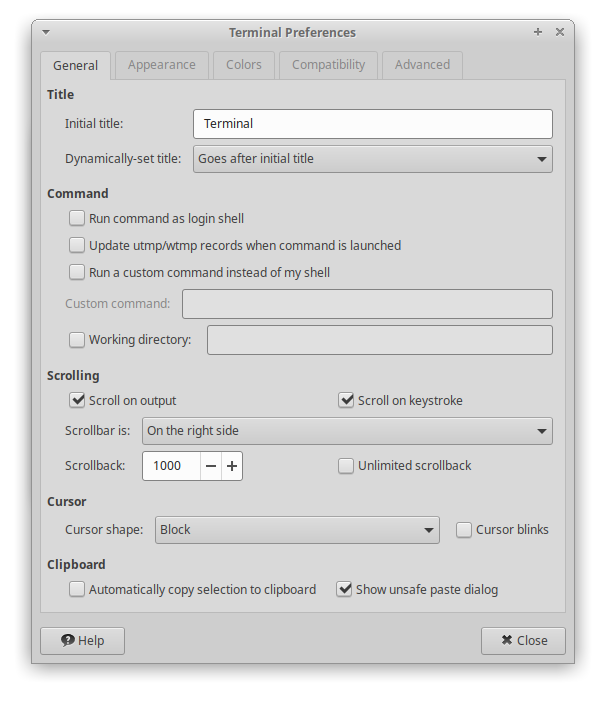
Some Linux terminal apps include this feature as well. For example, the xfce-terminal app that I use has the following preferences dialog:
Note the option in the lower-right corner. With this turned on (the default), any paste that contains a newline character (which will be processed as if you typed the return key) will pop up a dialog showing you the text and ask if you actually want to paste it.
Although this gets in the way when you know the text is safe (e.g., when I’m pasting a sequence of commands from a personal cheat-sheet file of useful commands), it is a good way to make sure you don’t accidentally paste something unwanted.
A new info-stealing malware named Infinity Stealer is targeting macOS systems with a Python payload packaged as an executable using the open-source Nuitka compiler.
The attack uses the ClickFix technique, presenting a fake CAPTCHA that mimics Cloudflare’s human verification check to trick users into executing malicious code.
Researchers at Malwarebytes say this is the first documented macOS campaign combining ClickFix delivery with a Python-based infostealer compiled using Nuitka.