Hello. I am running Apple Mail on a 15-inch MacBook Air with the M2 chip, OS Tahoe 26.5.1. When I used to right-click on an unopened Mail message and select “Block Sender” I would get the red circle/slash indicator on the message, which I would then delete.
In the last few weeks (not sure if that followed an OS update), the icon no longer appears when I select blocking—no matter how many times—making me unsure if the sender is blocked or not. I do bring in my Gmail and Yahoo messages through Mail, which has basically worked fine for a long time.
Anybody having the same issue and perhaps have solved it? Thanks.
Hm, the icon sounds familiar, so I just went and checked Mail here, v 16.0 on macOS 26.4.1.
Context clicked on a sender in the Junk folder of my Apple mail, selected Block Sender, no new icon visible anywhere. Did the same, expecting to see a checkmark by Block Sender, or the option changed to Unblock Sender. Nope, still plain old Block Sender.
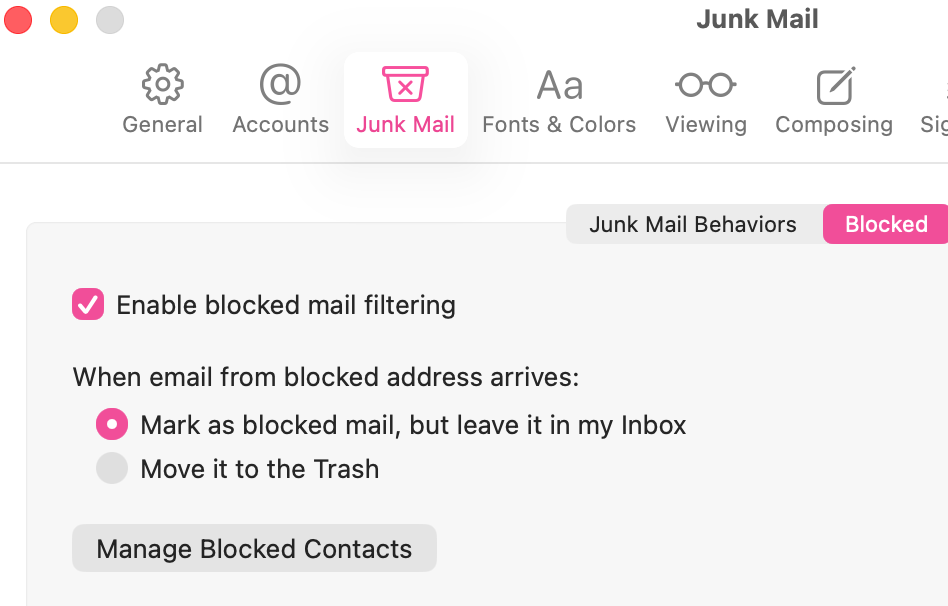
Checked Mail Settings and found the Blocked tab in Junk Mail, and Enable blocked mail filtering was unchecked (but I think that refers only to the filtering aspect). There is a button there to Manage Blocked Contacts, which opens System Settings > Privacy & Security > Blocked Contacts and the sender I just clicked on was in the list. As there is no date of block shown in that list, I may have blocked them earlier as well.
In the early months of Tahoe there was a Terminal command going around to turn off the icons in some of the Mac’s menus. Maybe the blocked sender icon was caught up in that.
This was also reported in 26.3.1 on Apple Discussions, with no solution found, though one vague post at the end of the Thread shows the icon in a screenshot without context.
Duh, ok, then I went and turned on the Filtering checkbox in Mail’s blocked settings, and the icon appeared next to senders name, with either of the two filtering actions below the checkbox. Maybe that’s it!
I reset (though they were already checked) Mail’s Block settings and saw I have 3512 blocked senders in the Blocked Contacts seen in System settings, but as you say, no date to indicate the blocking (yeah, I’ve been blocking bogus email for a while). But after the resets, still no icon appearing for the new bad mail, and those new senders can’t be seen in the Blocked Contacts. I appreciate you checking it out; thanks.
Strangely, my Mac running Mail 16.0/Tahoe 26.6 shows the icons, but these dratted emails are not automatically deleted, but rather still show up in my mailboxes.
Weirdly enough, in the last few days, I’ve been seeing some of my blocked senders (with the icon) appearing in my mailbox—must have to do with my rejiggering the settings a number of times lately. But I still can’t freshly apply Block Sender to new messages. Thanks for writing.