Hi Adam – Thanks for joining in! I exported the open tabs from Safari & Firefox to stop my M2 computer from crashing now and then. In Safari it is easy to export tabs – you open the side bar and right click the count for tabs (per window), but I had tabs organised somewhat well for each window roughly corresponding to how one would use spaces in Arc. In that case I got the exported links like this:
IT-BS-1525
https://www.centcols.org/util/geo/visuGen.php?code=IT-BS-1525
Geoportale Regione Liguria
http://srvcarto.regione.liguria.it/geoviewer2/pages/apps/geoportale/index.html
– that I pasted into a new note in Notes for easy access across browsers
In Firefox I installed the plugin called Export Tabs URLs, which handily quickly create a plain text list of all tabs/links, so I could copy them to yet another note in Notes.
– I was hoping to to simply drag these links into a space in Arc then (would have been most flexible if I wanted to repeat this later on again), but no go.
Actually “Import bookmarks” with cmd+T didn’t bring up the command in Arc for me, but just “Import” and “Import from another browser” did – but just gave the same dialogue as when setting up Arc that allows you only to import full profiles from a selection of browsers, which is not helpful – esp. when I have no links or bookmarks there now to be imported (only very old and mostly irrelevant bookmarks in Safari), nor would I want to import a “profile” – only a chosen set of links (those that I am working with for the last months and typically not bookmarked tabs in different browsers, including ones not available in the dialog for Arc).
Dragging links into the side bar is only possible to do one-by-one, so I would not call that importing bookmarks/tabs and takes a long time, but might be the best/only way in the end here. Or I could simply keep them in a list outside browsers and open them as needed from the list. One problem with having many tabs in Safari instead of having the links just as bookmarks in Safari or outside is that they consume a lot of app memory and one will have to constantly kill those tabs in Activity Control if Safari doesn’t kill them by itself – like it sometimes recommend closing down an open (for example) Apple store page because it consumes too much memory (very helpful way to sell stuff … ;-)) – maybe you had a tab open because you wanted to use it - well … .
I also tried creating a bookmarks file from the link lists I had saved in Notes via the nice online tool: Bookmarks HTML Generator
– still no way to import that either even though I was hoping your command would let me choose whichever bookmarks-file I wanted, but that is not so in Arc I am afraid … .
So that’s the problem, and I have told Arc about it but they only ever got back on one other very minor thing I reported.
Another workaround would be to import all links to yet another browser I am not using (supposing there was one such in the Arc options, but I don’t use Vivaldi regularly, and that could be an option – Vivaldi btw seems to be closest to Arc in functionality of all browsers now) and then import from that browser, but tedious and not very practical and doesn’t give the flexibility one would want to have just dragging a list of maybe 40 links to a new space in Arc … .
Importing tabs (as opposed to bookmarks) seems like a less-common feature, so I’m not surprised Arc doesn’t do that. Ideally it would, given Safari’s Tab Groups. However, there’s what looks like an easy workaround: convert your tabs to bookmarks and import those.
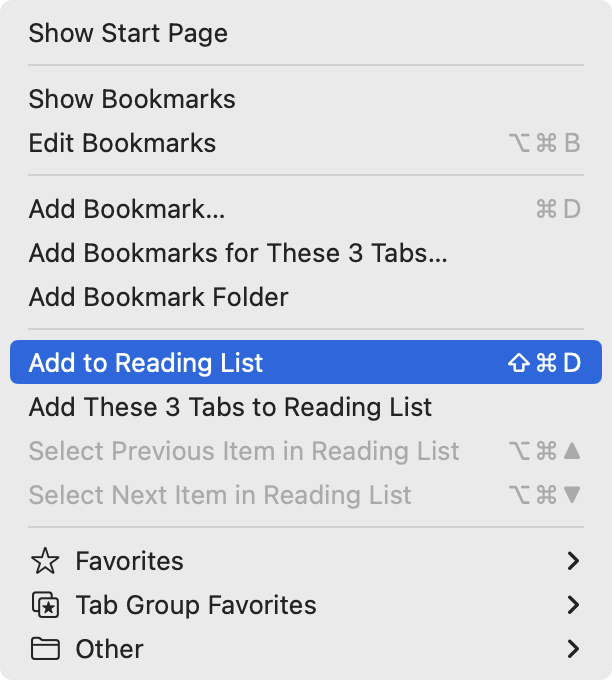
Just select the top set of tabs or the tab group (the enclosing “folder”) and then go to the Bookmarks menu, where you’ll see an Add Bookmarks for These X Tabs command.
Well, in my case I had exported all open tabs to links to make sure the web browser was working decently well, so then I would first have to re-import the exported tabs; then add them all as bookmarks; then import them in Arc (could apparently only choose folders of where I have put these bookmarks( if I get the dialog correct P Boerstig showed correctly). Yes, it is possible or perhaps better import them to one of the browsers not really used otherwise to make it easier importing as I suggested before. If people do not export tabs and make into bookmarks before deleting the tabs in their previous browser and arrange them so they and they can be imported separately it would solve the problem that one cannot import links from other sources than from a few web browsers in Arc. Still it would have been very nice if one could import links in other (more easily understood) ways too.
I saw my card and liked it, but what is the significance of a card?
In a related question …
During the first launch there is a registration (that creates this card?) and it includes designating a password. Where is this stored and how do I move it to and access it from my password manager? (Won’t I be asked to authenticate someday?)
I’ve gotten quite comfortable with Arc after working with it for several days. It is now my default browser. I’m impressed how much thought and work were put into developing this app.
The only site I still have to rely on Firefox to use is Facebook, not because Arc does not work correctly but because of the add-ons I use; Social Fixer and F.B. Purity. They make navigating through Facebook a little painless.
Many thanks to Adam for introducing this app to us.
I think the card, which you can change, apparently randomly, is kind of a quasi-business card, is a measure of how much they see this as being different, you’re not just a user…
I’ve been trying to get in touch with The Browser Company for the past three days. I’ve sent emails to three different addresses, and even posted on “Feedback” and “Report a Bug” pages out of desperation.
It seems that they are not concerned about my issue. It is disappointing to experience such a lack of customer support.
I must say, while they are quite chatty on Twitter with outbound posts, they haven’t replied to anything I’ve sent via email either.
Given the limited beta, they simply may not have staffed up a support team yet. Which would merely be an explanation, not an excuse—I would far prefer a responsive company too.
I’m slow at picking up anything new, but Adam seemed so enthusiastic, I had to try Arc.
I finally found my bookmarks imported from Safari in a nested folder called “Imported from Safari” (duh) in the tabs area of the sidebar (forgot whether they were in pinned or unpinned, but they’re now in pinned) and I found I could readily reorganize and move them into whatever (Arc) spaces or nested folders I needed. I don’t seem to be able to give each space a unique sidebarwidth unless I keep a separate window open for the space.
Were the annotations retained in any form in the nested folders when you imported from Safari or other browser (“Import from another browser…” in the Arc menu), or were they simply omitted?
I wasn’t able to get anything but a Google search for “question” if I typed that word into a new tab as suggested in the introductory video. But I simply misunderstood that suggestion, because if I press ⌘t , I can type “question”, then choose “Visit Help Center”, and from there I can click the Chat button at the lower right corner, enter an email address and submit a question.