We enabled the availability of iOS 18.7.7 for more devices on April 1, 2026, so that users with Automatic Updates turned on can automatically receive important security protections.
Note: We enabled the availability of iOS 18.7.7 for more devices on April 1, 2026, so users with Automatic Updates turned on can automatically receive important security protections from web attacks called DarkSword. The fixes associated with the DarkSword exploit first shipped in 2025.
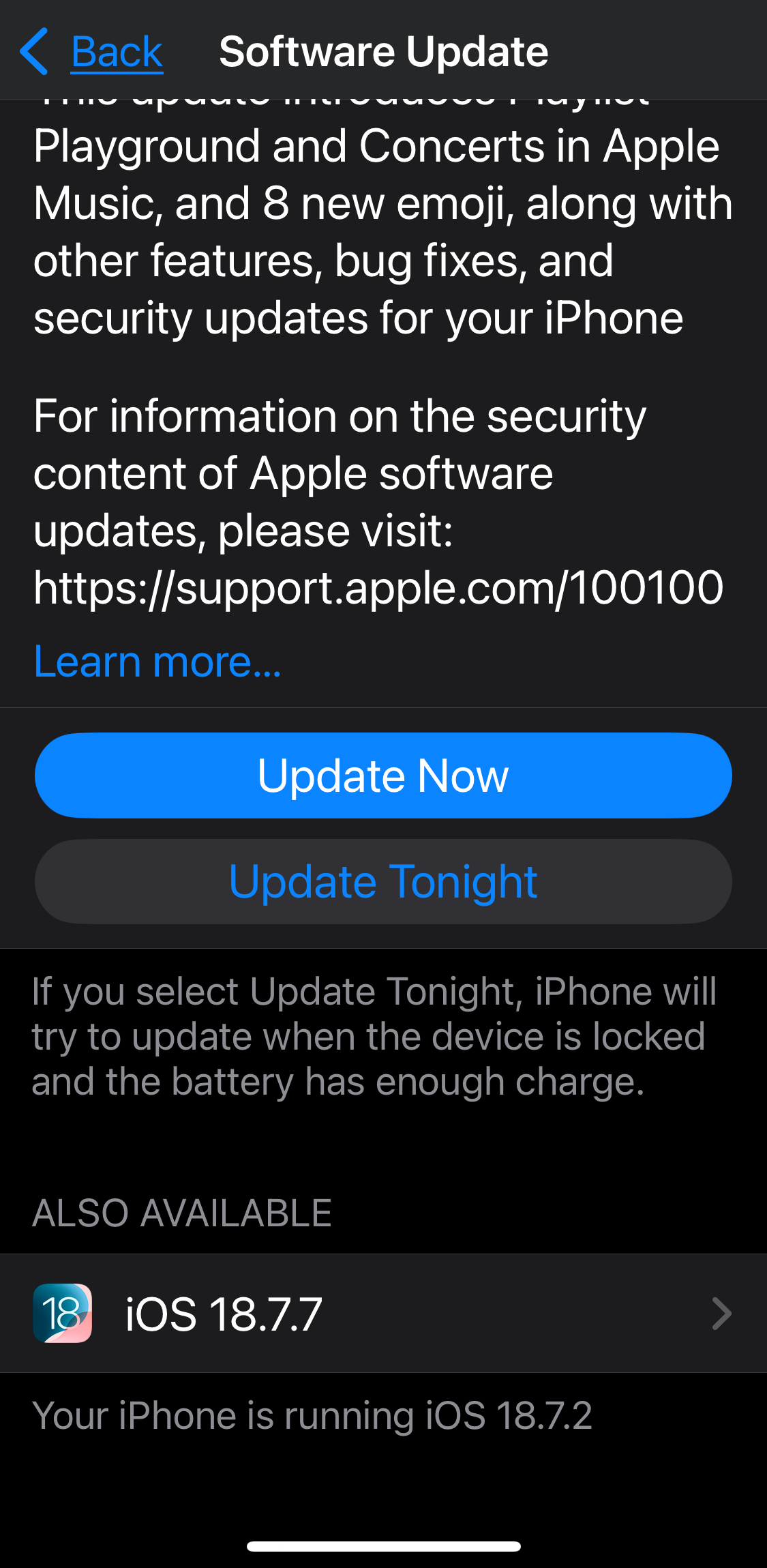
For those who have stayed with iOS 18 instead of upgrading to iOS 26.4, you can now go to Settings > General > Software Update, scroll down to the Also Available section, and tap iOS 18.7.7. My iPhone SE is now happily updating.
Given the severity of DarkSword, its proliferation in exploit markets, and Apple’s unprecedented move to allow users to update without upgrading this late in the cycle, I strongly encourage all iOS 18 holdouts to install iOS 18.7.7 immediately.
iOS/iPadOS 18.7.7 appears to be live for devices currently running 18.
This means if you have a device that CAN be upgraded to iOS 26 but you have not done so, you can now update to 18.7.7 (see the full list of supported devices on the Apple Security Releases page). I manually updated an iPhone 13 and iPad Air M1 that were running iOS 18.7.2 with Automatic Updates turned OFF.
Open Software Update (top of Settings or under General), wait for the update check and then scroll to the BOTTOM (below iOS 26.x) and you will see an option for the 18.7.7 update. You will need to slide your finger from the gray text area BELOW the “Update Now/Tonight” buttons for iOS 26. Otherwise you may just scroll the iOS 26 update description.
… Thus, it appears to require Iran’s IRGC threatening direct attack on Apple, etc. to get critical iOS 18 security updates for devices still on that system, which is only 1.5 years old.
[Edit: Added info and screenshot regarding 18.7.7 location, and link to Apple Security Releases]
True, however this is the same update from March 24, so it would just need to be enabled for existing iOS 18 users. In other words, they essentially removed the code blocking 18 updates for devices that could be upgraded to 26.
But to your point, we do not know if this decision was made before the IRGC threat or since DarkSword became so widely available.
Regardless, Apple should never withhold critical security updates on a device’s current system that are simultaneously available to others on older devices. Recent events only reinforce how foolish this policy is.
NOTE: Be aware that on the Software Update screen you may need to slide your finger from the text area BELOW the “Update Now/Tonight” buttons for iOS 26. Scrolling in the middle area only affects the iOS 26 update description text.
I will mention that this update does not show for me if I attempt to update via the Finder on my Mac, only the 26.4 update. I don’t know if that’s because I’m still running Monterey, or because the update simply won’t show in this place. It does appear on the phone itself. I just prefer to do my updates via my Mac.
Very unimpressed with Apple. Last week, I felt forced to “upgrade” several family devices from iOS/iPadOS 18 to 26, due to the threat of DarkSword. But now it seems if I had delayed, we would have had the option to stay at 18? Teaching me to delay in this situation doesn’t seem like a good lesson.
I have a family member with an iPad Air 11" M3, which we upgraded from 18.7.2 to 26.4. They are unhappy with Liquid Glass and have asked me about downgrading. I see this model in the “available for iPadOS 18.7.7” list that MacGuyver linked to (thank you!). I made a backup of the device in iTunes (on a Mac still running 10.13) before the upgrade. So perhaps I would be able to: 1. erase the device; 2. install 18.7.7 using iTunes; 3. restore the backup. Does this seem like a plausible plan?
There’s a period of time where it’s possible if you’ve got the right device. I think today the iPad 9 is the only one that can be downgraded. You would need the full installer to be available and it’s not for all other devices.
On iOS perhaps, but on macOS delivering security updates for the prior OS version is the established norm. And if they can do it on macOS, they should do it on iOS. This is IMHO just another case where a simple order from the very top decreeing that user security and experience shall trump marketing urges would suffice to fix an obvious conflict. The ability and resources are there, Apple has plenty of that. What’s missing is the leadership to declare that customers and their experience comes first.
My wife’s iPhone is an XS, which is too old to run anything past iOS 18. When trying to install the 18.7.7 upgrade I get either of these two errors:
The iPhone “iPhone” could not be updated. An unknown error occurred (1170)
The iPhone “iPhone” could not be updated. Declined to authorize this image on this device for this user.
These are what happens when upgrading using a Mac computer connected via USB (I have tried two different computers). When trying to upgrade on the phone itself, the error message is even less helpful, saying the upgrade is “unavailable right now” and offering to retry. Suggestions from Googling and AI haven’t helped any.
MacInTouch site seems to be unreachable again. (It remains like that for at least a few weeks.)
If I try to open that link, or, if I try to open their home https://www.macintouch.com/, either way, I get an almost-blank page that only displays 3 letters:
Cck
The page source is simple too: (just 8 lines)
html>
head>
meta name=“color-scheme” content=“light dark”>
/head>
body>
pre style=“word-wrap: break-word; white-space: pre-wrap;”>Cck
/pre>
/body>
/html>
This has been happening with my iPhone updates for years. Finally gave up, I just plug it in to power and do it over wifi, which usually succeeds. Must be a reason Apple wants it done wirelessly.
When I checked my iPhone 12, it said I had 18.7.2 and was up to date. Toggling Automatic Updates from Off to Download Only made no difference. However I realized I still had iOS 18 Public Beta checked in Beta Updates and when I disabled Beta Updates, it found the 18.7.7 update. I’m installing the update now, and my iPads are waiting for me to start the downloads.