Apple has released updates to all its current operating systems, advertising them as providing “important bug fixes and security updates,” with few details on the bugs. Here’s what you will find:
iOS 18.6 and iPadOS 18.6: Apple says that these updates fix a bug in Photos that prevented sharing memory movies. We’ve also confirmed that StandBy, which we reported as being significantly less responsive to motion in iOS 18.4, has returned to its previous responsiveness. For users in the European Union, these updates also introduce significant changes to App Store rules, adding a new interface for installing alternative app marketplaces or downloading apps directly from developers’ websites. Apple was forced to make the changes by the EU’s Digital Markets Act; the company has said it is appealing the decision. Additionally, the iOS 18.6 enterprise release notes state that managed apps can now browse managed locations in the Files picker and the certificate picker displays correctly for Single Sign-On Web applications. iPadOS 18.6’s enterprise release notes add that temporary sessions defined by a device management service on a Shared iPad will now log out correctly when the timer expires. These updates address 24 security vulnerabilities.
macOS 15.6 Sequoia: Although Apple’s main release notes don’t describe any of the bugs fixed in this update, the enterprise release notes reveal that the softwareupdate —fetch-full-installer Terminal command now completes successfully, Macs using transparent proxy extensions no longer fail to obtain IP addresses via DHCP, Setup Assistant completes successfully even if device management skips both Terms and Conditions and data migration, Macs will no longer boot to Recovery after installing a software update, platform SSO enrollment no longer fails when an associated domains configuration is required, and the authentication timeout is increased when manually entering 802.1X credentials. Finally, Apple’s developer release notes report that macOS 15.6 fixes a bug that prevented the Finder and Apple Configurator from restoring some devices from DFU mode. macOS 15.6 addresses a whopping 81 security vulnerabilities.
Practically speaking, there’s little reason for most people to look through the release notes because nothing in them is likely to affect how you use your devices. You should install these updates soon because they—particularly macOS 15.6—address so many security vulnerabilities. Although Apple said nothing about any of these vulnerabilities being actively exploited in the wild, several refer to zero-day exploits in open source tools included with Apple’s operating systems. In short, just upgrade.
Given Apple’s typical release patterns, these will likely be the final feature updates for the x.6 operating systems. Subsequent releases will be limited to security fixes after the OS 26 releases come out, likely in September.
Oh interesting—I saw that open source libraries had been affected but didn’t follow the CVE trail. Apple didn’t use its normal “Apple is aware…” terminology to indicate that any of these were zero-days.
I’m sure (?) it was purely coincidental, but my M3 MacBook Air died shortly after installing the 15.6 update. It wouldn’t charge and wouldn’t start up. It’s now with my local Apple Store for investigation …
Has anyone heard of similar issues?
this is an important part of why I am slow to do updates. Apple has the capability to explain these things in common language and let users decide for themselves about updating, but they don’t. Sigh.
This is anecdotal, of course, but my M2 MacBook Air installed the update without any issues. Usually I wait, but this one prompted me earlier than most updates do.
To be safe, I made a backup to my Mac (from the Finder, via USB) before running the upgrade. But it wasn’t necessary - the upgrade seems to have just worked.
I did the actual upgrade over the air, not via USB.
I have not yet updated my Mac. I’ll wait until I get a notification from the system…
More anecdotal information: I have updated an iPhone 16Pro, an iPhone 12 mini, a MacBook Pro M4, two Apple TVs, an iPad Pro 11 inch, an Apple Watch 10, and various HomePods and all are fine. Doesn’t prove anything, but a bit more data.
Apple tech found no hardware problems with my MacBook Air (2020) which has stopped booting after MacOS 15.6 update. He restored T2 firmware, erased disk and reinstalled MacOS 15.6. MacBook now powers up without any problems and passed all hardware diagnostics. Not sure what happened to T2 firmware.
I added reply to Talk. Bottom line: restoring “T2” firmware appears to have solved the problem and no further problems so far after tech installed MacOS 15.6. Don’t know what caused problem with Firmware in 4 year old MacBook Air that has not been heavily used.
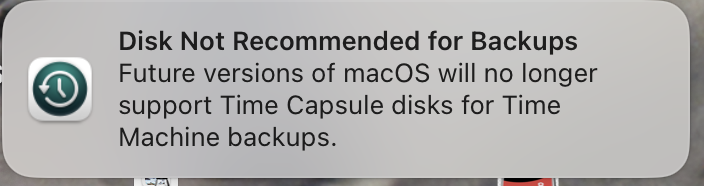
Well after the update, this popped up on my desktop this morning. Yes, I still have a working and upgraded HDD Time Capsule. Its duty is that and some 2.4Ghz stuff that soon won’t be an issue.
Disconcerting and a cold reminder that Apple cancels its support and also doesn’t offer a same or better solution. Thus I’ve been considering a NAS. But that will be an expense far more than the simple, LAN-connected Time Capsule (2TB → 4TB) provided.
In the meantime, CCC does its full drive backup to another drive. And to still have TM running, I’ll put a T7 4TB SSD on my mac studio while I contemplate how to do a NAS for TM and other media storage.
I was hoping these updates might resuscitate iCloud Safari Tab syncing that has been broken for quite a while now (seriously, how hard can this be?). Unfortunately, no dice. I guess my only hope now remains iOS/macOS 26.
If you had had a problem with the iOS update, how would you use the backup to revert to the earlier iOS version? I had understood that wasn’t possible. Thanks.
It is possible but only so long as Apple is still signing the older iOS version. For dot updates, they usually stop signing about a week after the new release comes out. But until that happens, you can still put the iPhone in DFU mode, install the prior version, and restore from backup.
You can put an iPhone into recovery mode and then use the Finder to install a firmware image. But the image has to be signed, and Apple stops signing old images a week or so after the next version ships.
But…
Since iOS 18.6 is brand new, the previous version is still signed and will probably be for a few more days.
And even if you can’t install an old version of iOS, if stuff goes catastrophically wrong, you may be able to “restore” the phone, to bring it back to a blank newly-installed 18.6 environment and then restore your backup. Which may be enough to fix any corrupt database or system configuration files.