And don’t you worry about the security holes in the older iOS versions?
I haven’t yet, but just put “Update iOS” on my To Do list a few minutes ago.
But then I read Howard Oakley’s criticism of UI changes in macOS 26 Tahoe, and am wondering if should hold off longer.
1 Like
But that article is about macOS, not iOS. ;)
I have two iPads that could run it, and they are not running it, by choice. They still get security updates. Not worried.
2 Likes
I am. I started using an iPhone a little over a year ago, and so far I have found the interface difficult to see and difficult to use. Cataract surgery several years ago relieved me of the severe myopia that made me walk around with thick glasses, at the cost of needing reading glasses for reading print or screens. But I can’t read the iPhone screen without having glasses on when the thing rings. I’ve been very disappointed by how poorly it meets my needs, and with the comments I have heard about Liquid Glass I expect upgrading to v26 would make matters worse.
3 Likes
Ah, iPads can still get v18.7.3 for now. iPhones, nope if they can use v26. :(
Jeff, does iOS’ accessibility for visual not help? My parents and I had to use large display zoom in iPhones because our eyes are old.
I have an iPhone SE, which is fairly small, so when I try to increase the size of the type to see it more easily, all of the numbers in the caller’s phone number don’t fit across the width of the screen, so I can’t tell who’s calling. The iPhone just doesn’t work well with my vision. I was severely myopic, and for decades I wore very thick glasses that were like looking through a tunnel to see the world. I like doing things outdoors and cataract surgery let me see the world much better by correcting my vision so I am far-sighted, so I can see clearly at a distance but I need reading glasses for close-up work on a computer, reading a book, or working up close. So when the phone rings I have to get it out of my pocket and get my glasses out and put them on, and by then the phone is likely to have stopped ringing. Or If I get that far with the phone still calling, then I have to unlock the phone so I can talk to the caller.
I didn’t select this iPhone; it was an old one my wife wasn’t using when my flip phone broke, and it seemed reasonable to try it. It works reasonably if have it sitting on my desk and I need to get a six-digit security code. I can take photos if I have to show the plumber what needs to be fixed. But it doesn’t fit my needs well. My fingers fit a computer keyboard, but not an iPhone texting screen. The Otter case that came with it obscures my fingerprint, but taking off the case makes it too easy to touch the wrong place on the screen. I’ve been using Macs for 40 years, and I know how to make them work for me, but iOS is different in so many ways that it’s confusing.
I’m the kind of guy who likes to drive a manual transmission car because I like the feel of the road and the way it handles. I feel the iPhone is making things harder for me rather than easier, and that’s what frustrates me.
3 Likes

I think you’ve just pointed to your problem and I’ve seen this with many older people (myself included). The UI design attempts to put vast amounts of information into every screen when, frankly, the screen is just too damn small for all that. It’s like compressing all the (simple) car controls into the steering wheel and there are so many that you can’t find where to touch in the upper right quadrant with its faintly glowing microbutton to accelerate.
Understood.
What you may have to do is buy an iPhone Pro Max and always hold it in landscape orientation when a call comes-in. 
Actually, seriously, you may want to buy that big phone. How about a 1990’s flip phone instead? You may remember them fondly but at this point in your life your eyes and that phone would be a disaster.
If you use AirPods, you can set them to announce incoming calls. That might help things even if you normally don’t wear AirPods all day. (People do that? Yuk!)
Dave
P.S. Happy New Year! No really! It’s the plan for all of us!
If Apple didn’t want us to praise and excoriate all of the operating systems as if they were one, then perhaps they shouldn’t have given them all the same release number.
2 Likes
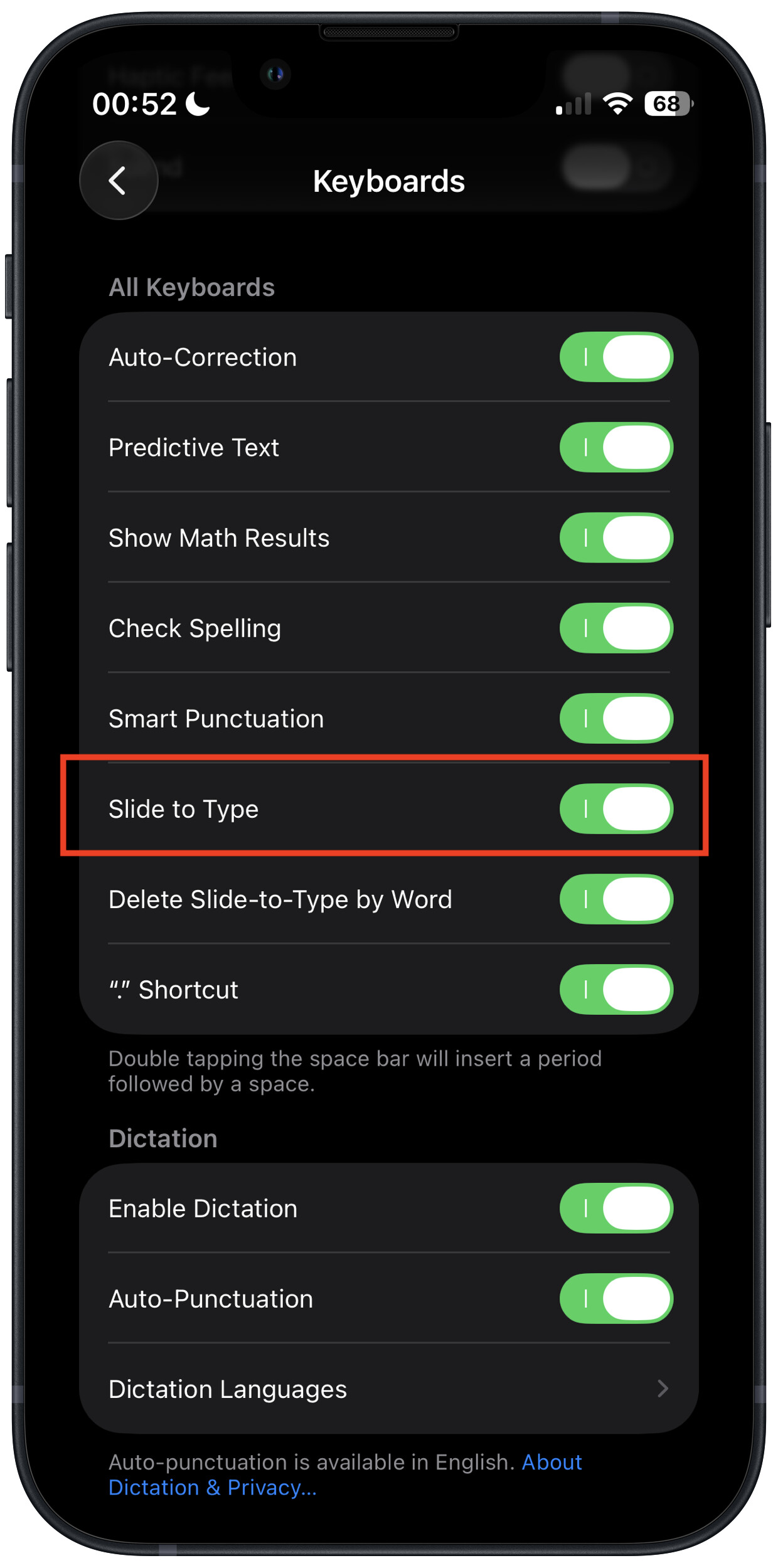
I realize this doesn’t solve all your problems, but I’ve found that using swipe-gestures to enter text can be a lot more forgiving, as long as you’re entering words in the phone’s dictionary.
I also don’t like typing on an iOS virtual keyboard, but using swipe-gestures, I only have to tap individual letters when entering proper nouns or unusual words, which helps me quite a bit.
The feature is called “Slide to Type”. I think it should be on by default, but if not, you can enable it via Settings → General → Keyboard:
I appreciate your suggestions. My only fond memory I have about flip phones is that they were simple to use when I needed them. Why that comes to mind is the problems I had to pick up my wife a couple days ago at a very busy airport. I stopped out of the way and was able to call her, but when she called me back I wasn’t able to pick up the call. This is by no means the first time I’ve had this problem. The fingerprint touch sensor does not work when the phone is used with the Otter case. Touch sensing sometimes works when I remove the case, but when I touch other places it does other things that can cause other problems. I need to keep looking around me because I am stopped in a pickup lane. I can’t get the phone to receive her call. Is there anything that I can do to turn off the security so can start talking just by picking up the phone, without taking the time to look for a spot to swipe? That would help a lot, but I can’t find it in the Settings.
Using my wife’s old iPhone seemed like a good idea a year ago. The camera is better than the old flip phone, and it’s easy when I need to take snaps to transfer them to my MacMini which has a 27-inch screen. But the screen is too small for me to use for much of anything but texts, which I rarely use. That may be because my eyes don’t have much depth adaption, one of the problems of growing old.
I should add one other thing. My myopia was so bad that I flunked the draft physical. In the Vietnam era, that could be a life-saving advantage. But I was very glad to have cataract surgery nearly a decade ago. I was very tired of the tunnel vision that came with thick glasses. I can see the world much better without the high-power lenses I needed to correct my myopia, and I have no regrets for choosing the surgical option of having my eyes corrected to see distance clearly.
I’m on an iPhone 16 Pro that I bought the week iPhone 17 was released. With the goal of staying on iOS 18 and skipping 26 entirely. iOS and macOS
3 Likes
I’m using an iPhone 13 mini with iOS 18, and I don’t intend to move to iOS 26 any time soon. If I do move to iOS 26, it will be because I get tempted by an offer to get an iPhone 17 for “free” from my carrier.
1 Like
I don’t really recommend it, but you can turn off TouchID etc., which will remove a step or two from answering your phone. If you do that, however, I would suggest setting up a separate Apple ID just for that phone and making sure that it is not linked to any sensitive information. I’d also make sure that no third party apps are installed that can access sesnitive data. In essence, you’d be using your iPhone as a fancy flip phone, and you would do any photo syncing to your Mac manually. I haven’t had an iPhone set up this way in years, so perhaps I am forgetting some quirks.
Another option might be to use Apple’s “Auto Answer” accessibility feature. I haven’t tried it myself, but I think it will automatically answer all calls after a certain number of rings. I think you still can dismiss unwanted calls manually before auto-answering.
iPhoners who haven’t upgraded to v26.2, just remember no more security fixes after v18.7.2 (or v18.7.3 if you used that beta trick before Apple closed that trick). V26.2 fixed a lot of security issues as shown in About the security content of iOS 26.2 and iPadOS 26.2 - Apple Support. There will be many more in the future. :(
I have some devices that don’t often go online, stay at home for limited uses. They work fine and don’t need iOS 26.
I support some family members who use iPhones, some don’t like/can’t comprehend the changes of Apple’s frequent updates and are minimally exposed to harm as well. Another is a business user who has built in habits and no time to learn anything new. That user is fairly exposed to harm but chooses to operate on older systems to avoid disruption to 7 day a week workflows. There may come a time when apps she relies on for business communication require later OS but for now it’s a known risk and I encourage frequent backups and protective measures I think are sensible.
We keep our fingers crossed too that nothing bad happens. 
1 Like
Brilliant! I just tried it and it works. That’s exactly what I wanted, and it’s also something I can turn off if I don’t need it. I don’t give that number out much, so except during political season it doesn’t get much incoming spam. Thanks.
I do try to keep sensitive information off of the phone, but Apple does tend to share things between devices so I don’t want to ask for trouble.
2 Likes
David, we all go through that. I used to love new stuff when I was younger. Now, I just want stability, easy to use, not changing so much, etc. I just don’t have the time and energy for new issues!
I finally did the major upgrades during the slower times over the holidays since I had more free times, work on any new issues (minor ones came up as I expected), get used to the changes, etc. Same with my parents who would have to learn the changes too. I had to support them in person since they needed the newer versions for security updates (had to upgrade from v18.7.2 – couldn’t get v18.7.3 with the beta trick that Apple closed).
I just hate the unexpected upgrade changes by forced like middle of last month with Arlo on legacy accounts and camera systems! That wasted a lot of time and pissed lots of users a lot. Gah. :(
1 Like
Just want to add my perspective on using operating systems that are not obsolete or unsupported.
I’m a firm believer in a risk management approach to privacy and security.
I try not to center my Mac, phone, and tablet security strategy around predictions of bad actors’ behavior. I prefer spending some time up front–and money if justified–to minimize the possibility of having to deal with the fallout of a successful attack. This is especially important if you have client or business data to protect. I view using supported OS’s, Standard user accounts and anti-virus/anti-malware software as a form of insurance. Yes, it sucks that I need it but I feel that having it lets me sleep better than not having it.
Also, we are all human and we make mistakes, especially when we are in a rush, distracted, or tired. Relying on constant vigilance as protection requires perfection. I don’t think any of us can reach that standard very often, especially with something that is constantly changing and morphing.
5 Likes