Which version of macOS to migrate to from Mojave? (Making the jump off of iTunes)

I’ve been meaning to migrate the Mac I use for almost everything (a 2018 i7 “Space Gray” Mac Mini) from Mojave to a later version of macOS.

This is a big jump for me, primarily because of iTunes going away. Specifically, (a) it will mean moving all my music from iTunes to the Music App, and (b) I sync my Calendar, Contacts and music with my iPhone and iPad, via USB, through iTunes, and will now be doing this via the Finder (I understand).

I’d like to migrate to a version of macOS where this conversion goes as smoothly as possible; i.e., I want to avoid known issues with the migration to, or the functionality of, these two features. For example, if Catalina had migration issues with music – say, for example ratings weren’t migrated correctly; or syncing Calendar via USB with iPhones started to get flakey with Sonoma – I’d like to avoid those versions.

Given this: does anyone have recommendation for which of these macOS version to migrate to, from Mojave? The 2018 Mac mini can run anything up to and including OS 15 Sequoia. Please feel free to give me a range of macOS versions, if you wish – or even “any version”. Your input will be greatly appreciated!

A few data points that might influence your recommendation:

  • All of my music is either ripped from CDs, or purchased and downloaded from iTunes. I don’t use iTunes Match; and any music I buy from iTunes, I store locally (and back up). I don’t stream music from Apple.
  • My iPhone and iPad all have the latest version of iOS/iPadOS on them. They’ve synced flawlessly with Mojave over USB. I’d like to keep syncing via USB if possible.
  • I use Home Sharing to stream the music library in iTunes on my Mac to my Apple TV hardware, via our WiFi network. My understanding is that this is still possible with all later macOS versions.
  • I have no problem migrating to one of the older versions of macOS (but newer than Mojave, obviously), and then doing a second migration soon afterwards to a later macOS version. (At some point in the next year or 2, I’ll be buying an Apple silicon Mac Mini and moving to that – when I have the time. (It’s been a hectic 5 years!))

Thank you for any advice you can provide!
My iPhone/iPad synced flawlessly over USB when I was on Mojave. I jumped straight from Mojave to Sequoia. Most of my calendar syncs properly via Finder/USB with one exception: all day events transferred from the Mac to the iPhone now span two days. Last week I downloaded SyncMate and that problem has been solved. SyncMate has both a free and premium version. The free version syncs only calendar and contacts; the premium does so much more.

1 Like

I’m not sure if you want to change from iTunes or think that you have to but if your computer can go up to Sequoia, then you can still run iTunes either installed using Retroactive or by using a script mentioned in this thread although this one is about Apple Silicon:

The store doesn’t work so that may be something that affects you in any of the old iTunes versions as I recall.

In my situation, I still use a 2012 Mac Mini i7 running Catalina to rip CD’s using iTunes 10.7 CoverFlow and also XLD. I don’t download music, no Music Match etc. only my own CD’s and records I digitize when I have some spare time. I used Retroactive to install iTunes many years ago and that still works as far as I know except in some of the later versions of Sequoia and also Tahoe. I used to sync my phone by using a later version of iTunes 12 on a separate partition running High Sierra but even though I purchased a new phone earlier this year, I haven’t tried it to see if that still works as I synced the new phone from the old and haven’t added more music yet.

I also have a MacBook Air M1 and use iTunes 10.7 on that using Sequoia just for music playback and it still works fine. However, under Tahoe the CoverFlow part of 10.7 gets separated although the other sections work like song list, album list etc. The thread I mentioned above indicates that a version of iTunes 12 works on Tahoe. On my M1, I have two partitions using Sequoia and the other Tahoe so I can experiment with any changes to the newer OS but can still run iTunes 10.7 correctly under Sequoia.

If you have enough hard drive space, I would create another partition to install the OS you think you want to use and clone your Mojave partition to that and see what happens regarding iTunes if you think you want to keep it. I don’t like the Music app simply because iTunes especially 10.7 is better looking and better organized for my taste.

As for streaming, I use a couple of older Airport Express units (first generation, second model) from the 2012 Mac Mini, the M1 and even older computers like a Mini PowerPC all using iTunes 10.7 but I have no Apple TV units so can’t comment on that.

2 Likes

I have retained a “retired” 2015 27” iMac running Mojave as my home media server. It has a 1tb Fusion drive. There are several Mac apps (including a couple of 32-bit apps!) that I want to keep, including iTunes. USB backup of iPhones and iPads with the latest OS still works. Homesharing to my Apple TV also works well. I don’t plan to risk an “upgrade” for this machine.

My main computer is an M2 Macbook Air running Sequoia. I suppose it would work as a Homesharing media server and backup device for iPhones and iPads if it had a larger SSD (only 500gb - I have had to put my Photos library on an external drive).

1 Like

This should happen automatically. When I made that jump several years ago, the Music app, on first launch, created a new Music Library database from the iTunes database, pointing to the same audio files, in their existing locations. You’ll see the library paths that iTunes was using (so “iTunes” will be in the path name), but it will work fine without renaming/moving anything.

If you ever want to redo that migration (I never had to), you can hold down Option when launching Music and tell it to open the iTunes library, which does not get deleted by the migration.

If your iTunes library contains videos, they will auto-migrate to the “TV” app. And any books will migrate to the “Books” app.

The migration from iPhoto to Photos is similar. On the first launch, it creates a new library, with hard-links (to avoid wasting space) to the images in your old library. You can delete the old library whenever you wish - it won’t be wasting space, thanks to the hard-links.

1 Like

Useful info, thank you. I have older Macs that can run iTunes, but if I could get this working on my M1, I’d prefer it. The music I have in iTunes is 95% ripped from my CDs.

1 Like

Out of recent iterations, I was happy on macOS Monterey (12) and am now learning to live with macOS Sonoma (14). What drives me crazy in Sonoma is how long it takes to open folders in the Finder, particularly folders with lots of images. What was fast is now horribly slow. I do a lot of this. Apparently file management has gone downhill in the last few versions of macOS. Lloyd Chambers at MacPerformanceGuide always documented these file system issues in great detail until his health issues last year.

macOS Sequoia (15) was where I tried to migrate to from Monterey. Sequoia would not allow me to keep my Photos library on an external drive, even with symbolic links. This mostly worked in Sonoma, though eventually it failed there too. Finally I abandoned Photos, and with it the iPhone*.

It takes a long time to get a new version of macOS working smoothly with a wide suite of pro applications (development, photography, video). What I try to do with macOS is move late (third-party apps are all updated) and move several versions (hence the attempt to go from 12 to 15).

So you are right to consider carefully the target system for your migration.

The more recent the OS, the less chance one or two of your favourite apps latest versions will work. The ones over which I stumble regularly are DxO PhotoLab and Davinci Resolve. Current versions of both require macOS 14, Sonoma.

I’ll be looking to move to macOS 17 in a couple of years but am open to moving to macOS 16 if core functionality is good enough. I don’t care at this point about any of Apple’s intrusive bells & whistles which require storing one’s data on Apple servers or allowing Apple to manage one’s passwords. The only reason to upgrade is to run recent hardware and those third-party apps which require a recent OS.

If Apple continues to lock down third-party apps & OS installs and increase telemetry, I may never upgrade and macOS Sonoma is my final resting place before I move to Fedora full-time. The software which I update and buy reflect my uncertainty about a future with Apple (i.e. I buy and update fewer apps).


*I’m on a Xiaomi 14 Ultra, which means I have much better hardware cameras and less computational photography, much happier with Android text-to-speech and speech-to-text and the custom keyboards one can install with multipaste and undo keys, the one I use is FUTO keyboard; while the Xiaomi build quality is good, Apple iPhone hardware seems more suitable to underwater photography and really hard knocks as an ersatz action cam, I also preferred the hardware button layout with a thumb button on the opposite side of the volume keys).

1 Like

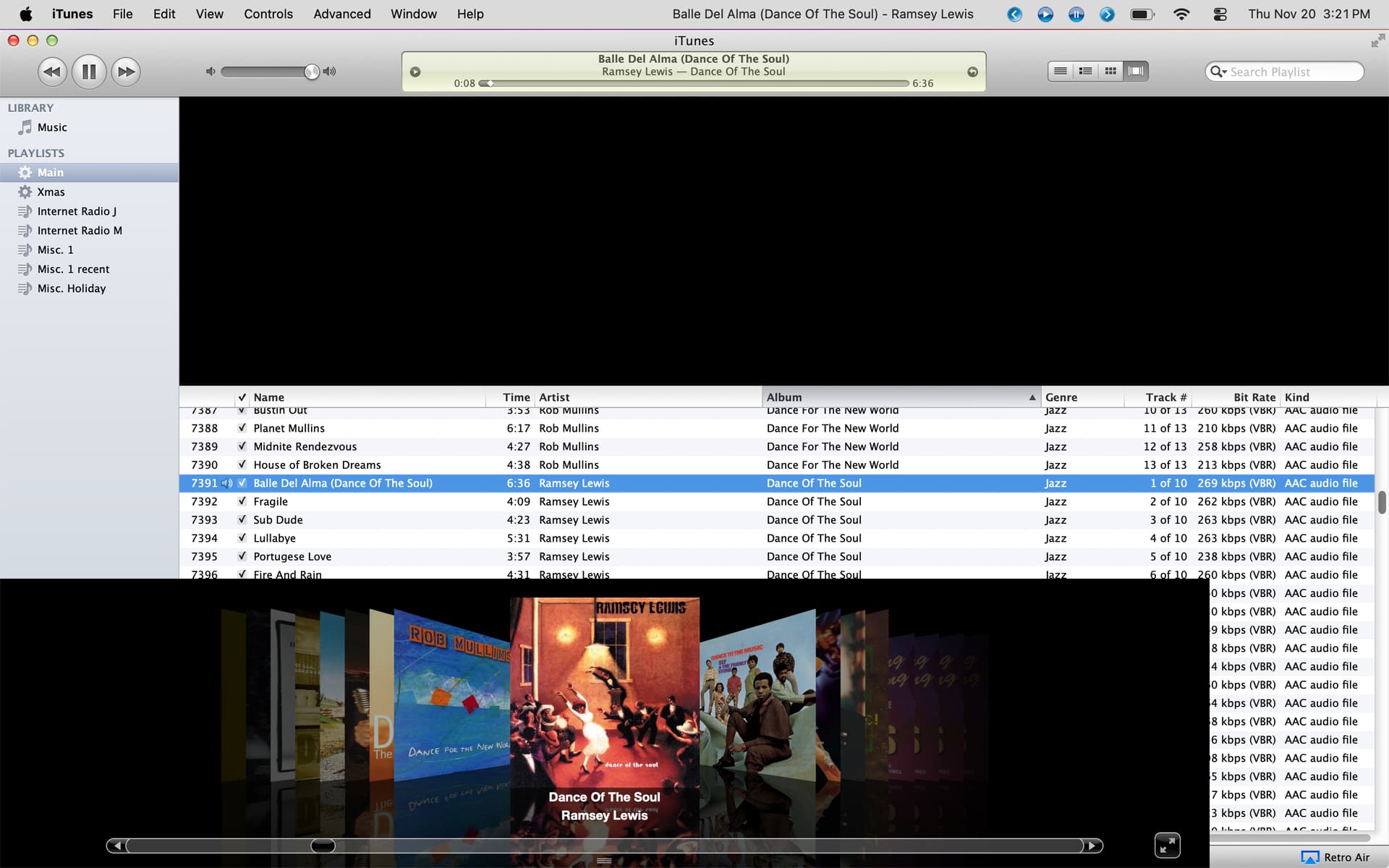
The MacRumors thread I mentioned talks about what works and what does not like the store. If you only need playback and ripping capabilties, iTunes should work even on Tahoe. My problem is since I like the 10.7 CoverFlow version, I can’t use that regularly with Tahoe as that mode gets distorted due to some change although the other three modes are fine.

As you can see, the covers are at the bottom instead of the top where they should be although it still works in full screen cover mode by clicking on the “right” spot near the Kind column in the black area.

It appears from some comments on that thread that older versions like iTunes 12.9.5.5 which is actually from Mojave still work with Tahoe. Since you have older Mac’s you might already have some of the older versions which just need a script from that thread to work.

2 Likes

Thanks - I do indeed have iTunes 12.9.5.5 on my Mojave Mac, so this is appealing.

Though after re-reading that thread, it sounds like support for Retroactive, going forward, may be limited. I think I want to do a prototype migration, and see what issues the Music app has for me first. If Retroactive and the script no longer work with a future version of macOS, or are not supported for new versions, then I’ll end up having to deal with Music in the long run.

BTW, thanks to everyone who has responded to my query - this is valuable feedback, and much appreciated! After I’ve made the migration, I’ll post here with my results and observations.

2 Likes

I think Retroactive stopped working properly with Sequoia 15.2 or near that. The install procedure would work fine but the iTunes app would not launch properly due to a change in the code signing in MacOS but as noted in that MacRumors thread, that was easily overcome. But you’re right in general as there is no way to know when these older apps will stop working. If Rosetta is deprecated in future OS, then it’s over for iTunes and other old apps. This is why I’m still keeping my Sequoia partition on my M1 Air and the other for Tahoe and future OS updates if I need an up-to-date system.

2 Likes

I use Cesium on my iOS devices. If the developer made a MacOS version, I’d probably get it.

A discussion in another thread reminded me that the Windows 10 version of iTunes is still maintained, receiving an update to v12.13.9.1 about a month ago. I only use it to maintain my “reference library” of music from ripped CDs and various online purchases.

FWIW, the machine is an eight year old Dell desktop running a plain vanilla installation of Windows 10 Pro with extended security updates. The only third party apps I run on it are Firefox and Thunderbird. Aside from the occasional nag to upgrade to a Windows 11 system, it’s surprisingly free of interruptions, though I did spend a little time customizing settings to minimize annoyances.

It’s not for everyone, but if you have an old Windows computer hanging around, it can be a solid way (and the only way, I think) to retain iTunes in an Apple-supported configuration.

Edited to add:

If you are interested in running iTunes on Windows, there is some folklore suggesting that it is better to download iTunes from Apple than from the Microsoft store. I don’t know if there is any truth behind the folklore, but it is easy enough to do. Just download and run Apple’s iTunes installer, and then let Apple Software Update bring you up to date. You also can install iCloud if you want more integration with Apple services.

1 Like

If someone wants to run the older iTunes 10.7 CoverFlow version in Windows, it does work as I tested it using Windows 11 in a VM some time ago. The download from Apple is not around anymore, but is still available through Internet Archive:

The download page defaults to Mac iTunes 10.7 but you can select the Windows version at the bottom.

1 Like