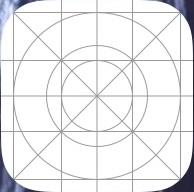
Found a couple screen-swipes back on my iPhone 16 Pro Max w/ iOS 26.0.1.
It has no title. Doesn’t show up in any app lists in settings or App Store. iOS doesn’t seem to have anything like the Finder’s “Get Info.”
Somewhat creepy…
Found a couple screen-swipes back on my iPhone 16 Pro Max w/ iOS 26.0.1.
It has no title. Doesn’t show up in any app lists in settings or App Store. iOS doesn’t seem to have anything like the Finder’s “Get Info.”
Somewhat creepy…
I don’t know but I have it too. Can’t be deleted.
That’s the default icon Xcode assigns to a new app if the developer has yet to supply a “real” one. Can’t say why it’s on your phone unless you’re a developer, or allowed a developer to deploy a work in progress app to your phone (many hoops to jump through…wouldn’t have happened by accident).
[Edit: I may have spoken too confidently. It is also possible that is the icon that the OS assigns to an app whose icon is missing or unreadable. I see it in Xcode development, and nowhere else, but I don’t know for a fact that Xcode is the agent here.]
That doesn’t describe my situation. I test Fantastical through TestFlight, but that’s all. And Fantasical has its normal icon. This appeared after update to iOS 26.
Your response made me re-think my reply to the OP, and I’ve added a bit of a qualifier. Thanks.
In my case, this icon does not respond to clicks (nothing launches), and I can’t delete it.
I see it for apps that can’t be loaded from the App Store. This typically happens to me after I migrate to a new iPhone. Since the migration relies on getting fresh copies of apps from the App Store, apps no longer available show that icon. However, the name does appear under the icon, and I can delete it.
Can’t delete it here either. Doesn’t show up in the App Library page. iMazing can’t see it. iMazing support replied (within 45" on a Sunday no less…)
“This icon is a placeholder for an App icon. Were you downloading any app recently? This is iOS-related, and Apple should have more information about this issue.”
Only recent download, I can recall, was the iOS update.
This describe my case too.
Apple tech support had the answer:
Settings / General / Transfer or Reset iPhone / Reset / Reset Home Screen Layout
Of course, my meticulously arranged Home Screen Layout is blown away, but good to have that icon gone. Tech said icons like that are usually associated w/ a failed download, but we never could figure out what download failed. I personally believe it might have been the iOS update.
I had no idea Reset was so granular now. There are six options, short of blowing it all away.
I don’t think mine was a failed download either, but it did appear after migration to a new iPhone 17.
Good news. This means there was no spurious file, but some corrupt data in the icon-layout file. So resetting it cleared the problem.
I have that icon on my new iPhone 17Pro for the Google Calendar app. But I have spent a lot of time creating multiple file folders to organize >500 apps, so I am not keen on having to record what is in each folder and recreating them all again just to get back one icon. Any other way to get that one corrupt icon fixed?
Have you tried going to the App Store to see if there is an update? Installing the update (or perhaps waiting until the next update and then installing it) may get the proper icon.
Yes, reinstalling should work in Jason’s case.
My icon was different in that no one, not even Apple could determine what it actually belonged to (part of why I think it was from the iOS update rather than an App that didn’t download correctly.)
Since I know the app with the wrong icon, I deleted it from the homepage, then added it back. After several minutes, when I returned to that homepage, the correct icon appeared.