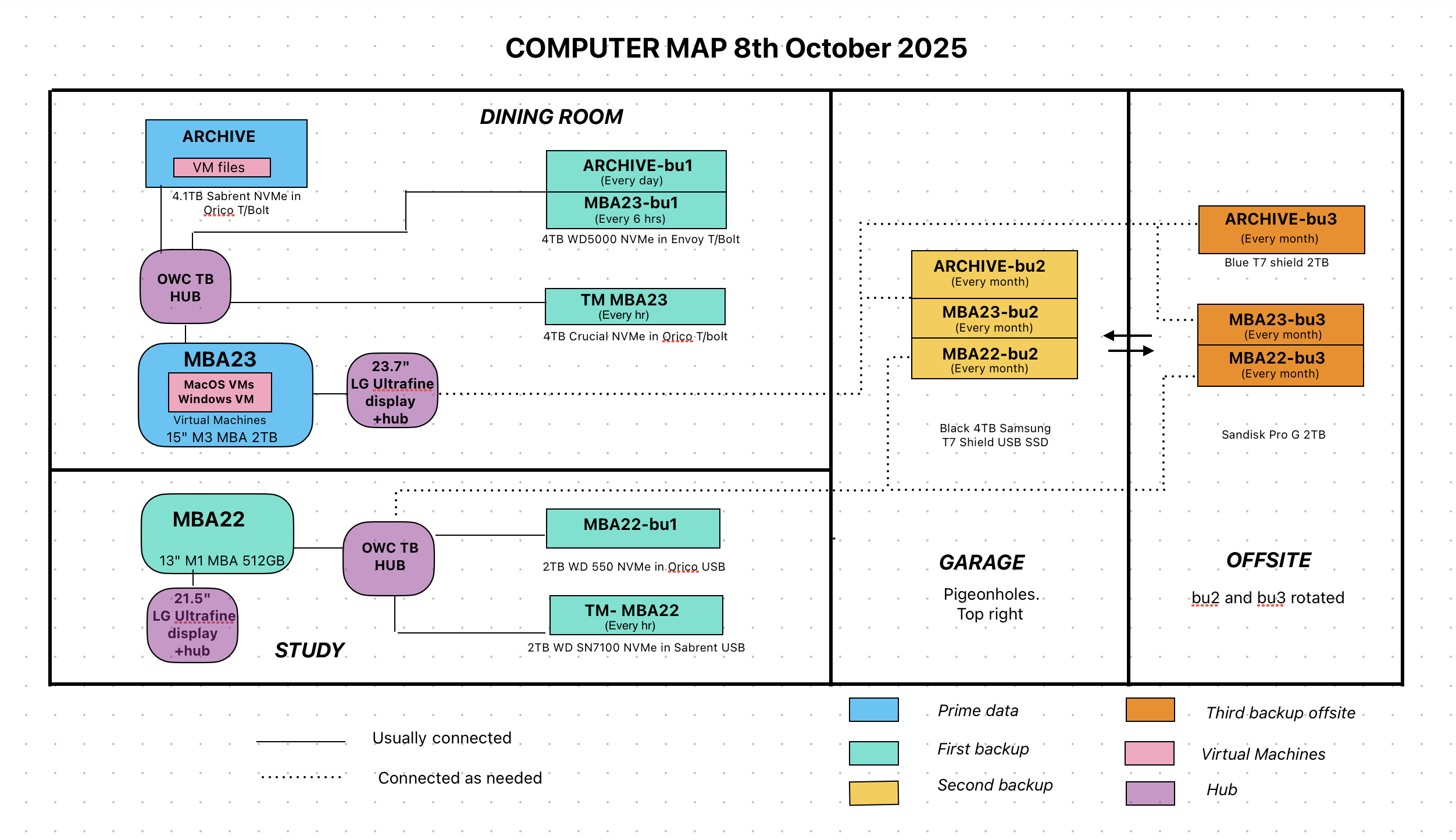
I’m running 26.1 on all my devices, so I’ll go ahead and update. In the article the FreeForm app was mentioned. I never heard of it before. I looked it up and my impressions was “interesting… and confusing… what can I do with it?”
In essence, it’s a digital whiteboard intended for quickly drawing diagrams, arranging photos and text in suggestive ways, adding other documents that can be previewed, etc. You can set it to share the “boards” across all your Apple devices and even set it to share with other Apple users who can collaborate and add to the board. You can export PDFs, too.
So, think of sitting around an office with a few people and quickly posting notes and clippings on a board and drawing squiggly arrows between them to come up with ideas for your next fundraising push.
As is often true with Apple it is “simple” but hides a lot of fanciness under the hood.
However, compared to the 1,000lb gorilla of digital whiteboards, Curio, it’s weak. The collaborative sharing (which Curio doesn’t do) is pretty slick, however, and you can’t complain about free. Curio has a simple free version and then standard ($80) & professional ($100). I’ve used it for 20 years and simply adore it. I tend to think both graphically and textually and the ability to slap nearly anything you can imagine up on a “wall” is wonderful. It’s so powerful, now, I ignore 80% of the features but that whiteboard is wonderful.
Since it’s free and a default installation, Freeform may well be the best way to see if you like this sort of spatial thinking.
After opening it up I saw that I had, in fact, tried it back in 2022 and shared a board with a friend in St. Louis and we went back and forth a few times.
I guess the fact that I hadn’t touched it in over 3 years and forgot about it shows how useful it seemed to me.
I do a lot of diagrams for research articles in OmniGraffle, both simple and complex. I’ve found Freeform to be useful for making some of the simple diagrams and sharing them with collaborators.
I use it for diagrams of my computer system as this example. I have tried other more complex apps in the past but find Freeform very intuitive and quick and easy. It is capable of much more complex plans. It is a much underrated app IMHO.
I’ve used Freeform on an iPad for collages of photos and diagrams and added text boxes. It is handy for this. However it does seem to create one giant canvas and I haven’t found a way to view a page layout for exporting to a PDF. But then I haven’t looked at the manual, if there is one!
Another vote for Omnigraffle for doing this type of work on a Mac.
Lots of great features, but I am mystified as to why there’s no pen (or tablet support) in the MacOS version. One thing that always has me running to Miro or Notability is the need to sketch things. If you want to do this in Freeform on the Mac, you have to use your iPhone (Insert → Insert from iPhone → Add Sketch). You can’t even draw something with your finger and the trackpad.
Am I some kind of edge case expecting an app with a squiggle in its icon to allow you to draw squiggles?
I wonder if it’s also incompatible with third-party graphics tablets, which are really the only supported pen interface for the Mac platform.
Which brings to mind a possibly useful new feature. Would people appreciate a Magic Trackpad (or laptop Trackpad) that is compatible with an Apple Pencil? I would think that this would work well, especially since graphic professionals have been using external graphics tablets for a very long time.
Sorry, to be clear - I’d like a pen tool, so that I can scribble in the app. This tool is present in the iOS/iPadOS versions, why not the MacOS version?
I’m currently using OpenTabletDriver with my old Wacom tablet - I haven’t had any issues with it in MacOS 26, but my needs are pretty simple.
 but that whiteboard is wonderful.