By the way, there is no ability to change BB’s automatically excluded folders. AI overview is totally wrong in terms of “How to Fix It.” As many others have noted here, there is no fix in BB.
1 Like
One could @leays just setup a script or CCC task or whatever to sync the Dropbox folder to another one someplace else and then BB will happily back it up. It needs space of course but aren’t most of us doing local backups as well anyway?
By the way, there is no ability to change BB’s automatically excluded folders. AI overview is totally wrong in terms of “How to Fix It.” As many others have noted here, there is no fix in BB
Perhaps AI is fooled by the fact that you can configure the default list of file types excluded. But as you say, not the default folders it excludes. However the Default excluded folders do not include any user directories, so that isn’t the explanation for Dropbox not being backed up.
I started using Backblaze yesterday. All my docs are in iCloud Drive, including Desktop and Documents, and optimise is off, so local full size copies exist.
After setting it all up I remembered the Dropbox thread and asked Backblaze support for a clear statement about whether BB backs up iCloud Drive (assuming full size local copies present). The unequivocal answer is NO. You have to relocate the contents of iCloud Drive to a different location, which of course destroys the point of iCloud Drive. Backblaze documentation has now added a note in a yellow box to this effect. This note effectively makes the rest of the document irrelevant.
I have now cancelled my account and told Backblaze they are handling this situation very badly. Ordinary users of BB who don’t read forums will be still believing their iCloud Drive and Dropbox files are being backed up.
I like Adam’s suggestion in the Dropbox thread, of using CCC or similar to automatically maintain a exact copy of iCloud Drive in another location which would be backed up by Backblaze, but still feeling sore with BB so not rushing back! BB support have confirmed this would work.
(PS All my iCloud Drive files are local full size, no optimisation, so I wouldn’t need CCC’s capability of downloading, backing up and then evicting)
It’s more than just iCloud Drive and Dropbox. It’s apparently true of any cloud syncing service that uses the Apple File Provider API, including Box, Google Drive, OneDrive, and others.
2 Likes
Thanks yes I did realise that but kept the title to iCloud Drive, as that is what I was using.
I have always had a poor view of BB for macOS. There are too many things it doesn’t backup which are of value in the macOS file systems. For example, BB does not backup any extended attributes (e.g. Finder tags) and other file system metadata including dates..
Smug alert: I use Arq for backup to cloud storage. Requires a bit more configuration to get started but is a much more complete product for Mac users.
4 Likes
Does anyone know if this is a new development with BackBlaze and iCloud Drive? As recently as this winter when BB stopped working with Dropbox and there was a long thread here on it, I shifted over to using iCloud Drive for my documents instead and I did a test to check and BB was backing up all the files in my iCloud Drive at that point.
Obviously this thread has bumped up rechecking my backups to the top of my to-do list. If this is really the case, I’ll probably be cancelling BB too. Not much use if it can’t back up the stuff I want backed up.
Ok, the BackBlaze support notes on this ICloud Drive issue are unsurprisingly confusing. See the following from their support website…
Back Up iCloud Drive
NOTE:
iCloud’s most recent update prevents Backblaze from backing up files that iCloud synced.
To back up these files, download them to another local location where Backblaze can read them.
On a Mac, you can back up iCloud Drive files to Backblaze Computer Backupas long as the files are saved locally on your computer and are not stored solely on iCloud Drive remote servers.
For Windows, you can not currently back up iCloud Drive files to Backblaze Computer Backup. Windows regards the iCloud folder as a reparse point, and there is no way to disable this requirement within the application.
I checked and documents I created in the past two days and have saved in iCloud Drive appear in my BackBlaze backup. Perhaps this is because I’m still running Sequoia and the “recent update” mentioned above that broke iCloud backup only applies to OS26? Confused.
This is the default behaviour for many backup and synchronisation apps. That includes Time Machine. But some Mac focused backup/sync apps do have an option (which must be explicitly enabled) to download any cloud-only files, back them up, and then release them to the cloud. In my direct experience: Arq, Carbon Copy Cloner, and (less well) ChronoSync do this with files stored on iCloud Drive and other cloud services (Dropbox, Google Drive, OneDrive) which use Apple’s File Provider Framework.
It is a worrying regression if Backblaze does no backup of iCloud (even of locally stored) files.
1 Like
I checked and documents I created in the past two days and have saved in iCloud Drive appear in my BackBlaze backup. Perhaps this is because I’m still running Sequoia and the “recent update” mentioned above that broke iCloud backup only applies to OS26? Confused.
It was exactly this contradiction that caused me to ask BB Support directly. I can only assume that Sequoia is the explanation. I am using latest Tahoe.
I have set up Adam’s suggestion and have contents of my iCloud Drive syncing to an external location with CCC every six hours, and so confident that if I do start using BB again iCloud Drive would be backed up. As my iCloud Drive content is only 60GB this was easily done.
I am sore with Backblaze because I think they are being deliberately unclear because they don’t want to lose customers, which they surely would if they were unambiguous out it. This is very bad practice.
PS the text of the reply I received from BackBlaze is:
“You’re seeing conflicting info because Apple’s recent iCloud changes mean Backblaze can no longer back up files that remain inside iCloud-managed locations, even if they look “downloaded” in Finder.
So the key rule is: Backblaze can only back up your iCloud Drive files if they are moved to a fully local folder (not inside iCloud Drive).
What to do:
1. Open Finder and go to iCloud Drive.
2. Select the files or folders you want backed up.
3. Drag them to a local folder like ~/Documents or ~/Desktop (and make sure Documents and Desktop are not synced to iCloud).
4. Confirm the files no longer show an iCloud icon, then let Backblaze scan and upload.
If you leave files in iCloud Drive (or ~/Library/Mobile Documents), they will not back up”.
Obviously moving them to off iCloud Drive completely destroys the point of having them in iCloud Drive, but Adam’s way is a reaonable work around.
I asked Backblaze support if Tahoe was the recent change that caused the problem, and got this back almost immediately:
Hi Mike,
It is not macOS Tahoe that caused this. macOS 26 Tahoe is supported, and the change you’re seeing is not tied to that macOS version.
The reason iCloud Drive is no longer backed up directly is that recent updates to macOS and iCloud prevent third party backup tools from backing up files that remain iCloud managed, even if they look fully downloaded in Finder. This is a limitation of Apple’s iCloud architecture, not a Backblaze policy choice.
So your friend on macOS Sequoia may be seeing iCloud Drive back up because their setup is different (for example, their files may be stored in a fully local, non iCloud location), not because Sequoia “allows” it and Tahoe does not.
I have asked to speak to a human.
I asked BB Support if Tahoe was not the recent change, when exactly did the change happen?
The reply was that I am being handed off to a team member for review and will get a reply within 24hrs.
I have set up Adam’s suggestion and have contents of my iCloud Drive syncing to an external location with CCC every six hours, and so confident that if I do start using BB again iCloud Drive would be backed up. As my iCloud Drive content is only 60GB this was easily done.
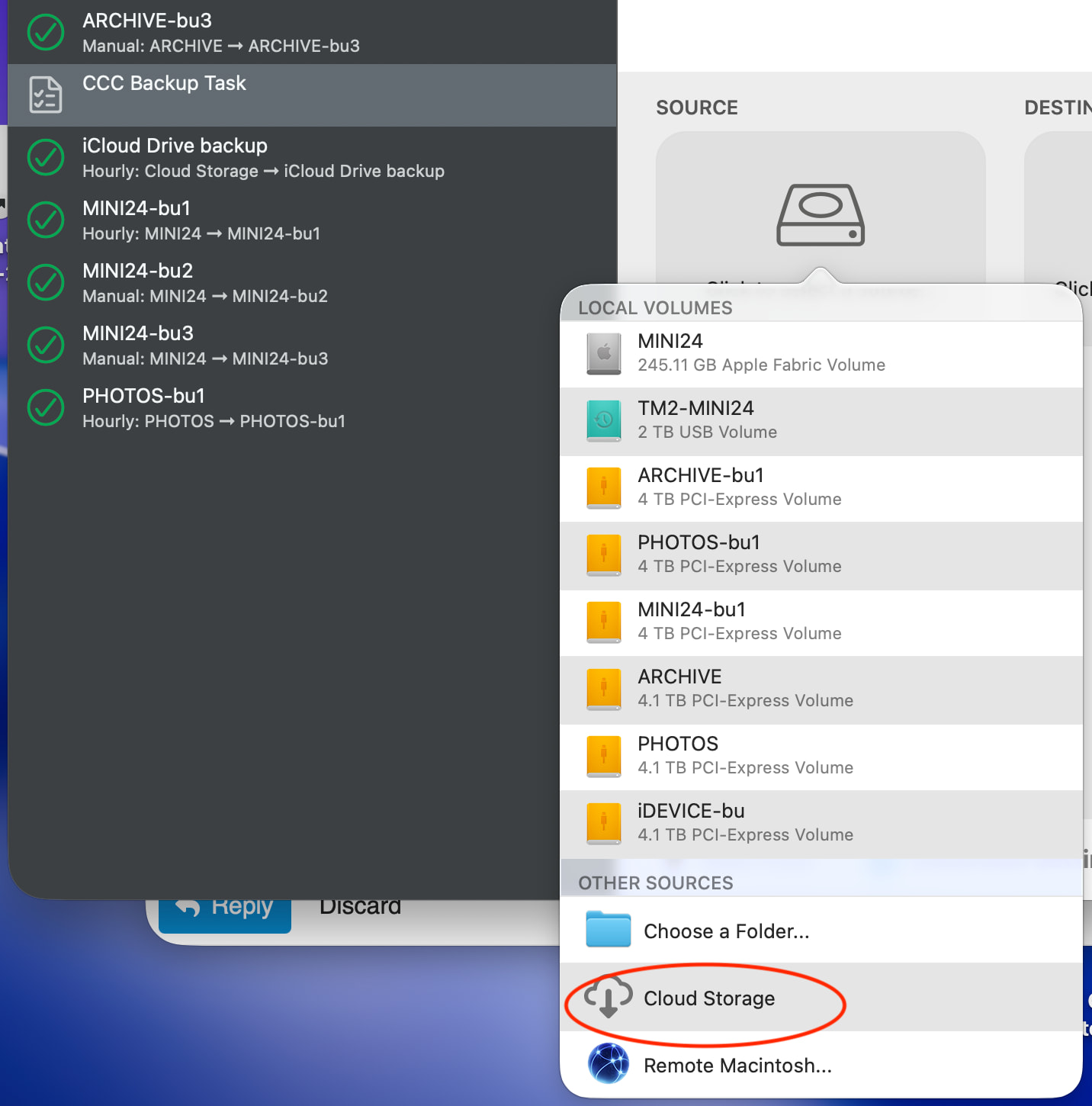
This was not straightforward as Apple does an amazing job of hiding the actual local files from the user. Unsurprisingly, in CCC it does not work if you simply drag “iCloud Drive” from the sidebar into the source box. However I was surprised that, even with invisible files showing, Finder does not show ~/Library/Mobile Documents/com~apple~CloudDocs/. However third party app Path Finder does show ~/Library/Mobile Documents but not the subfolder com~apple~CloudDocs/. Dragging the ~/Library/Mobile Documents folder from Path Finder into the CCC source box did not copy my iCloud Drive folder.
What worked was using the option “Cloud Storage” in the CCC setup process, see below
Maybe all this is related to why Backblaze say it can’t back up files in a cloud storage location..
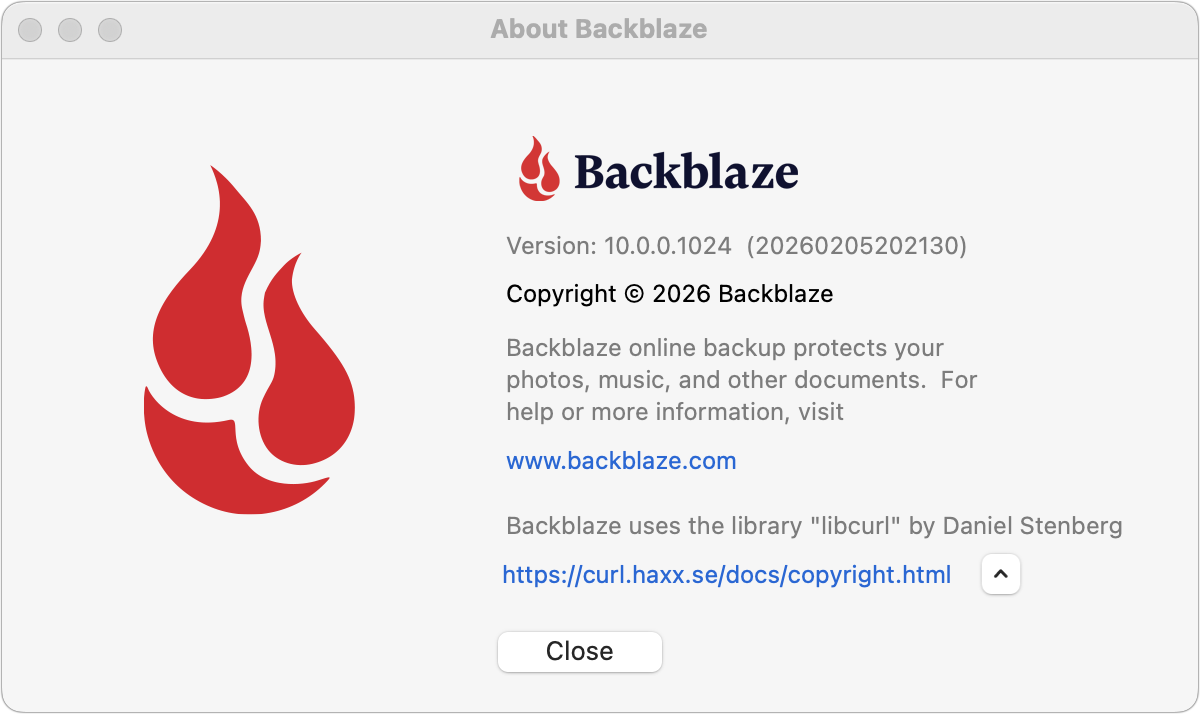
I need to dive back into this—I’ve been having conversations with Backblaze for months about this. In theory, Backblaze 10.0 should allow backing up of iCloud Drive, but no other FileProvider services. That’s what I’m running (choose About from the Backblaze menu bar icon). My understanding is that not everyone is getting the 10.0 update automatically, so if you’re still on 9.2.2, try downloading a manual update.
1 Like
Please do dive back into the topic with Backblaze. I have been hammering the topic pretty hard and not received any mention of 10.0.
I have uninstalled BB and deleted my account so I can’t check what version I was running.
Are you saying that your iCloud Drive definitely is being backed up, without your suggested workaround?
I have now received a response from a senior support technician who I believe is human:
Hi Mike,
Thanks for writing in!
We made changes around last September regarding iCloud and other cloud storage directories. This decision was driven by a consistent set of technical issues we were seeing at scale, most of them driven by updates created by third-party sync tools, including unreliable backups and incomplete restores when backing up files managed by third-party sync providers.
To give a bit more context on the “why”: these cloud storage providers now rely heavily on OS-level frameworks to manage sync state. On Windows, for example, files are often represented as reparse points via the Cloud Files API. While they can appear local, they are still system-managed placeholders, which makes it difficult to reliably back them up as standard on-disk files.
Moreover, we built our product in a way to not backup reparse points and cloud synced files for two reasons:
- We wanted the backup client to be light on the system and only back up needed user-generated files.
- We wanted the service to be unlimited, and following reparse points would lead to us backing up tons of data in the cloud.
We’ve made targeted investments where we can, for example, adding support for iCloud Drive by working within Apple’s model and supporting Google Drive, but extending that same level of support to other providers like Dropbox or OneDrive is more complex and not included in the current version.
We are currently exploring building an add-on that either follows reparse points or backs up the tagged data in another way.
We also hear you clearly on the communication gap. Both the sync providers and Backblaze should have been more proactive in notifying customers about a change with this level of impact.
Best regards,
Jave
Coming back in on this having started it, it feels like some of this from Backblaze is nonsense.
It feels like there are two issues here:
First, backing up files that are actual, local files actually stored on the local hard drive (but being synced to other devices). There is no reason at all I can imagine that these couldn’t just be backed up like any other file anywhere else on the hard drive - and indeed as they were prior to last September .
Two, backing up files that only have a local placeholder (Dropbox ‘online only’ files). Yes this is a quite different technical exercise but the Arq backup software, for example, now has a way of dealing with this. But there seems to be no good reason to conflate the two things: you could continue to backup actual files while warning you weee not backing up online files, rather than just not backing up anything (without any warning).
For Backblaze to on all this on new Apple frameworks is also nonsense as they have stopped backing up Dropbox on my iMac running 10.14.6 which doesn’t use these new Apple frameworks
It feels nice of them to say they realise they could have communicated this better…. Except as far as I can tell they still haven’t communicated this critical change directly to anyone who hasn’t asked
Rob
I share your concern that BB are still confusing the issue of actual local full size files, with the location of the fileprovider folder.
I have been at great pains to emphasize that my files definitely are local full size but they insist it is all about location.
I was so disgusted when they told me iCloud Drive would not backup that I deleted uninstalled and closed without investigating, which I regret now.
For what it’s worth, at least on version 10.0.2.1048, BB does appear to be backing up my iCloud storage. It seems to have both my Desktop and Documents folders (which I have synced) as well as the iCloud Drive files in ~/Library/Mobile Documents/com~apple~CloudDocs.
1 Like
Yes, all my iCloud Drive folders (including Desktop and Documents) are being backed up with no extra effort.
I’m not seeing any support for Google Drive yet.