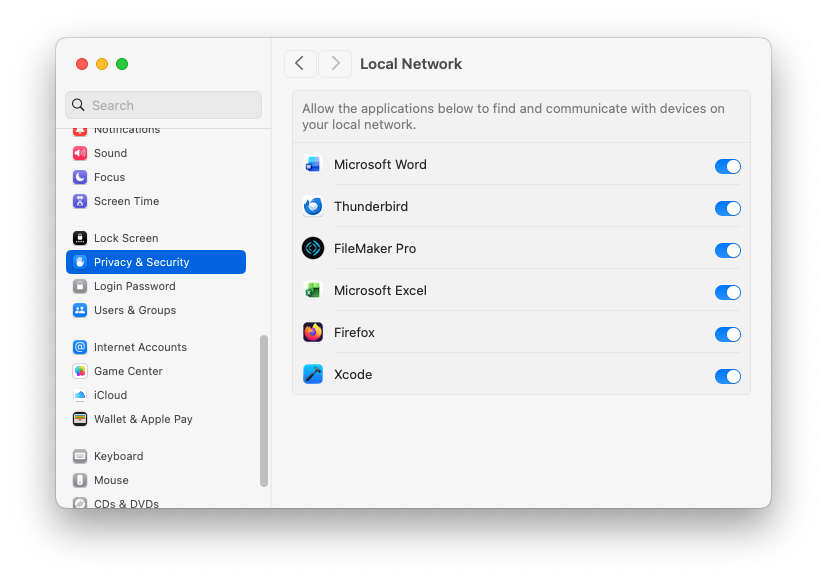
Does anyone here upgrade non-ESR Firefox in updated macOS with a non-admin account? If so, then do you have problems upgrading that doesn’t work even after entering macOS admin account information and install helper was added? I never had this problem before upgrading macOS Ventura to Sequoia. I had to reboot and log into my macOS admin account to upgrade Firefox (e.g., v145.0.2 to v146). Did Apple and/or Mozilla change something in its newer version(s) to break it? Or is it just me since last month (upgraded macOS back on 10/18/2025 and always updated Firefox (internal updater) on its first release day)?
Thank you for reading and hopefully answering soon. :)
I never run from an administrator account. Firefox’s normal updater (which I manually trigger via the About box) just works without asking permission. I may have had to authorize it the first time, but it’s been a long time so I don’t remember anymore.
If yours isn’t updating, my recommendation is to download a fresh copy from the official download site. Drag/drop the app from the downloaded disk image to your Applications folder and it should just start working again. If you’re not logged in as an administrator, macOS will ask you for credentials, but you can just type in the user-name and password for an admin account. No need to actually log in as an administrator.
Yeah, I did drag and drop Firefox app into trash and then downloaded and drag and drop the new one, but that didn’t fix it last time. According to https://bugzilla.mozilla.org/show_bug.cgi?id=1957613#c31, it might be related to macOS’ local network connection access that was off for Firefox and its installer app. I’ll need to try it again when the newer Firefox version is out to retry the internal updater. Do you have local network connection enabled for them in your macOS (which one?)?
I run as under an admin account like @Shamino . Firefox (non-ESR) updates fine when I tell it to update from the "About” box while logged into an admin account. But it doesn’t seem to do so automatically, even when the “Automatically install updates” preference is selected within Firefox. I still have to go into the “About” box and install the update.
I do find that when my wife (who’s not an administrator) wants to update Firefox from the “About” box, she’s required to enter an admin password each time to actually perform the update. The admin privilege doesn’t persist.
Google’s AI Overview when asked about automatically updating Firefox on macOS returns the following information about updating:
For updates to work seamlessly, especially in standard user accounts or custom installs, ensure Firefox is in the main /Applications folder and allow it necessary system permissions (like Full Disk Access or firewall exceptions) if auto-updates fail.
A response in the Mozilla support forum also indicates that reinstalling Firefox while logged into a Standard account and not an admin account fixed an issue with updating.
I use a Standard (not admin) mac account. Firefox not in Local Network list. Started update automatic as soon as I launched it. Up and running with 146.0 now.
I actually said that I never run from an admin account. I manually provide admin credentials when some part of macOS (typically an installer or some critical system setting page) requires it.
WRT automatic updates, that’s a feature I leave disabled. I have it configured to notify me when updates are available. I see the update and can click its “Download” button when it pops up. The update installs at the next app-restart, which is at least once a day, because I always quit all apps when I’m done using the computer.