This has always felt like a weak spot on the Mac. I hate using Windows, but at least I can easily and completely remove an app if I want to.
It’s been a few years since I tried one of the Mac app uninstalled apps, but I was never terribly impressed by the one I tried. I also don’t recall TidBits reviewing any of them at least in recent memory. Perhaps an article idea, @ace ?
This is a side-effect of the fact that installation of any non-trivial Windows app requires a lot of tricky work that’s better left to others. So just about everybody uses Microsoft’s own installer-generator tools. And these create uninstallers that get registered with Windows.
Apple never went in that direction. They addressed the installer-complexity via Application bundles - an app is a directory full of files. So you can just drag/drop the bundle anywhere to install it. In theory, you should be able to just delete this bundle to uninstall it.
Sadly, the “delete the app” approach fails to get rid of other data files. It makes sense to not delete your documents, but any other files (preferences, add-ons, other downloaded content), gets left behind.
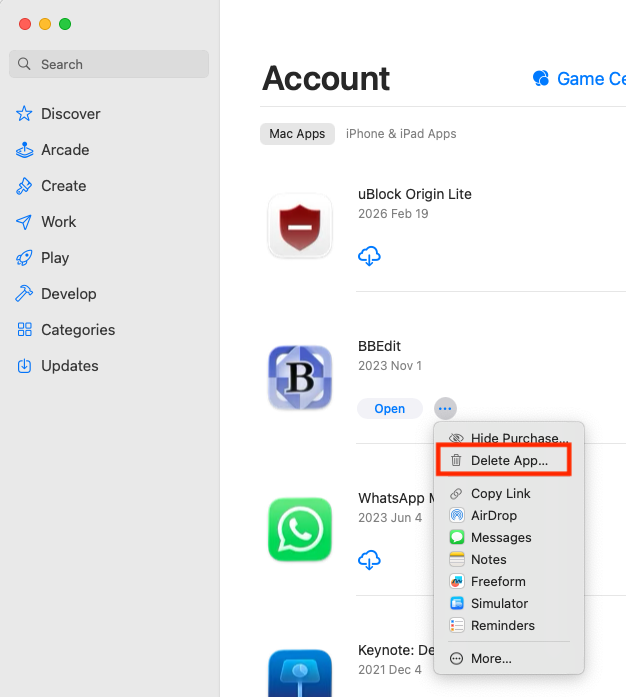
Apple’s solution to this has been to use sandbox-containers. So all of an app’s files are kept together in the container. This is how App Store installations work, and it is why you can cleanly uninstall these apps from within the App Store itself:
The surprising thing is that non-App Store applications that are installed with Apple’s official installer tool don’t automatically get their own uninstallers, like they do on Windows. Definitely a shortcoming in the Mac ecosystem.
Of course, those apps that don’t use any of Apple’s installers can’t be expected to be uninstalled using any tool from Apple.
I’ve always been dubious of third-party uninstallers because I can’t see how they could know all the files that an app might create. Testing them would also seem really difficult, since even the user doesn’t know what an app might have done. Only the app’s developer will have that knowledge, so they’re the ones who should build an uninstaller.
That is true if you refer to a designated uninstaller app. But Apple allows the exact same functionality to those who seek it.
The default Apple installer allows saving an exact BOM with paths of all installed files that can later be piped right into a rm -rf. That is no doubt more involved that MS’ solution because a) you have to at install time remember to save that BOM (all of that is optional and not exactly well advertised, unless of course you know where to find install receipts) and b) you actually have to run the script yourself which is definitely not something people who like to stick to a GUI (eg. probably 95%+ of Mac users) can be expected to enjoy.
I’ve always wondered if Apple has not provided this final step for convenience simply because they don’t like the idea of “uninstalling”. True to the original Mac paradigm, you’re supposed to just drag it to the trash and done. And indeed, on iOS that is essentially all that is required. The Mac is somehow in between. It offers that simplicity to novices via MAS while it gives power users what they need to essentially run a (selective) uninstaller.
Yes, but this will only remove the files that were created by the installer.
It will not remove anything that was downloaded/created after installation. Like hot-fixes, add-ons, plugins, templates, caches, preference files, etc.
The Microsoft installation system actually creates a special-purpose uninstaller for every app. Developers are expected to customize that uninstaller to perform a complete cleanup, or present users with options to decide what to keep/delete. So they can delete content created after installation, if the developer did his job.
Some Apple apps do ship with uninstallers, and those that do are usually pretty good. But it’s not mandatory.
iOS uses containers/sandboxes. All of an app’s files are always saved to that sandbox. When you uninstall, the whole sandbox is deleted.
This also happens on macOS for App Store apps, if you uninstall using the App Store (or equivalent commands via Launchpad and similar tools). But it doesn’t happen for apps installed through other mechanisms.
I’m sorry to have gotten us off topic. At any rate, it’s interesting that installing an app on the Mac is so awesome via drag and drop, but removing an app on Windows is better.
I didn’t know you could do that. I’ve always deleted App Store apps by the drag-icon-to-trash method, or using AppDelete.
I’ve seen apps that have a Launchctl or process that detects when the user has deleted the .app package, and then it starts a custom uninstaller to clean up the rest of the application’s files.
Is there any quick way, say in Finder, to ID App Store sourced Apps? I just looked to see if there is a Finder column for ‘Source’ and there wasn’t, nor anything in the Get Info as to source.
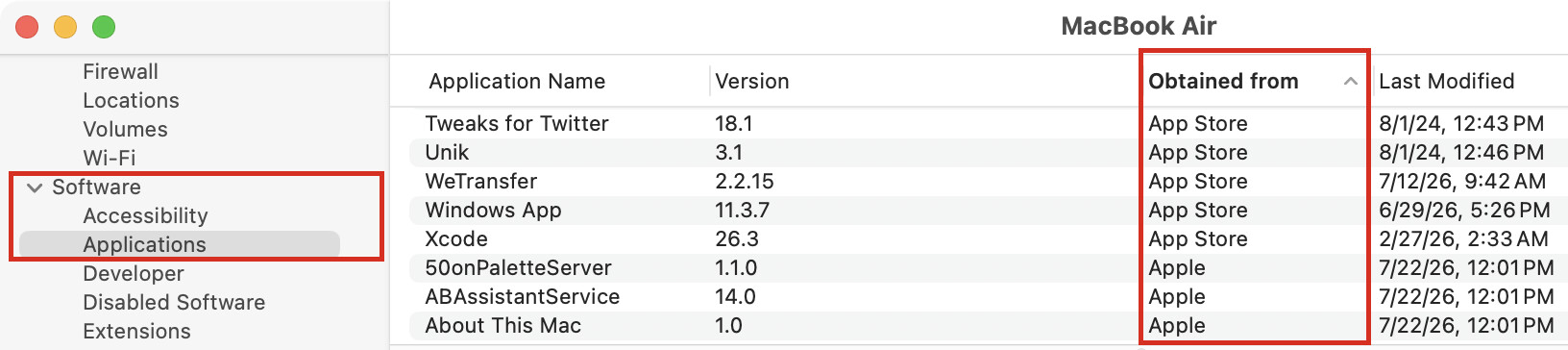
Hold down the option key while clicking on the Apple menu. Choose “System Information” (where “About This Mac” is located when you don’t hold down the option key).
Scroll down the sidebar and choose “Applications” in the “Software” category. If you don’t see that option, choose “Show More Information” from the File menu.
Click on the “Obtained from” column to sort by app source. “App Store” should be one of the categories.
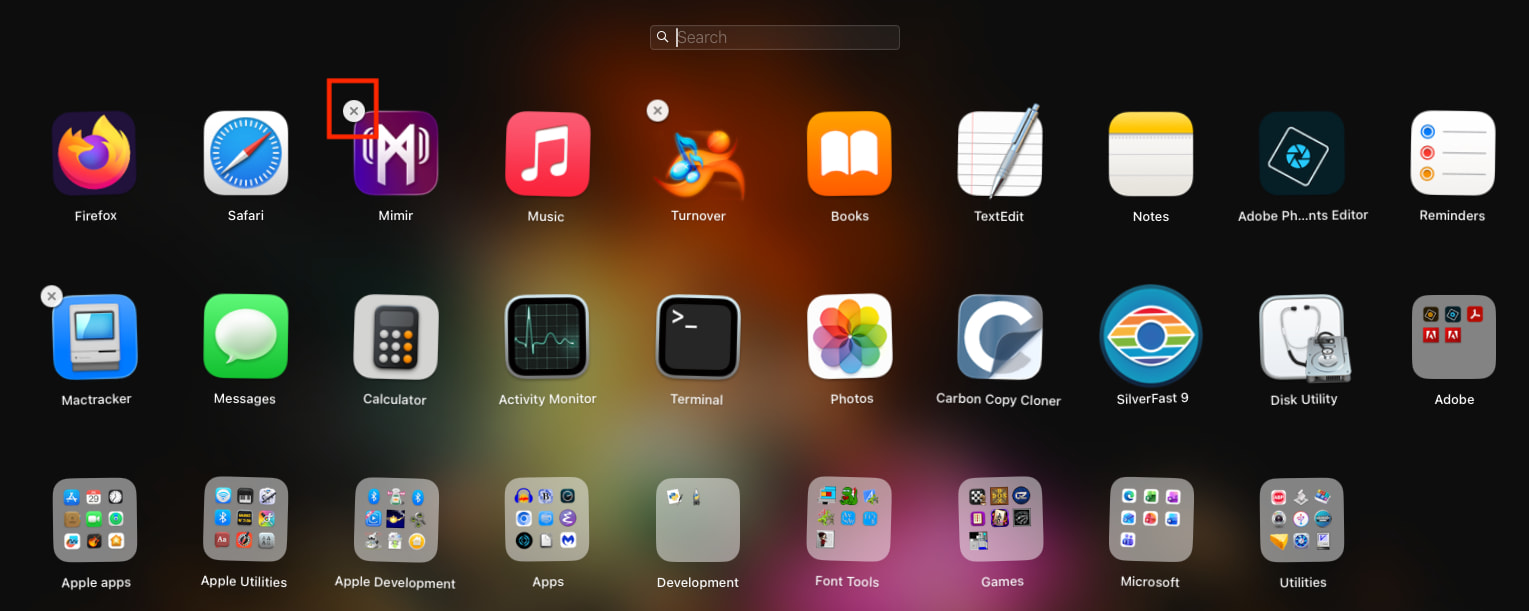
On systems running MacOS 15 or older, you can open Launchpad. Then long-click on an icon so they start jiggling. The App Store purchases will have little “x” icons, which you can click on to uninstall them:
Yes yes indeed! The good ol’ System Info, long time not visited, of course! It also has a column for Kind which shows the Intel apps that upgraders to 27 28 and beyond will need to deal with, as a current topic of interest. Thanks again @Shamino .
(thanks @ace for breaking this out to a new topic)
Most of the uninstallers are pretty good. Surprisingly so.
(a) Testing for completeness is a hard. In my experience they are much more complete than any manual attempt and clearly better than just drag and drop of the app. Failing to remove permissions granted in System Settings is can be an issue.
(b) Most installers list what they are going to delete and you can quickly look for false positives.
But, of course, I agree that it would be better to have an uninstaller from the developer. The much maligned Adobe provides uninstallers - sadly I have doubts about their completeness.
I use App Cleaner & Uninstaller (Nektony). Certainly it is yet to give me a false positive unlike some of the free uninstallers. And, as far as I can judge, it is more complete.
Uninstallers are often part of the installation package. So, if you want to uninstall an app, it’s often a reasonable idea to download the installer from the developer and see if there is an uninstall option.
Those of us who have relied upon AppDelete will have to find an alternative one day as it is an Intel app, and the developer died some years back.
AppCleaner is Universal, and pretty much the same as AppDelete, and free.
App Cleaner & Uninstaller is Universal but costs $34 for a lifetime license (subscription also available). It will also check for and install app updates like MacUpdater did, without the homebrew complexities of Updatest.
If you have apps installed as Homebrew Casks, then App Cleaner & Uninstaller will find the updates. It is roughly equal to Updatest for finding updates.