Yesterday, from my MBP running Mojave (needed for CS6). It did not go well. A lot of page features were missing and there was an error message about my “unsupported” browser. IIRC it worked the previous day. Anyone else see this?
I just tested this site using Mojave and Firefox 115.28.0esr and it is not compatible. I also tested Orion (Version 0.99.136-beta) and it worked fine – so you might consider using that.
1 Like
Yes. This is being discussed in another topic:
Apparently, Firefox 128 or later is required.
I am having success using Firefox Dynasty, which it should, since it is version 143.0.3, compiled to be compatible with older versions of macOS (including my 11" MBA running Sierra).
1 Like
Just giving FF Dynasty a try. Some objections at launch from Mac security about an invalid code signature. But it seems to work OK. Is there reason to be concerned about the code signature?
I don’t think so. The warning is that the app is not signed by an Apple-approved certificate. This means that either the developer doesn’t have (didn’t want to pay for) an annual developer certificate subscription (most likely) or he has one and chose to not sign the app (less likely).
These certificates are not required if you’re not trying to distribute your software through the App Store. macOS is warning you about it, because Apple has no way of verifying the origin of the software.
But that should be OK if you trust the source. Since this project has been around for over a year and has been written up by several trusted news outlets, I’m OK with it.
Just make sure you download it directly from the source (the GitHub release page). You may also want to verify the zip file’s SHA256 hash, to make sure it didn’t get corrupted/altered in transit:
From the download page, click the box next to the “sha256” checksum (the full string is truncated for display) to copy the full string to the clipboard:
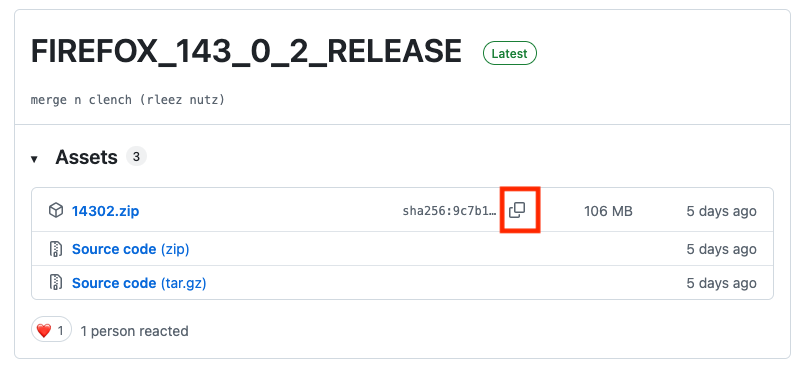
Create a text file (I like to call it SUMS) containing the hash value (all the text after the sha256: prefix), followed by two spaces and the name of the file you downloaded:
$ cat SUMS
9c7b1037cd4cb670abd6c55ef86ba62e8441619df9c7ac4d1ae003bf8e368d29  14302.zip
Put that file in the same directory as the downloaded file. And use the sha256sum utility to validate the hash:
$ sha256sum -c SUMS
14302.zip: OK
If you see “OK”, then the hashes match and you can be sure that what you got is the same file GitHub presented for download.
If you see anything else, then the file may be corrupt. Delete it and download it again. If you repeatedly see validation errors, then either you’re doing something wrong (make sure you’re copying the correct hash) or something’s tampering with the download and you should not install it. But tampering is highly unlikely, thanks to the use of HTTPS, which makes it highly unlikely that such tampering could happen without setting off warnings in your browser.
1 Like
Found an app for that called Checksum, which says they match.
I’ve downloaded Firefox Dynasty (v143.0.3) onto my Mac (I’m on Mojave 10.14.6). However, it’s crashing constantly.
I’ve looked around for installation info/README files for FF Dynasty and haven’t found any. A couple questions:
- Which FF Dynasty version are you running? (1.403.02?)
- Do you know of any issues with running it on a Mac with an existing Firefox version on it? (In my case, the latest ESR version?). Do I need to copy my Firefox profile files to FF Dynasty first?
Any pointers to documentation files for FF Dynasty would be appreciated. Thanks in advance for any help or suggestions provided!
The zip file I downloaded was 143.0.2. But after running it, the about box said 143.0.3.
I just wrote about this in another thread: Discourse drops support for old versions of Firefox - #8 by Shamino
You can run both on the same computer. In my case, I renamed the app to “Firefox Dynasty” in order to avoid confusion. Launchpad only shows one icon - I think it got confused, because I didn’t rename it in any of the resources inside the App bundle. Which I won’t do, because I don’t know if it might break anything.
When I ran it, it created a new profile and went through the usual first-launch set of screens. I chose to not import anything.
If you want to just run with that and configure it (install add-ons, etc.), that should be just fine.
In my case, I made a backup of my original ESR profile before starting, just in case something failed. But that turned out to not be necessary.
I replaced the entire content of the new profile directory (used by Dynasty) with a copy of the content from the old profile (used by ESR), in order to see if everything would just migrate. That seems to have worked for me.
After a couple of days, I decided to delete my installation of ESR, but I am leaving its profile in place, in case I want to go back for some reason.
1 Like
I think a new installation of ESR might create a new profile. My current ESR install is using a profile that ends in esr-5 and I have 5 other ESR profiles: esr through esr-4.
1 Like
Yes, but I could always use the profile manager and tell the new installation to use a pre-existing profile. Then delete the newly-created one.
1 Like