Thanks. I don’t like to be a fussbudget, but I guess I am, sort of. I really enjoyed the early versions of iGTD, but by the time Cultured Code subverted it into Things, the Getting Things Done methodology lost all of its appeal for me.
Lack of bidirectional sync with Reminders and Calendar rule it out for me.
GoodTask is going in the right direction, but isn’t quite there yet with Calendar integration.
Just a quick thanks to everyone posting on this topic.
I’ve been a BusyCal user since it became available following years of using Now Up-to-Date but I’ve been looking for more for awhile. I used OmniFocus for a year or so but I felt like I had to meticulously feed it to get what I wanted.
Adam’s initial post has got me looking at TickTick and I’m appreciative of all of your insights and comments. 
As an old Things user, I’ve been following this. I missed the upgrade to Things 3 because they removed support for Sierra by the time the released it, but I may upgrade now that I have the M4. But open to other programs too.
I’m looking for something that can not only show me a list of my projects, but also the last time I touched them.
Ideally nestled
Project A
Task 1 August 15
Task 1 July 31
Task 3 August 5
These are things I touch 1-2x a month so I guess I could set todos for them.
The Things 2 logbook only shows Month Year, not the actual day, and their website doesn’t have a new logbook picture.
I looked at TickTicks site - laughing at “never lose a Sticky” again because it’s on your screen! MacOS still has Stickies, I keep hitting them with a keystroke! Not a fan of subscriptions though.
I would strongly recommend checking out GoodTask. I’ve been using GoodTask for many years, and it is one of my most heavily used iPhone/iPad apps. In fact, when I bought my first Mac last year, the very first thing I did was buy the Mac version of GoodTask. (FYI, I’m just a very happy paid user of GoodTask; I don’t have any affiliation with the developer. I’ve been using GoodTask on my iPhone as my primary to do/task/reminders app since 2014!)
GoodTask has at least two key features that TickTick is lacking: (1) it reliably sync two-ways with Reminders and Calendars, and (2) your personal data is kept within iCloud and not uploaded to third-party servers. (See GoodTask Privacy Policy vs TickTick Privacy Policy.) … I use Reminders (via GoodTask) for both personal and work tasks, and privacy is a necessity.
I have disabled notifications in Reminders and just use GoodTask to send me notifications of my reminders.
The main GoodTask website doesn’t do a good job describing or showing the features. See
- GoodTask Introduction
- GoodTask User Guide
- GoodTask Support page
- GoodTask Youtube Channel
- GoodTask Forum (where the developer is active).
GoodTask has the following features (among many others and lots of customization options for those who want to use them):
- Versions for iPhone, iPad, Watch, Apple Vision, and Mac (Mac version is a separate app)
- Today page
- Now View
- Goals page
- Matrix view (e.g., Eisenhower Matrix or any other matrix you want to setup)
- List view, Board view, and Calendar view
- Tags and tag management
- Focus timers
- Integration with Shortcuts
- Integration with Apple’s Focus Filters
- Interactive Widgets
- Quick Actions (which can be accessed directly from each Notification and from within the app itself).
- Subtasks
- Notes
- Reminder + Calendar Integration
- Auto-Snooze (Recurring notification options, which can be configured per task, per list, or with other customizations. For example, you could configure “every 20 minutes, 4 times” or “every 1 minute, 5 times”.)
- Notification sound options (including a Silent option)
- Lots of powerful features I haven’t taken the time to learn/use.
My favorite features are:
- Repeat on Completion
This causes a new task to be generated based on your repeat schedule but starting from when you mark the task as completed. For example, I have a lot of house maintenance reminders for my home and vehicle scheduled for every X months. But I often procrastinate doing the task. Repeat after Completion causes the next occurrence of the task to be scheduled X months after I mark the task complete, rather than X months after the task was originally due. - Quick Actions
I can long press on a notification on my iPhone, which shows a menu of 5 options: Completed, Snooze (10 Minutes), Snooze (30 Minutes), Snooze (1 Hour), Quick Actions. If I select Quick Actions, I get a 3x3 grid of customizable buttons (with ability to scroll to see more Quick Action buttons). My Quick Actions are:- Today (move reminder to today)
- +1 Day (move reminder forward one day)
- -1 Day (move reminder back one day)
- +1 Week
- +1 Hour
- -1 Hour
- Tomorrow @ 6am
- Saturday (move reminder to Saturday at same time)
- Sunday @ 1pm
- Monday @ 6am
- Monday @ 8pm
- +12 Months
- Home - Arrive (set reminder to trigger when I arrive at home)
- Work - Arrive (set reminder to trigger when I arrive at work)
- Tag: #work (add the #work tag)
- Tag: (various other tags I use)
- Matrix view
I’ve used four separate Reminders lists for years for the Eisenhower Matrix concept. I was so excited when GoodTask recently added the Matrix view. - Duplicate
Ability to quickly duplicate a reminder. For example, I often setup different reminders with similar recurrence schedules or multiple separate reminders for the same date. This makes it easy to do that. - Today page
I really like the Today page that makes it easy to stay on top of keeping my task list organized and prioritized. - Smart Lists
- Favorites Smart Button (iOS/iPadOS)
This is a customizable button that floats in the lower right corner. You press it to view a customizable list of options, such as to view a particular list, open a particular view, Add a Task to a predefined list, etc. I use it to quickly access:- All Lists - Week (open Week view showing all of my Reminders lists)
- Today Page
- Work (#work) (view my reminders tagged with #work)
- (same for other similar favorite tags)
- Location (view my reminders tagged with a location)
- Completed Recently (view reminders completed recently)
- Added Recently (view reminders added recently) – This one is useful for viewing and correcting reminders added via Siri where Siri botched the text of the reminder. (I currently have a reminder that says “Buy more companies”. I didn’t catch that one in time, and now I can’t remember what I was supposed to buy, but I’m pretty sure I wasn’t trying to remember to buy a company!)
- Advanced Recurrence Options
Ability to create any sort of advanced recurring schedule for tasks you could want (e.g., every month on the first weekday, every Monday and Thursday, etc.). - Auto-Snooze (Recurring notifications)
I have a list called “1. Important and Urgent”, and I have it configured with Auto-Snooze (recurring notifications) to send a notification every 20 minutes, 4 times. It’s completely customizable, but that’s what I picked as my default for that list. - Buy once, no subscription required!
- The GoodTask for iPhone/iPad/Watch/Apple Vision version costs $19.99 as a one-time purchase (after a 14-day free trial). I bought the current version of GoodTask for iOS/iPadOS in 2014, and I’ve never had to pay for a new version or subscribe to get more features. (I’ve been afraid for a long time that the developer would switch to a subscription model, but they haven’t.) There is an option to support the app through a voluntary donation subscription or a one-time donation. I’ve used the one-time donation feature because the app is so good and I want to support its continued development (and avoidance of a subscription model).
- The GoodTask for Mac version costs $39.99 as a one-time purchase. A free 14-day trial version (outside App Store) is also available. I bought GoodTask for Mac the same day I got my first Mac (last year).
Edited to add details about Auto-Snooze (recurring notifications).
4 Likes
Thanks so much for this @MacDrew2000! It has me revisiting my long-time use of BusyCal as I’m feeling a need to refine and expand my task organization and productivity.
I purchased a month of TickTick a few days to evaluate but wouldn’t mind staying more tightly in the Mac ecosystem i.e GoodTask and BusyCal.
What do you use for your calendar?
@jonmcintosh The calendar services I use are: (1) Google Calendar (through my free grandfathered personal Google Workspace account) for my personal calendar, (2) Office 365 (Exchange) for work, and (3) a shared iCloud Calendar for family stuff.
I’ve tried many calendar apps over the years. Key features I have looked for in a calendar app are:
- Privacy - no credentials or calendar data shared with app developer (or other third party)
- Directly accesses calendar through iOS/iPadOS/macOS - I don’t want to provide login credentials to the app. That might not be a big deal to some, but it is mandatory for me due to work requirements.
- Event Details - The interface for adding/editing events should have the following capabilities:
- Complete repeat customization options (e.g., ability to select any sort of schedule, such as the third Wednesday of every month, or every Mon, Tues, Sat., etc.)
- Ability to mark an event as Private on Exchange calendars. (For calendars in Microsoft Exchange/Office 365, an event marked as “Private” is not shared with other people, even if you have generally shared your calendar with them.)
- Ability to select multiple reminders (on non-Exchange/Office 365 calendars)
- Good date selection interface (easy to pick year, month, day–I actually really like Apple’s current date selector for Calendars on iPhone/iPad)
- List view - high information density (i.e., ability to view a large number of events and details without scrolling)
- Month view that:
- Starts with the current week in the top row
- Doesn’t have a gap between months (e.g., in Apple’s Calendars app on iPhone/iPad, Sunday, Aug. 31st is on one line, with the rest of the row blank, and Monday, Sept. 1st starts on the next row–what a ridiculous waste of space!)
- Scrolling view (i.e., can scroll up/down to view previous/future weeks, rather than scrolling/paging entire months at a time)
- High information density (i.e., smaller text with ability to see more events in each date block) (should be able to see 6 events in a calendar block)
- Nice event location picker that integrates with a map search feature (i.e., where I can search for the name of a location and it will find the location and address)
- Ability to duplicate entries (I often add events to both my personal calendar and my work calendar, so I frequently duplicate the event and then change the copy to be on my other calendar)
- No subscription required (but one-time purchases are fine)
Unfortunately, I haven’t found a single Calendar app that checks all of the boxes. The calendar apps I currently use are:
- Pocket Informant (I only use the iPhone/iPad version, but they have a Mac version)
- Pocket Informant has the best Month view I’ve seen and it checks all the Month view boxes above. I use this it regularly when viewing my calendar and trying to figure out when to schedule something. But that’s all that I use this app for. I add events using Calendar 366 or Apple’s Calendars app. I don’t subscribe to this app.
- I can view 6 events in each calendar block in month view in Pocket Informant (iPhone/iPad), but only 4 events in each calendar block in month view in the native Calendars app (with a note that there are “# more” events).
- Calendar 366 (iPhone/iPad) and also Calendar 366 II for Mac
- I really like Calendar 366. It checks all of the boxes except (1) the date selector when adding an event is subpar (just a scrolling date selector dropdown), and (2) the month view is mediocre, which is why I have to use Pocket Informant on iPhone/iPad.
- The List view is excellent. I can see 12-13 events at a time on my iPhone 16 Pro.
- I usually use Calendar 366 when adding a new event (and when duplicating it to move to another calendar). (But if I’m adding an event a few months or more in the future, I would usually use Apple’s Calendar app because of the better date selector.)
- I really like the Calendar 366 II for Mac app that lives in the top Menu bar. I use it all the time to see today’s schedule, add events, etc.
- There is a free Lite version of the iPhone/iPad app, but I paid for the one-time $9.99 full version for iPhone/iPad and paid $14.99 for the Mac version.
- Apple Calendars (Mac and sometimes iPhone/iPad)
- Besides using Calendar 366 II for Mac, which I use for quickly viewing today’s events or events on specific days or quickly adding events, I exclusively use Apple’s Calendars app on Mac. It checks all of the above boxes for a calendar app on Mac.
What a great list, thanks! Since you’ve obviously put a lot of effort into thinking about what works and investigating options…
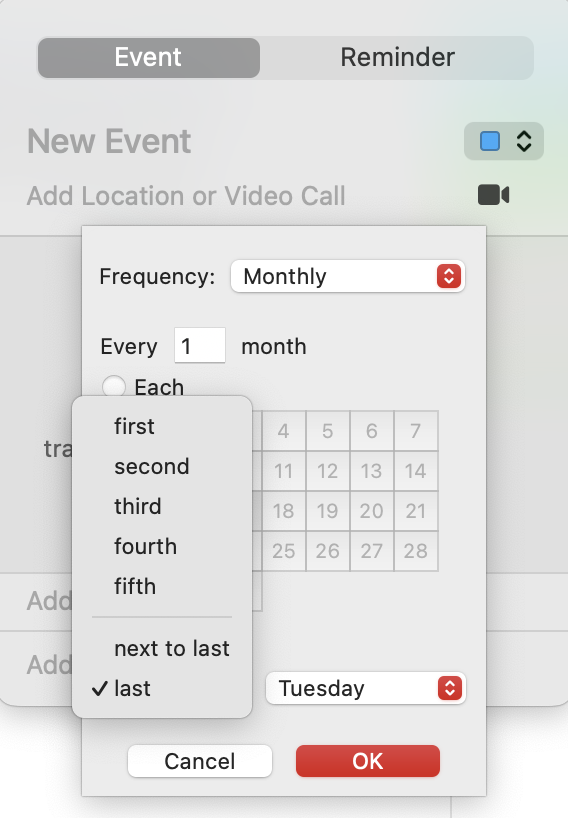
Some years back, I had a meeting that occurred on the second and last Tuesday of every month (there were actually good reasons, though I no longer recall what they were). I could not find a single calendar program that let one schedule for “the last Tuesday of the month.” Fourth Tuesday? No problem. But the fourth Tuesday is not always the last Tuesday.
Have you seen a calendar/task UI that would allow this?
@ron The Apple’s native Calendars app (iPhone/iPad/Mac), Calendars 366 (iPhone/iPad and Mac), and GoodTask allow you to create recurring events on:
- the “first”, “second”, “third”, “fourth”, “fifth”, or “last” (and native Calendars and GoodTask let you select “next to last”)
- Sunday, Monday, Tuesday, Wednesday, Thursday, Friday, Saturday, day, weekday, weekend day
Here are a couple screenshots:
Apple Calendars on Mac (every month on the last Tuesday):
Apple Calendars on iPhone (every 3 months on the next to last Saturday):
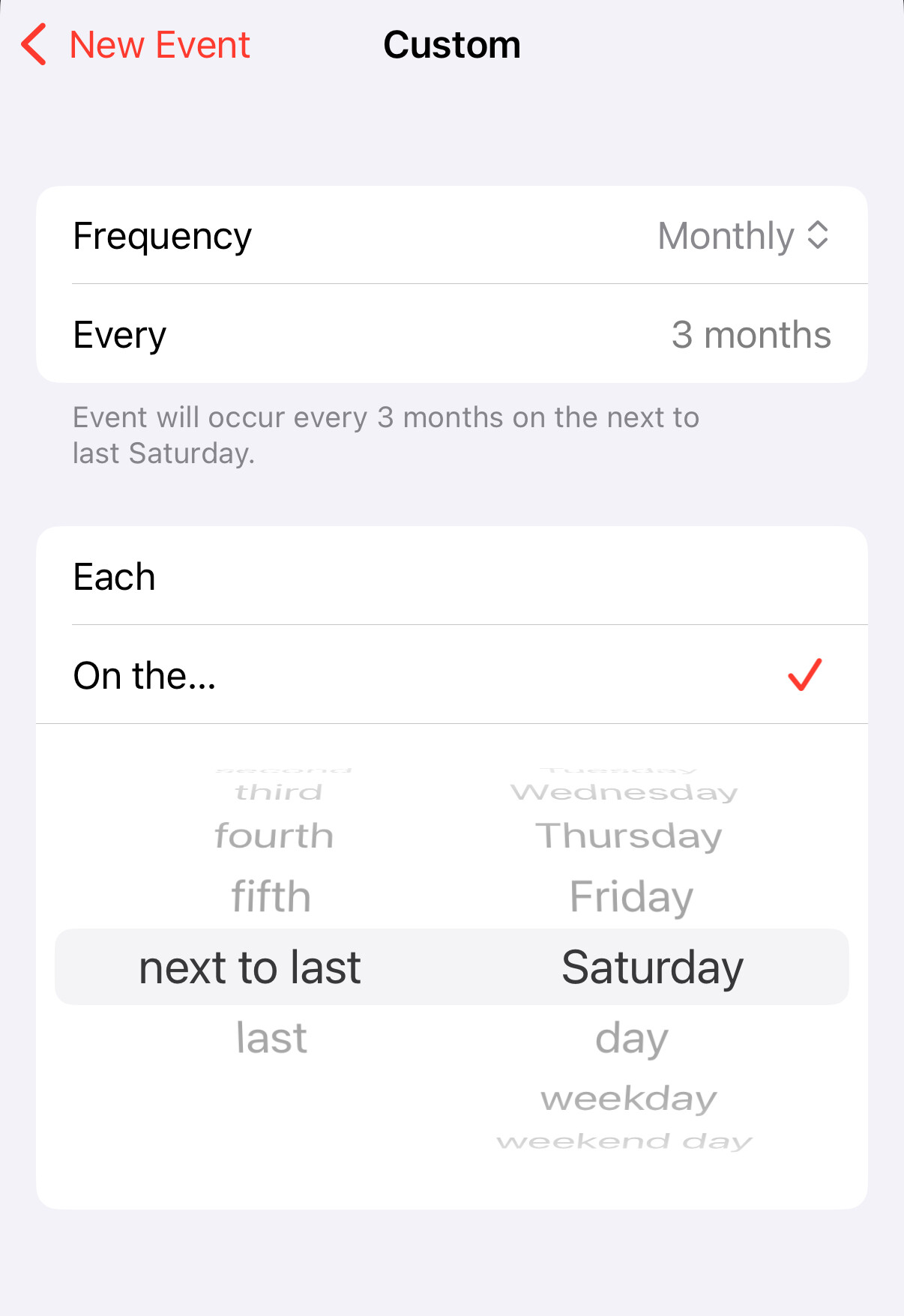
Edited to note that GoodTask for iPhone/iPad also supports adding events with the custom repeat options described above. The GoodTask add event interface appears to be identical (or virtually identical) to the native Calendars add event interface on iPhone/iPad.
1 Like
Cool! Either that wasn’t the case when I needed it, or I had given up on the native Apple apps. Thanks for the info!
Thanks @MacDrew2000 !
1 Like
I have increasingly found the Apple apps to be worth a second look.
Over the years I picked up BusyCal, Things, Due etc. But have found my needs met to a large extent with Calendars and Reminders of late.
1 Like
Years ago I found myself intrigued with BusyCal as an expansion of Apple Calendar and BusyContacts as an expansion of Apple Contacts along with their rock solid iCloud syncing.
Reminders is getting better all the time and that’s what I have been using yet GoodTask is on another level and at least helps me think that with using it I’m better organized.
TickTick looks great but it means a trip outside the Apple ecosystem. With GoodTask for to-do’s/reminders and BusyCal for event scheduling with hassle free device syncing for both it’s looking like this is the approach for me going forward. For now 