Spammers are clever, but how do they accomplish THIS?

I have seen some spam emails that have bold in the From: header and Unicode characters in the Subject: header. Here’s how it appears in Apple Mail:

spam bold & Unicode

How do they do that? When I copy the raw text, it appears as (this post mangles it):

picture of how it appears

I’ve pasted those lines into BBEdit and told it to zap gremlins (with both Replace with code and Replace with HTML entity), but neither the original form nor either result of the zap will reproduce the bold or Unicode characters when pasted into a subject line.

Here’s the output of the two zap operations:

Subject: a\0x9D+/-a\0x9D+/-a\0x9D+/-\0xF0\0x9F\0x94\0x94Safety. One of many benefits of a walk-in tub
From: \0xF0\0x9D\0x90\0x96\0xF0\0x9D\0x90\0x9A\0xF0\0x9D\0x90Yen\0xF0\0x9D\0x90\0xA4-\0xF0\0x9D\0x90c\0xF0\0x9D\0x90S\0xF0\0x9D\0x90\0x81\0xF0\0x9D\0x90\0x9A\0xF0\0x9D\0x90\0xAD\0xF0\0x9D\0x90!\0xF0\0x9D\0x90\0xAD\0xF0\0x9D\0x90(R)\0xF0\0x9D\0x90\0x9B\0xF0\0x9D\0x90\0x92\0xF0\0x9D\0x90!\0xF0\0x9D\0x90 \0xF0\0x9D\0x90(c) <qlslw1mx6d@ka3ncdyae2.tdur.dderi.tdurecom.uk.com>

Subject: &acirc;&#157;&plusmn;&acirc;&#157;&plusmn;&acirc;&#157;&plusmn;&eth;&#159;&#148;&#148;Safety. One of many benefits of a walk-in tub
From: &eth;&#157;&#144;&#150;&eth;&#157;&#144;&#154;&eth;&#157;&#144;&yen;&eth;&#157;&#144;&curren;-&eth;&#157;&#144;&cent;&eth;&#157;&#144;&sect;&eth;&#157;&#144;&#129;&eth;&#157;&#144;&#154;&eth;&#157;&#144;&shy;&eth;&#157;&#144;&iexcl;&eth;&#157;&#144;&shy;&eth;&#157;&#144;&reg;&eth;&#157;&#144;&#155;&eth;&#157;&#144;&#146;&eth;&#157;&#144;&iexcl;&eth;&#157;&#144;&uml;&eth;&#157;&#144;&copy; <qlslw1mx6d@ka3ncdyae2.tdur.dderi.tdurecom.uk.com>

I’m downright curious as to how they do that. What’s the trick here?

[BTW, replying to the message reproduces the bold in the To: field…no, I didn’t actually send it! Editing the address does away with the boldface, so it’s encoded somehow.]

If you mean how do they do bold, I think they’re using “styled” Unicode characters from the Mathematical Alphanumeric Symbols block. For example, 𝐖𝐚𝐥𝐤-𝐢𝐧𝐁𝐚𝐭𝐡𝐭𝐮𝐛𝐒𝐡𝐨𝐩 (using styled text) is \u1d416\u1d41a\u1d425\u1d424\u002d\u1d422\u1d427\u1d401\u1d41a\u1d42d\u1d421\u1d42d\u1d42e\u1d41b\u1d412\u1d421\u1d428\u1d429.

Note that while originally email protocols were ASCII based, since RFC 6532 and other standards UTF-8 is permitted in email headers.

3 Likes

For anybody interested in a deep dive into what @mschmitt wrote about above, here’s a paper, written by a team led by a MIT academic, that discusses how spammers and other attackers abuse Unicode characters:
Unicode Attacks

3 Likes

Makes perfect sense. I knew that the word “Walk” didn’t appear in the text! Thank you.

That is scary. I knew that some Cyrillic letters resembled Roman letters, but this is even worse!

Even within a single language, there’s room for confusion. For instance, in many fonts, the sequence rn can be really hard to distinguish from m. Notice: “rm” ≠ “m”. In some fonts at smaller point sizes, I’ve found it impossible to distinguish.

2 Likes

That’s why my password is rnarnrnograrn.

13 Likes

The one that annoys me is fonts that don’t distinguish, in any meaningful way, between “I” (capital i) and “l” (lowercase L). In many sans-serif fonts, they are completely indistinguishable unless adjacent (if even then), and then only by height—with the reader left to guess which one is the taller.

Could be worse, though. I grew up with an old manual typewriter that didn’t have a “1” (numeral one) key. (I think it was a Remington, but I’m not certain.) You were supposed to just use the lowercase L and expect the difference to be clear solely by context. (I no longer can recall what character was in the place of the one.) A small number of “old-fashioned typewriter” fonts echo this by using identical glyphs for those two characters. Imagine the chaos if computers used the same code point for them…

3 Likes

A little off-topic, but how about modern fonts with proportional-spaced numbers? They refuse to line up!

Yes, that’s annoying too, but it doesn’t have any scam potential, whereas easily confused characters and character combinations do. Just a massive annoyance.

But that gets me thinking more about scams based on spacing, kerning, and/or glyph width (which the aforementioned “m”/“rn” falls under). You could probably use zero-width characters in this type of scam. Imagine the indistinguishable difference between the single-glyph “é” and the one composed of regular “e” with a combining acute accent. Those would be represented by different code points.

And, of course, there’s the non-scam but common use of tightly-kerned sans serif faces in all caps to depict the word “FLICK” on signs. I can’t believe that every such instance is accidental.

The original Remington typewriters didn’t have “1” or “0”, in order to save costs. You would use a lower-case “l” or a capital “O” instead.

And apparently, some (with a different font) would have you type a capital “I

Although everybody soon added a “0” key, some typewriters were sold without “1” keys all the way into the 70’s.

See also:

I remember using one such typewriter (an electomechanical unit made in the 60’s I believe). There was no “!” on the keyboard either (because there was no “1” key?). You were expected to type an apostrophe, then backspace and type a period.

My parents have Smith Corona electromechanical (late 60’s, I believe) that has a 1/! key. It was apparently a new/special thing because that key cap has reversed colors (white on black) compared to the rest of the key caps (which are black on white).

The modern layout that we all use today is pretty much the creation of IBM, with their Selectric typewriters, which later got ported to IBM’s computers, including PCs.

Before the IBM PC, computers generally all had the same layout for letters and numbers, but the symbols were often in different places. Like a double-quote over the 2 instead of an “@”. Or putting the < and > characters on the same key (and other symbols being the shift-state for the . and , keys.

Note:

  • Apple II keyboard. Note the quotes over the 2, the @ over the “P” and other interesting symbol locations:
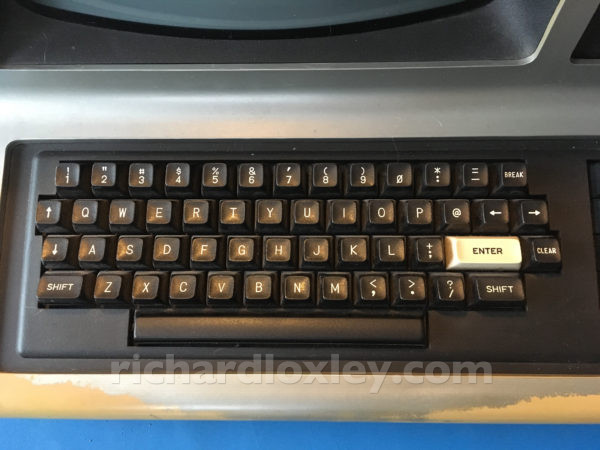
  • TRS-80 Model 3 keyboard. Also used by many other TRS-80 systems. Similar to the Apple II, but the @ key got its own separate key:
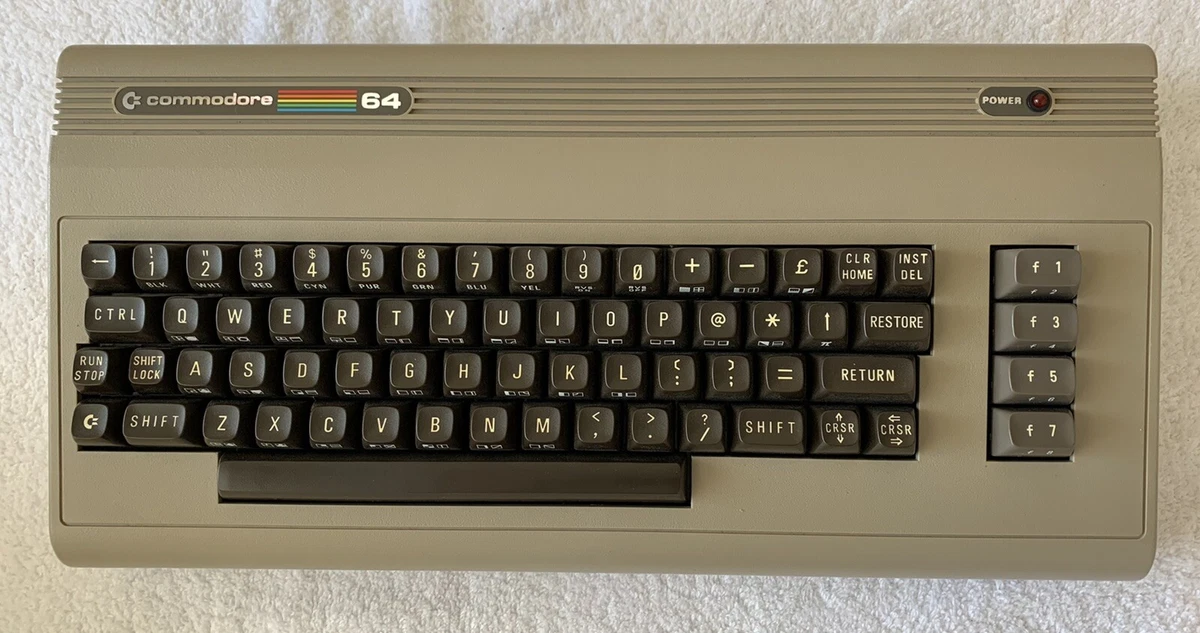
  • The Commodore 64’s keyboard layout is just wacky by today’s standards:

For anyone interested in a deep dive into keyboards, I recommend the (sold out) book, Shift Happens by Marcin Wichary:

3 Likes

Character encodings are messier than you might think. A web page, email address, iMessage, etc. are all binary underneath.

The programs you view them with have to figure out what each sequence of binary digits is supposed to represent … and how to interpret and display it to you. Each field/sequence of bits could be a character in some language encoded in some way (most often UTF-8/ASCII, UTF-16, etc), an embedded image of some sort (many different formats are possible), or link to some external data of some kind (usually text, code, or image).

If your browser or email client interprets some bits as a character (say a UTF-8 character), it then has to figure how to interpret it: as text to be displayed, as HTML or some other formatting commands, or to be interpreted as code (JavaScript source code perhaps?). If it’s text to be displayed, what font should be used, and what other display properties (size, color, etc.) should be applied.

If you look at the data using, say the Developer mode of Safari. keep in mind that it is doing its own interpretation of what different runs of binary digits mean. usually some intermediate representation between naked bits and what the browser wants to show you …

What I find most fascinating is not the tricks spammers use to embellish what you see, but what’s there that you’re not supposed to see. There are many ways of obviscating and masking information in messages and on web pages … as well as a variety of reasons to keep that information secret – most often because the information isn’t for you, but for programs retrieving the data.

The oldest trick is to display text in the same color as background. I’ll leave it to your imagination most of the ways that get used. But the most recent thing is …

As secret, invisible prompts to whatever AI agent you might run or used to retrieve or filter your bowsing or email. Most recently seen in chatbots:

3 Likes

In at least one typewriter keyboard from c. 1930 it was “=” with “+” as the uppercase character — but that was a UK keyboard.

In a photo of a 1917 Remington standard, there simply is no key in that location; the leftmost key in the top row is the “2” key, located above the space between the “q” and “w” keys in the second row.

I’ve never been a Remington fan, though they made the first Sholes machines. As a Royal lackey, I can say that through the 1950s and 1960s, they did indeed have a 0 but no 1, and no ! – and yes, I remember using a ’ and backspacing with a . to get !

It wasn’t hard though moving to a typesetting machine and then to a Mac required a little adjustment. Really appreciated then and now the easy ability to get optional symbols with the option key. I never did learn the inane Windows codes for special characters and used to have a list.

My 1919-ish Royal #10 with the beveled glass windows has the same keyboard as my 1956 HHE and my 1950s portable. (They used to toss them out of airplanes for publicity stunts - with little parachutes - as long as they didn’t land on a corner, they were fine!). My HHE fell off the back of my desk dozens of times as a student, the desk was “almost” deep enough for a typewriter. The only damage was eventually knocking one of the back holders off.

Just this year, the cable snapped and broke the reel, and now it’s probably going up for parts. However… that’s neither here nor there.

I really appreciated the 1 and ! on the Selectric but not their tendency to print ------ hyphens when I went too fast for them. Or the tendency of daisywheels to type at the same slow speed when I went too fast and characters went into the buffer. Or the Silentwriter (inkjet, I think) which did the same thing but was REALLY fun to watch, for me, back then. I went back to manual typewriters… well, now computers. I put on an extra 10 wpm and cut errors to zero with computers.

I’m not sure how to follow up on this since reporting it to Apple brought no joy in that they said there is no security issue involved.

I received an email from Apple saying that my email address was used to download software on a device not recognized as belonging to me. I did not download any such software mentioned. The email went on to say that if I did not recognize making such a download that I should reset my password immediately (which I did). But I went one step further and reported it to Apple (on the web, not by email) and gave them a copy of the email sent to me.

They replied and said that there is no such security issue that they can identify and pretty much left it there. I’m not feeling too good about this and wanted to know if anyone else here has experienced something similar. TIA.

I have a decades old Gmail address that I’ve essentially abandoned because it has been involved in breaches of other people’s address books and was used as a public-facing address for awhile. Even though the address is no longer in active use, I see alerts similar to yours occasionally. I don’t worry about them, though, because I have 2FA turned on for the account plus I’m pretty sure the notifications I receive about order confirmations, software downloads, hotel reservations, retailer loyalty programs, and the like are because the address is known by a lot of people.

1 Like

I appreciate the advice but my Gmail email address is NOT the one that was used, it was my iCloud/Mac.com email address that is not disclosed here on TidBits.

The main question for me is, WHY would someone else download a free app using another person’s email address? How does that benefit them?

Sorry for not being more clear; I didn’t intend to say the problem is limited to Gmail or any other email provider.

In any case, there are many reasons why somebody would use an email address that doesn’t belong to them. I have an email address, not the one I mentioned above, at a major provider that is short (similar to abcd@bigISP.com). It picks up a lot of “random” use. My least nefarious explanation is people who don’t want to give out their real address for retailer coupons, free downloads, discount codes that require signing up for a mailing list, and other single time promotions type a few characters at random and pick the first domain name that pops into their head. These are annoying but are more of a nuisance than a threat to my mind.

From there, the reasons get worse and worse. It could be anything from fraudulent purchases to identity theft. The common thread is a need (say, making a hotel reservation with a stolen credit card or activating a burner cell phone…yes, I’ve had emails for these) to hide one’s real identity and contact details. Scammers have many sources for live email addresses: scraping websites, especially community organization sites run by volunteers, searching social media, stealing online address book entries…the list truly is endless.

2 Likes

It might be worth resetting your iCloud password again.