Southwest Airlines landed in my Spam Folder!

I know others will reply, and they will have good suggestions for you again. I don’t really understand why Apple Mail is not working. I’d bet it’s not Apple Mail itself. Try sending to yourself. But also take up the suggestion of @TonyTownsend and start a Gmail account. If nothing else now you can use it for testing to ensure Apple Mail is working. After starting the Gmail account, again either send an email to yourself at this new address, or ask a friend to send to you at this new Gmail address.

Again, Apple Mail should be working. I use Apple Mail (and another email app), my wife uses Apple Mail, and we both work on MacBook Airs. I’ll bet you a cup of coffee when you open a Gmail account and set up the outgoing (SMTP) server address, Apple Mail will work just fine for you.

You say your Comcast email is your user name on many websites, and ask if you can keep using it as a user name. I think (and others will have good answers too), the answer is yes, with some understanding. Often a user name is just that: a user name, that allows you to log into a site. It doesn’t necessarily mean email will be sent to that name, although it might, depending on the site. For example, one of my retirement accounts uses one of my email addresses (see what I say below) as my user name, but email is sent to a different email address. In other words, the user name is just a name, even though it “looks like” an email address (e.g., xxxx@XXX.edu).

So yes, you can probably keep using your Comcast email as a user name on these sites. Also, if you want, for important sites (banking, etc.) you can very likely change your user name (and password, which is not a bad idea to do occasionally anyway).

Also, remember, if you follow @TonyTownsend’s advice, and you should, eventually you will want to auto-forward your comcast email to the new email address (probably Gmail). This is in fact, what I do. Not with Comcast. I have a university email address. It’s reliable, that’s not a problem for me, but for other reasons I started my Fastmail account years ago too. Mail sent to my university email address is auto-forwarded to my Fastmail address (and it remains on my university account as well).

1 Like

I just to want to add on to one of my earlier comments here: it’s true that for a lot of uses, using one email address for a user name and a different email address for correspondence isn’t a problem. But for anything involving financial or legal stuff, I recommend a matching user name and contact email address. Client service workers, especially at regulated firms such as banks and stock brokers, can view unmatched client information as a fraud signal when transactions or changes to accounts are requested. This can add major hassles to both ongoing activities and once-in-a-lifetime situations.

Further, I think it is better to not use an email address as the user name for critical or sensitive accounts. Since email addresses are widely distributed and frequently stolen—all it takes is a friend allowing a scammer to access their address book or a company suffering a data breach—hackers already know 50% of your login info if you get targeted for hacking or phishing.

@Halfsmoke My bank account has a different user name than my email address. I will check and see what I have for my credit cards and change it from my email address. Thanks for that suggestion.

@Halfsmoke I also wanted to add that I use just “janesprando” as my user name, so changing email won’t be a problem on those sites. Do you see any “red flags” using that?

My personal ranking of user names, from least secure to most secure, is:

  1. Email address/phone number/real-life name
  2. Social media/online messaging name
  3. Meaningful location + birth year
  4. Unaltered words that can be found in a dictionary (i.e. bird but bird537248 or bird-card-cough are OK)
  5. Random chain of characters (i.e. rcy~3f^v)

A simple rule of thumb is that anything that can be found about you on social media is not a good choice for user names on important accounts.

1 Like

I’ve read through Comcast’s overview of the Yahoo migration process. Based on what I’ve read about your issues now and in the past, my recommendation would be to wait for Comcast to offer to migrate your email to Yahoo and then accept the migration, even if technically superior paid alternatives exist.

Among other reasons, Yahoo will allow you to keep your current Comcast email address, so you wouldn’t need to worry about updating your information with any third parties. I’ve been through similar migrations where Yahoo has taken over an old ISP’s email accounts, and the migrations have worked fine. Since your mail would be using Yahoo’s servers, it is likely that your Southwest issues and your Apple Mail issues will disappear, too.

There are a few, relatively rare limitations, such as the maximum number of folders that can be migrated is 4,100 and the maximum number of contacts that can be migrated is 10,000. There’s also an attachment size limit of 25 MB, so you should check that you don’t have any attachments near that size, just to be safe. For example, I would manually download any attachment above 20 MB before migrating.

1 Like

@josehill Comcast also has a 25 MB limit. I will wait then for the migration, especially if I can easily transfer folders. Meanwhile, I think I will get a gmail account just to have a back up.

Verizon moved its email to AOL a year or two. Fortunately, I had migrated almost all of my email to my own domain or other accounts, so all that I have dribbling in from my verizon.net account is spam from an organization I no longer belong to and ads to block spam going to the AOL account. Anything sent to the AOL account goes nowhere.

Another way to check if Apple Mail is working is to BCC yourself on the outgoing email.

2 Likes

And in yet another convoluted journey taken by one of the original online companies, what was left of AOL was sold to an Italian company a few months ago by Yahoo and its private equity owner:
https://www.businesswire.com/news/home/20251029086811/en/Bending-Spoons-to-acquire-AOL-following-%242.8B-debt-financing

:zany_face:

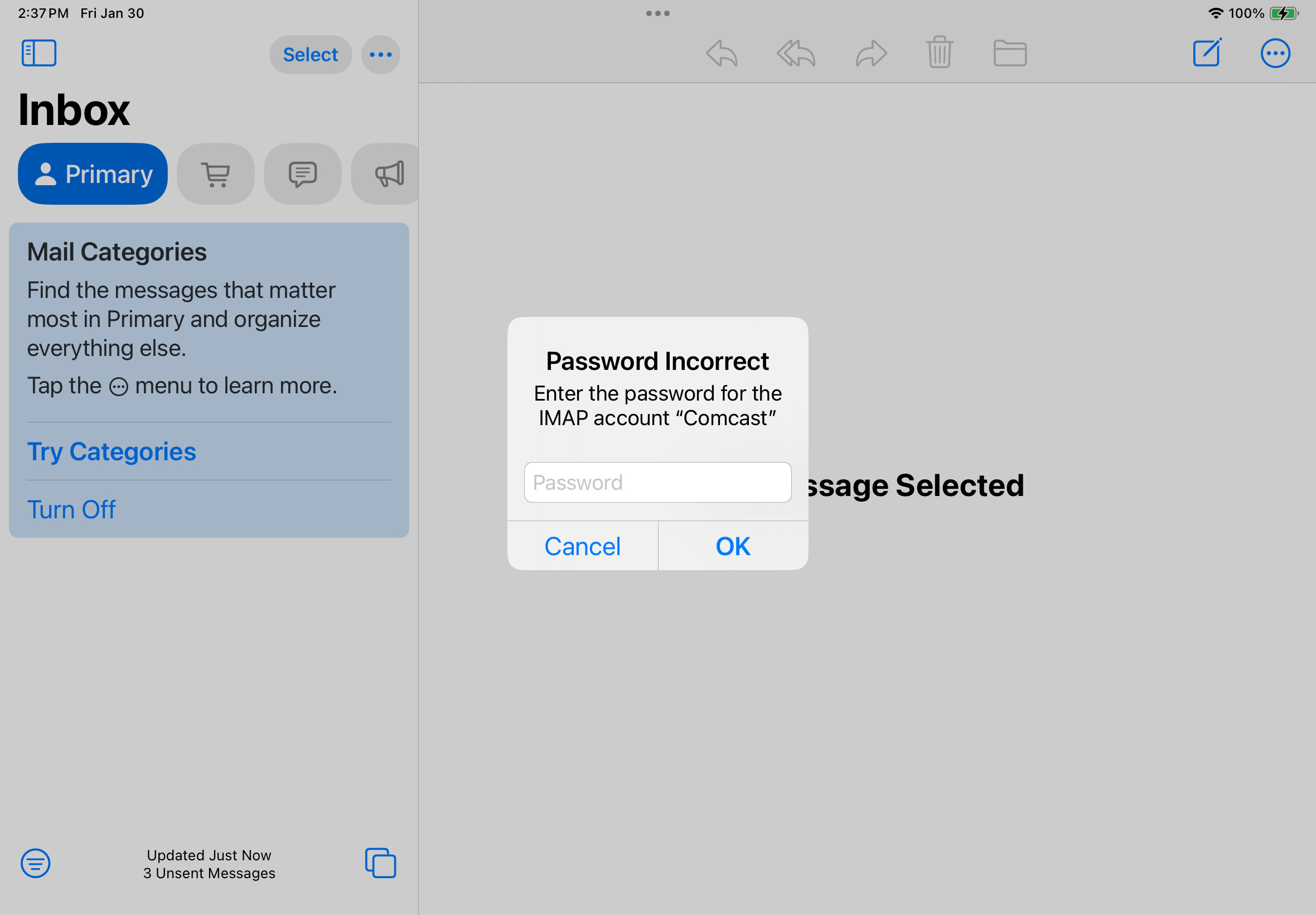
@mpainesyd I attempted to send an email to a friend and myself from Apple Mail. It made the “swish” sound, then this alert popped up: I know I have the correct password because I can send from Comcast.

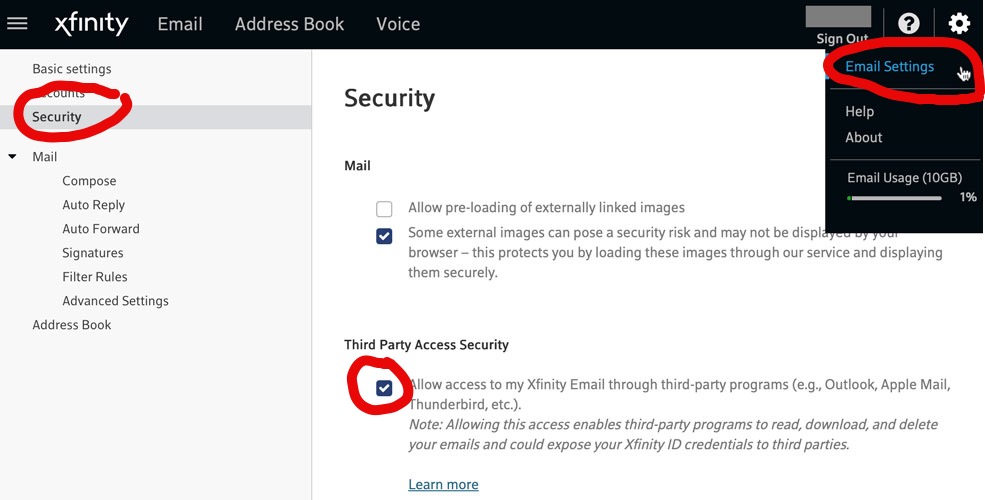
Apologies if this was answered in another thread, but have you enabled “third-party application” access via Comcast’s email web page? Sign into Comcast email via the web, go to “Email Settings” by clicking on the gear icon in the upper right corner, then click “Security” on the left side of the screen, and choose “Allow access…” on the right. See attached.

4 Likes

@josehill THANK YOU!!! I wasn’t aware of this!!! I will follow your instructions!!!

IT WORKED!!! Thank you!

3 Likes