Southwest airlines main email address (southwestairlines.com) landed in my Comcast Spam folder. I don’t get any more email from that address. Apparently, they they don’t have a way to contact them about about it without using my email address. i tried using the customer service number on my Rapid Rewards card and the representative didn’t have a clue on how to fix the problem.
Does anyone know of a way can 'UNspam" me? Comcast says it isn’t their problem and to add their email to my contacts–it is already in contacts.
I need to book a flight using my miles. I was thinking of using “Hide my email” and creating a new email for me. Then I would have to change my email on their website.
I am trying to think of all the downsides to this. I would appreciate your thoughts, comments or even another solution to my problem.
It might also work, if you are using Apple Mail, that when you find an email from them in the Junk Mailbox, to drag it to the Inbox. That might tell Mail app that it is ok.
To alert you to the presence of mail from that domain, you could also make a Rule in Mail Settings that when mail from the desired domain arrives, you get sound, Notification, bouncing icon etc and you could also have the rule place it in your inbox.
If you’re not using Apple Mail, maybe those techniques would work in other email apps…
If it’s being put in the spam filter by one of Comcast’s server-side rules, then nothing you do from Mac/Phone mail app will have an effect.
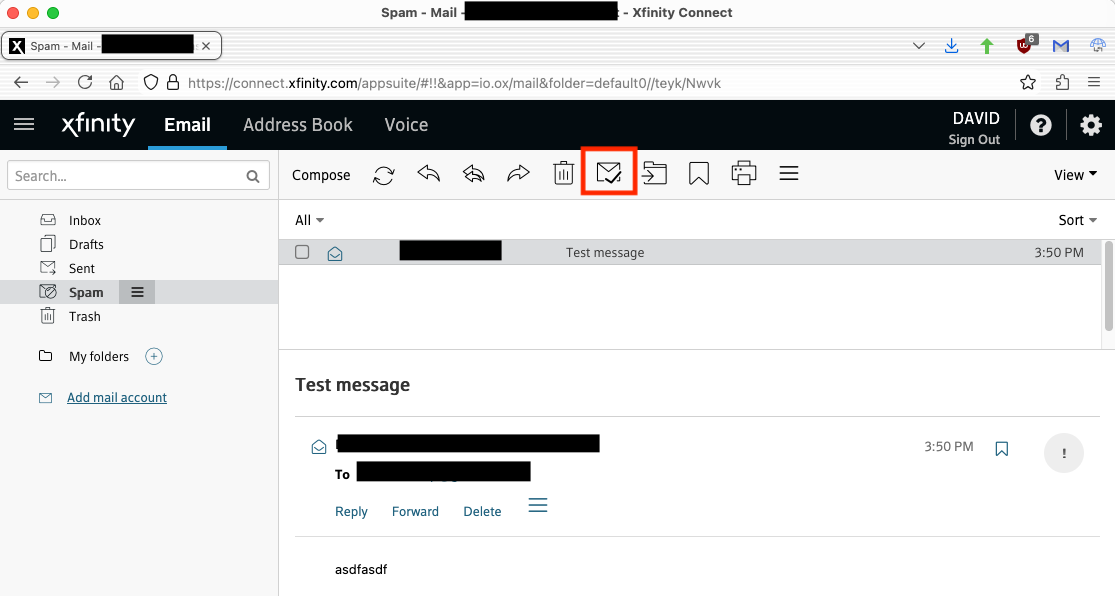
I’d log on to the Comcast web-mail site. Then go to the spam folder and click the “not spam” button (highlighted in red) for each incorrectly-classified message:
David, I already marked it as “not spam” as soon as I saw it. It is even “whitelisted” in my contacts. that didn’t help. I wouldn’t know if i received any more email from Southwest because it is marked spam. (ironically, the real spam emails always appear again, but not legitimate email!!
FWIW, I always scan my spam folder as a part of reading mail. If it’s all real spam, then I quickly purge it, so I’ll only new spam next time. But it lets me catch the occasional mistake.
FWIW, I never use my Comcast mailbox. I don’t want to have to change addresses if I should change ISPs in the future. As I’m hoping I will be able to do if/when FiOS comes to town.
My non-work e-mail is provided by three sites: Google/GMail, Mail.com and Yahoo Mail. I usually access them via their respective web sites on my Mac, but I also have my iPhone’s Mail app configured to access them via IMAP.
Irritating that Apple Mail on an iPad doesn’t seem to have an “unspam” option. I have moved a couple of emails that were in the spam folder to the Inbox so will see if future emails end up in spam.
The bizarre thing is that some of these “wanted” emails end up in the inbox and others in spam on the iPad. However this could be because, for some, I might be looking at new emails on my Mac instead of the iPad and it has a different algorithm.
Something to check: make sure the email that was marked as spam is a legitimate email. It is simple for spammers to insert any email address into the “From” field when blasting out messages. If the email was not really from the airline, then Comcast’s spam filter isn’t broken.
If you’re using Comcast’s webmail, then it’s Comcast’s filters that are marking these messages as spam, and you should talk to Comcast to find out how to get them whitelisted. There’s either something you can configure in your webmail settings or something they can configure on the server side (depending on where the messages are getting caught).
And I apologize in advance for the experience you’re likely to have with Comcast tech support. I’ve heard that they’ve gotten better in some ways, but they have a longstanding reputation for being extremely unhelpful.
I have talked to Comcast. They said it is not their problem. Southwest needs to UNspam my email and then I would get their email. Adam knows this, too. I wish I could find where spammed email goes so I can find my email and remove it from that list!
Does anyone have any suggestions or comments about my creating a “hide my email” and using it to get Southwest’s emails again? I sure could use any suggestions you have.
I recommend setting up a new email somewhere other then Comcast. It should be some well-known address like Google, Yahoo or a university alumni account if you can get one. You can use it to check your main account as well as to try to get mail through to Southwest. Even aside from your problems with Comcast and Southwest, it’s good to have a backup for emergencies.
Receiving systems classify incoming mail as spam or not. Sending systems (like Southwest) do not look at a destination email address and say, “bob@earthnet.com” is a spammer so we’ll mark mail TO bob as “Spam”.
The typical problems are:
Mail you are sending gets incorrectly classified as spam by other systems. So when you send email to some places, they don’t get it
Mail you receive is incorrectly classified as spam because it contains keywords that are typical for spam.
Mail you receive is incorrectly classified as spam because the path it came from has been used for spam campaigns. (I’d argue that it is correct in this case for it to be marked as spam)
Mail you receive is classified as spam because you previously flagged messages from the same sender, or messages with the same keywords, as spam
Mail you receive is classified as spam because the sending system, or the systems it passed through, did not correctly configure or pass the markers of message integrity and source. So, it looks like the email is lying about where it came from.
But none of these would apply to “Southwest needs to UNspam my email”.
I worked in higher-ed IT for almost four decades and I can tell you that getting an address or domain removed from a spam blacklist is a thankless task. So much of it is done (erroneously) by automation (not even AI) that techs don’t even know when it happens or why.
@janesprando
I agree with @jeff1 's advice. In fact, as somebody who used to rely on ISP-provided email, I have found moving to non-ISP email to be well worth the effort. ISPs are all either transferring their email service to outside companies or ending email service altogether. If very short notice is given, scrambling to change things is not very fun.
If you do decide to make changes, here are some things I suggest based on my experience:
Plan on at least a month or two, if possible, of overlap before cancelling or stopping checking your ISP account to ensure the transition was set up correctly.
As soon as your new address is active, set up automatic forwarding to it from your ISP account(s).
Maintain a list of the changes you need to make and have made with affected companies and people.
Ensure you have a backup or copies of important and treasured emails.
Check all of your 2-factor authentication setups to make sure none are using your (soon to be) defunct email address.
Next, I view all email services provided by companies whose main business is advertising to be equivalent for privacy. This includes Google and Yahoo-AOL. All rely on analyzing your email to sell targeted advertising and personal data. I think Apple (iCloud) and Microsoft (Outlook) are marginally better for privacy because both are big companies with diverse sources of revenue. This could change at any time, though.
A funny thing is that Gmail may be somewhat more secure than others because of Google’s lack of human customer service. It is impossible to social engineer call center employees that don’t exist.