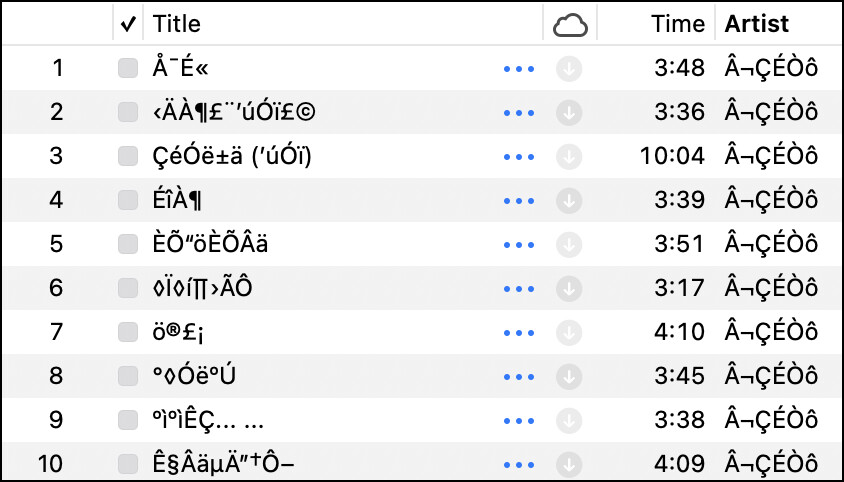
I have a collection of music that was imported into Apple iTunes/Music from a Windows computer some years ago. The songs were MP3s annotated with Chinese characters. The characters displayed correctly on the original Windows machine (now lost to history), but display as gibberish in iTunes. An example is in this screenshot:
I realize that the original issue probably was based on a character set mismatch, but I doubt there is enough information left in the displayed characters to remap to the original set.
I notice that most of the songs have been “matched” by iTunes Match, so somewhere in the digiverse there must be a link between those files and the “official” annotation, whether in English or Chinese. I have not found a way, however, to retrieve that annotation.
Does anyone know if there is a way to retrieve the annotation to replace the gibberish I currently have, either through Apple Music or another service?
Have you tried running the list through ChatGPT (or similar)? I gave it your image, and while it expressed low confidence working from an image, it did have this to say:
The artist name shown as:
¬ÇÉÒô
is classic mojibake. If you take those displayed characters, treat them as Windows-1252/Latin-1 bytes, and then decode those bytes as GBK (a common Simplified Chinese encoding used on Windows), you get:
卢巧音
which is the Chinese singer Candy Lo (Lo Hau-yam / Candy Lo).
What happens if you remove the file of a matched song from the library and download it from Apple? Does the metadata on the new file overwrite the info in the library?
I had that thought, too, but no, it does not change the metadata on a matched song. (Exception: if the song had embedded album art, that gets deleted.)
I wonder if letting the little gnomes that answer the phones at Shazam have a listen might help.
They seem to be quite a smart bunch and don’t often get defeated even when I play a bootleg live recording. They do occasionally and tell me ooh that’s a hard one,.
There may well be a Chinese gnome or two on the team now so it could be worth a shot.
Downside - they might respond in Chinese characters.
I have a few hundred of these, maybe a thousand, so I’d love to find a way to automate the process a bit more than Shazam or manually recoding the metadata. Nonetheless, those are feasible approaches if I do a few at a time. I do suppose that I can figure out a way to export the affected songs to a spreadsheet, recode the spreadsheet, and use that to update the files and associated metadata.
I’m also looking into tools like SongFinder.gg, Musici.io, and Picard, but I haven’t tried them yet.
The ideal solution would be something that could do a lookup and offer options within iTunes/Apple Music, kind of like how iTunes offers to load information from the Gracenote.com database when importing songs from CD.
BBEdit would probably be able to handle the recoding quickly and easily. And I think iTunes lets you export a song list in some text format. Updating the files again is the tricky bit but as @mpainesyd says, maybe Doug’s AppleScripts can help here.