Quicken has updated Quicken Classic for Mac to version 8.5 with various improvements for the financial management app, though some features are available only to higher-tier subscribers. The release adds Portfolio Value and Portfolio Value & Cost Basis reports to Investments, improves performance calculations for short positions (so gains and losses are reflected correctly), enables you to use a custom date in Bills & Income > Projected Balances, improves the Bills tab eBill column to show additional amounts (like Minimum Due and Balance), adds a Pay Online action to the in-register scheduled transaction editor, enables viewing of details for matched downloaded transactions by clicking the matched status icon, and allows you to item prices and descriptions directly in the Products & Services menu when creating an invoice. Quicken 8.5 will be the final version to support macOS 12 Monterey. ($77.88/$101.88/$143.88 annual subscriptions, free update for subscribers, 3.2 MB installer download, release notes, macOS 12+)
Just a nit-pick: You paraphrase the Quicken update announcement as saying “The release adds Portfolio Value and Portfolio Value & Cost Basis reports to Investments…” (etc.).
But these “added” features are not, actually “added.” They are merely menu items displayed in the “updated” product, but which are not actually usable… unless the user pays for a pricier version of Quicken. In other words, the “added” features are actually merely advertising prompts to drive users to pay more for a different product containing the “added” features. That’s true for the online data storage "feature,” too. It’s not “added” to the product until users buy a different version of the software.
Of course, there’s nothing wrong with advertising higher-priced versions of software. But claiming that the features are, somehow, “included” in the update… is disingenuous.
We’re working from the release notes, so if they don’t explain where the features appear, that’s why.
Keeping in mind that I don’t use Quicken, is it the case that the features you’re talking about are available in only some of the tiers they sell: Classic Deluxe (base level), Classic Premier (mid level), and Classic Business & Personal (top level)?
Sorry. I didn’t realize you were working solely from the release notes (but it’s perfectly understandable that you can’t “fact check” every software release!). Thanks for asking for more detail.
I’m a decades-long user of Quicken, since long before its ownership change. And I like the software a lot. I depend on it.
In recent years, Quicken has broken its releases into separate tiers. I think they include “Basic,” “Deluxe” (which is the version I use), “Premier” and “Business & Personal.” Maybe there are others I’m not aware of.
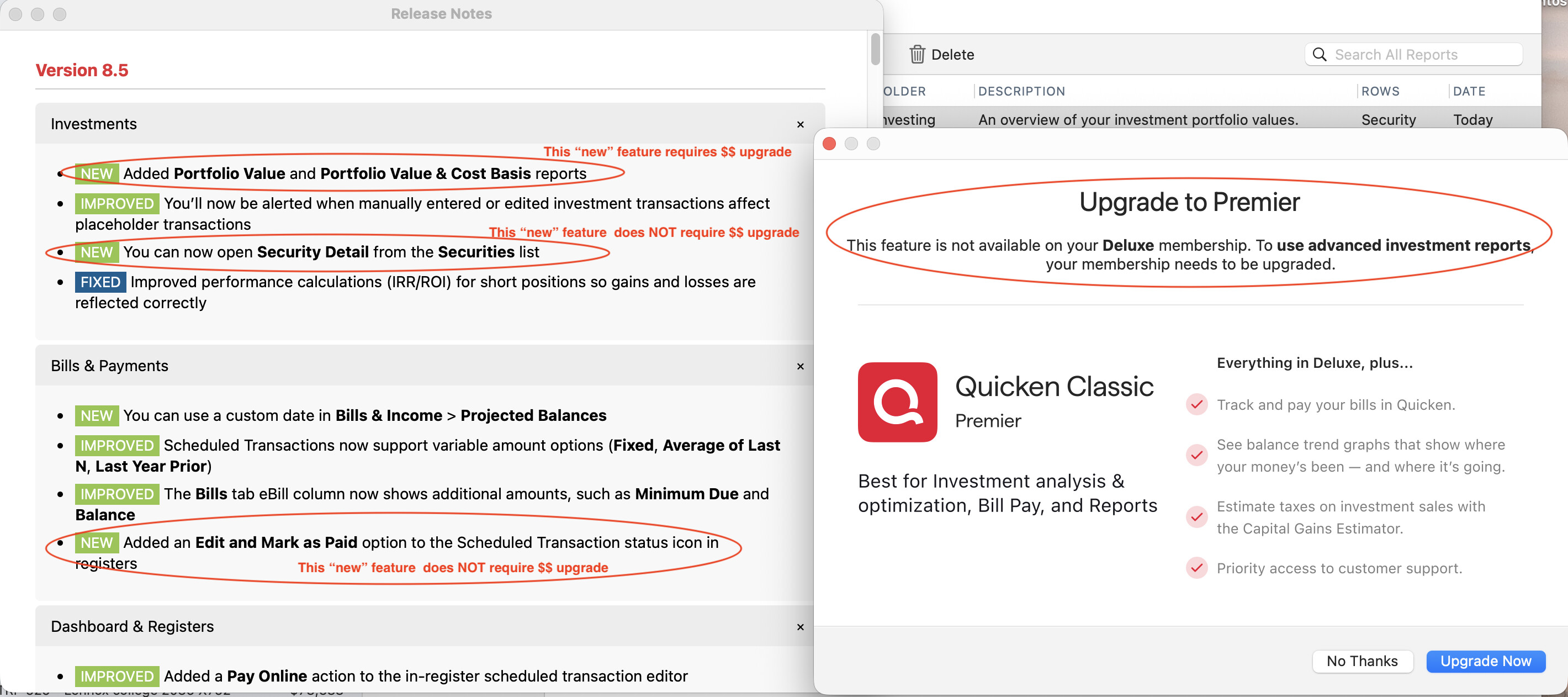
Their sales model for probably a year now has been to advertise “New” features in the release notes, along with “Improved” features and “Fixed” problems. In the most recent release, the “New” category reads like this: “Added Portfolio Value and Portfolio Value & Cost Basis reports”
But those two new reports are not, in fact, “added.” Those reports do appear in the list of reports (with no special designation, no asterisk, no $ or anything like that). But when users of their “upgraded” software click on those two reports, a message announces: “This feature is not available on your Deluxe membership. To use advanced investment reports, your membership needs to be upgraded.”
I don’t have any objection to a limited amount of nagging to “upgrade” tier levels. But it’s disingenuous for Quicken to give no indication that options clearly “included” in the software are not, in fact, “included.” They could signal to the user that these features are “extra cost” features or use a symbol of some sort.
It’s similar, actually, to Apple’s new “Creator” iWork scheme, where so-called “premium” content is “available,” but not really until users pay extra for the software.
I’m attaching a couple screenshots from Quicken to illustrate the deceptive nature of Quicken’s “new” features lists.
Well, that’s an annoying approach on Quicken’s part. @agen is away right now, but I’ll see if we can remember to note that not all features are available to all tiers next time. (Actually, I’ll update this piece slightly as a reminder.)