I haven’t rechecked the specs, but I believe I saw that the screen is essentially the same as 2020 27" iMac. However, in addition to the screen, the Studio Display incorporates the following elements:
Supposedly a better microphone cluster
A camera upgrade to the iPad front camera
An upgraded speaker system supposedly capable of reproducing Spatial Audio (we’ll see if that’s true when it’s reviewed). If it’s that good, goodbye to desktop speakers.
Way back in the 80-90s, my dad and I used to joke about how expensive Macs were. And then how keyboards and mice were sold separately for a mint. Because back then it was unheard of that a PC would be sold without a keyboard. Or keyboard/mouse later on.
We first got started on the Mac on PowerBooks, so didn’t need external keyboard/mouse. When he first got started on a desktop, the Power Macintosh G3 had by then come with keyboard and mouse in the box. In fact, some of the later Power Macintoshes came with the round mouse.
I see that Apple is reverting to their no mouse/keyboard for their non-screen Macs. This is not a complaint. Just an observation. The shipping box would be tiny.
Its ironic that I was just working on a 27" imac (2012 8Gb/1TB SSD) to update for Catalina, its last supported OS and noticed how nice it ran, compared to the 21.5" models I’ve been replacing at work. But now, I get to start putting in 24"M1 iMacs (less screen size) in as replacements for the 27" deprecated models and think, its not the same cost wise to replace with similar 27". A 27" Studio Display would be $500 under my budget per desktop. Leaving me $500 for … ? Its double that for a M1 MacMini. Or less available if I opt for the tilt-Studio mount. Replacing 27" iMacs reality just hit. Like everything else, its going to cost more for same size and features. (A M1 MacMini 16/1TB is $1300…the Tilt stand version $2000. Total for the replacement equivalent is now $3300. For my work, its $1000 over my allocated budget for replacement.
(I had to edit as I am rushing out the house…so much for remote from home)
I have two LG 5K’s and was hoping for an (affordable) Apple display. But this is not it. I didn’t expect it to be cheap either, but at least in line with reality for 5.5 year old technology in the LG’s (or 8 years old, if you talk about the first Retina 27" iMacs). Sure speakers, mic, camera are better, but for $1600 (or £1500 GBP) it’s simply not worth it.
Outside the extras above, the LG’s are not as good in terms of aesthetics, but the screen is exactly the same, and the keyboard shortcut integration is exactly the same. It got talked about as it was the one Apple sold and supported (even with support articles) all over their sales campaigns. And there was nothing viable that competed (the few other 5K’s ever released in limited numbers were flawed in one way or another; needed two cables, no Mac integration, etc.).
For an example of the overpricing. I bought my two LG’s each for £884 (£1768 for both) direct from Apple in late 2016. They came with a 2m TB cable, a hydraulic-type straight-up-down stand, plus a hidden neat vesa mount point (I later mounted mine on a dual arm accordingly).
Yet here Apple are releasing the same technology some 5.5 years later for $1600 minimum. They are then offering three options that have to be chosen at time of purchase(!?), so extra $300 nano, $400 height stand (or take either the plain stand or vesa version). They then only include a 1m cable that won’t be long enough for getting even on a stand under a desk, then charge $130 1.8m / $160 3m extra. So a maxed out one is just under $2.5K ($2460) for the nano version, or $2160 non-nano version. And you still can’t ever vesa mount the thing in future!
And what about the other other point I previously mentioned: the marketing is off.
Apple markets it aiming at pro’s who need a more affordable option, but then by withdrawing the 27" standard iMac, they’re effectively doing the opposite; aiming at the mom+pops who if they want an all-Apple setup, will have to buy the “Studio” display. It’s entirely incongruous with the price point & marketing direction. Weird.
I don’t see how you’d claim you need a $2k Studio display to replace a 27" iMac. The 27" iMac had the same silly limited stand as the $1600 Studio.
If you previously bought a 27" iMac for ~$2.5k, plain and simple that means you now have $900 left for a Mac mini.
If that’s not enough to get the specs you want, you have essentially two options:
• 24" M1 iMac
• get a cheaper display (quality 4Ks go for ~$600)
So yeah, this Apple price hike means you get less for more (sound familiar? iPhone? iPad? Bueller?). But it also means that if you can afford what they’re offering right now, you’re getting some really sweet kit.
No doubt a third-party may manage to find a way to do some kind of option to get from the stand/height stand to vesa somehow. But then would that have the stand hanging off the back on the vesa arms. Lol!
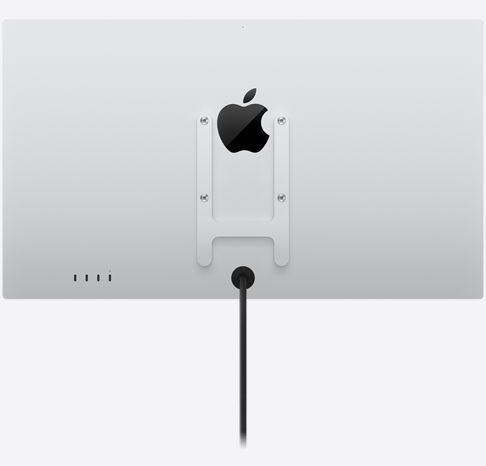
And have you seen Apple’s vesa mounting ‘solution’. It covers most of their logo in the process, seemingly. Who designs these awful solutions…
I was excited at the announcement of the Studio Display and Mac Studio. Then I started to price out the upgraded RAM and storage (64 GB and 4 TB). Pretty soon I was at $3600. And no ability to upgrade either RAM or internal storage in the future.
So I’m back to where I was before. I’m using a 2010 MacPro and had planned to upgrade to the 2019 MacPro – until I saw the entry level price of $6000. So I stayed with the old MacPro hoping for something better in the future.
I understand that Apple does not build upgradeable Macs anymore (MacPro excepted). I do not want to buy a system that cannot be upgraded. When I purchased my MacPro in 2010 it was with minimal RAM and HD space. Since then I have upgraded RAM, larger HDs, then small SSDs to larger SSDs, added PCIe cards for faster SSD, swapped out the GPU to allow it to run Mojave, swapped out the CPU for more and faster cores. I currently have 12 TB of internal storage (3 SSD, 2 HD) with boot drives for Snow Leopard, Sierra, and Mojave. I really don’t know how much I have spent on these upgrades – probably as much as a modern MacPro costs. But I did it a bit at a time when it was needed.
So, after a day of swooning over the Mac Studio and Studio Display I will continue to use my MacPro (2010) and my 20" Apple Cinema Display. After all, they work just fine for email, web browsing, Office, Lightroom, Photoshop, DaVinci Resolve, a handful of scientific applications, 32-bit apps, and more. Who needs a new computer? Apparently, I don’t.
$3999 eye watering? It is pricey, but how does it compare to other pcs of similar performance? Geekbench in excess of 24000, impressive graphics, fast and secure SSD, and great build and thermals? Probably quite well.
I’m having trouble finding comparables. I’d love to see some though
I’m seriously curious about this comment…especially for Lightroom use. The LG gets plenty of good reviews by folks on photography forums so I’m wondering if others here agree with it or have good experiences with the LG.
Since Apple doesn’t make the panel…it wouldn’t really surprise me if this the same panel as the LG albeit with slightly brighter output. Yes…it’s got the camera and spatial audio and etc…but for a lot of uses those are irrelevant. Wondering if there’s any real downside to the LG over the Studio display for Lightroom use…obviously nobody has one to compare yet but I’m assuming the Studio will be basically equivalent to the 27 iMac image quality wise so perhaps somebody has or has used an LG alongside a 27 iMac.
I’m not opposed to the Studio for image usage…and can afford the extra $$…but the added features are useless to me so if image quality isn’t better than the LG then the extra cost isn’t worth it.
I know. I know.
But this is what users want.
Personally, I have a LG 4K 27" USB-C that I got in 2020 for $500 before the pandemic buyers started sucking up resources. Added a Logitech Brio and using my old speakers (Monsoons… who remembers those? with magnplanar drivers and sub).
Irony: I’ve replaced one 27" iMac a month ago with a 24" M1 and they haven’t complained…which is a SHOCK!
(uh oh…rumors flying now of some M2 MacMini maybe in June…)
There are many different flavors of pros, and I think that Studio is aiming a level down from the high end Pro but above prosumer. Or maybe a prosumer who would like a monitor with really good built in speakers, but that’s probably a tiny market segment. The “my Rolex is better than your Seiko” crowd seems to make more sense. The Studio monitor line could end up as successful as the 14k gold encrusted edition of the first model of Apple Watch:
Apple has clearly moved towards a model where upgradeability post-purchase is considered an upper level professional characteristic that one has to pay a lot for.
Remember that desktops are a small fraction of the Macs that Apple sells. It’s predominantly laptops.
When did a built-in display become a mandatory part of the definition of “consumer desktop”? It wasn’t that long ago that the term simply meant “desktop system that doesn’t cost too much”.
I think the mini is absolutely a consumer desktop. And I think you could make the argument that the lower-end configurations of the Mac Studio also qualify.
One other thing I haven’t seen any mention of regarding the Studio Display is multi-computer support. One of the reasons I originally bought a $1k Dell 24" monitor in the 2000s was the built in multi-source switching. Remember when KVMs were hundreds of dollars, and a computer that booted when not hooked up to a monitor would get cranky in weird ways? The new Dell 32" I bought in 2019 also supports multiple inputs, so great for a laptop work computer and personal desktop etc.
I’m assuming the Studio display has no such support, which is another downside, especially now that they are separating out the monitor from the computer. Then again…it only has one input, so not sure how switching would work.
Agree. Two inputs would have been a killer feature that would’ve made it fly off the shelves. But I don’t think you can do it with Thunderbolt input, versus DP or HDMI ones.