Well, that explains why the globe ISN’T on my Mid 2015 MBP or my many A1243 extended keyboards if it was just added 2 - 3 years ago. I’m guessing non-Apple manufacturers like Matias just ignore it as another example of Apple’s non-standard concepts.
Looks like you missed the point of my question. I KNOW where the fn key is located on the keyboards. I was asking WHEN did APPLE add the globe icon to it. And since my Matias keyboard was made AFTER it was added, I guessed that Matias decided to NOT add the globe to their Mac keyboards (at least at this time). From the article Adam linked, it looks like it was done in 2022 or 2023.
Apple keyboards that include a numeric keypad place the Globe/fn key in the group of function keys between the alpha and numeric keyboards (On both my old extended keyboard and my current Magic Keyboard, it is directly under the F13 key). Recently Apple has defined it as a modifier key for window related actions; ‘Center’ is Control-Globe-C and ‘Fill’ is Control-Globe-F. While not a problem to use on a normal keyboard, it’s quite a stretch on the these keyboards.
This is the current Magic Keyboard with numeric keypad:

It looks like what used to be the “fn” key below the function keys is now a “right click” key. And Apple added the globe/fn key to the lower left corner (my Apple extended keyboard that came with a 2017 iMac has three keys to the left of the space bar).
1 Like
They must have made the change when they replaced the Lightning port with a USB-C one.
1 Like
The Macbook M1 Air that came out in late 2020 has the globe icon so it goes back a bit further.
OK, but it wasn’t on the Aluminum Keyboards that I have which, according to MacTracker, was discontinued in 2017. So it looks like Apple first added the globe icon no earlier than 2018 but no later than 2020.
Here is an Apple Support Discussion thread from 2016 that discusses the Globe key on an iPad keyboard:
This blog entry dates the iPad Globe to 2015 and the Mac Globe to 2019:
(the blog also gives a possible reason for Matias not adding the Globe…Apple has limited who has access to the keycodes for Globe/fn)
ETA: I was clicking around the aresluna website above and found the site owner has a connection to Glenn Fleishman! Small world…
I have a A2449 with a Lightning connector and a globe/fn key, so the globe was added before the switch to USB-C.
I’m not referring to the existence of the Globe icon; I’m referring to the placement of the Globe/fn key on an Apple Keyboard with Numeric keys.
According to MacTracker, the A2449 keyboard is the Touch ID version, but without a numeric keypad. The version with a Numeric Keypad is A2520, which I have, places the Globe/fn key in its traditional place for the Fn key on such a keyboard–in the top center island of keys below the F13 key. If there is no numeric keypad, the key was always located on the left lower corner of the keyboard.
The USB-C successor to the A2520 (the A3119) relocated the Globe/fnkey to a new key in the lower left corner and redefined the key under the F13 key. . That key is now the Contextual Menu and right-clicks the current selection.
Just updated to 26.5.2 on Mac and going thru the Settings I noticed:
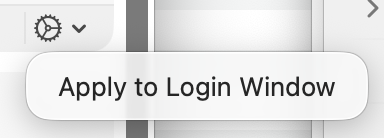
in General > Language & Region > Preferred Languages panel lower right. Maybe it’s always been there, maybe not, but maybe it helps someone contemplating this Topic.
Then again, it’s kind of vague… With multiple languages set, what happens when it is or isn’t applied to login window…  or if not ticked, what is the setting for the login window… hm.
(update) drat, I ticked to Apply and the whole setting icon and option disappeared. Now I can’t see how to un-apply it. Ah well. At the login I know it’s one or the other and should be able to see which it is and so on.
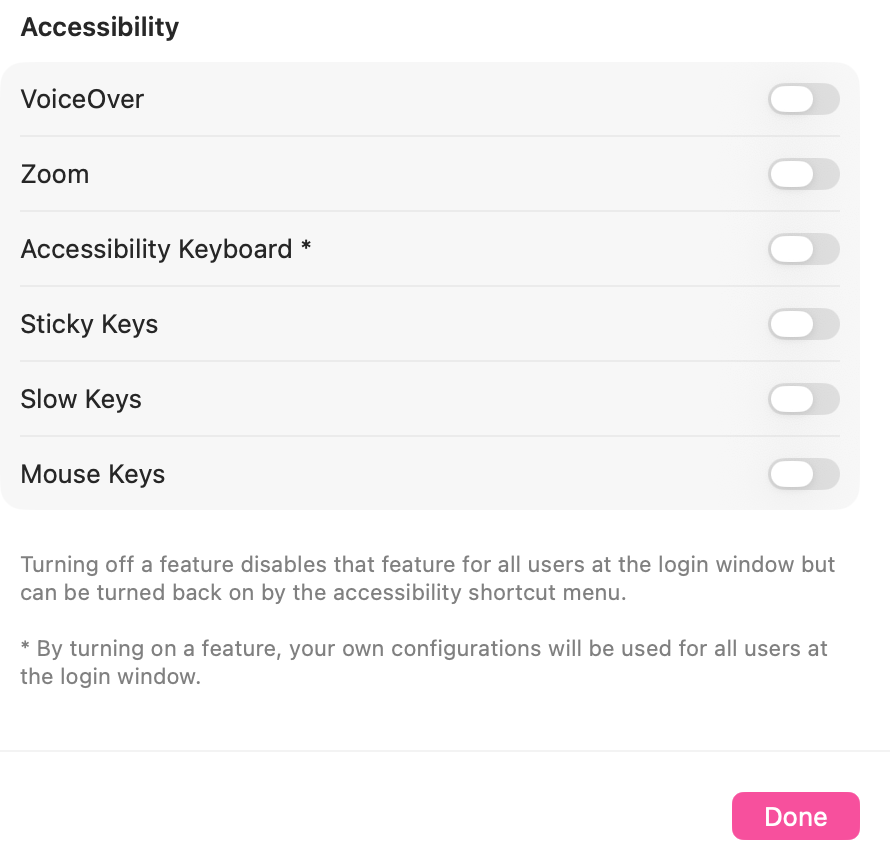
(further update) also noted in the Lock Screen Settings, things that may affect typing a login:
1 Like
The Mac User Guide explains this setting as follows: “If your Mac has multiple users and you want all users to see your primary language in the login window, click the Settings pop-up menu  , then choose Apply to Login Window. (If you don’t see the Settings pop-up menu, it means the login window is already set to use your primary language.)”
2 Likes
Thanks for looking that up @tom3 !
Apples wording there in the Tips App/Mac User Guide is less than complete, alas. Technical writing is a challenge, for sure!
Another possible cause of not being able to log in or type properly is turning on Accessibility>Pointer Control>Mouse Keys. This happened to someone I knew recently who somehow managed to accidentally and unknowingly enable the feature. The symptom was that much of the right half of the keyboard was unusable. It didn’t stop initial login, but made a mess after that.
Note: I’m sure the feature is useful and that there are ways to use it correctly. It only becomes a potential problem if it gets switched on by mistake.
1 Like
With all those accessibility options, there is an “i” icon to the right of the option for configuring it.
One of the Mouse Keys options (on by default) is that tapping Option 5 times will toggle the feature. A similarly annoying (if you don’t need it) feature is Sticky Keys, which is toggled by tapping Shift 5 times.
The key sequences to toggle these features can be disabled. I always do so on my computers (Windows has a similar set of accessibility features), because they will otherwise activate themselves if I idly tap various modifier keys.
1 Like