In Song view, the Status Bar at the bottom of the window shows how many tracks/items/songs are in the selected set. So if you use Song view to display your entire library, the total number of items will show there. (The easiest way to ensure that you’re viewing the entire library is to use the Column Browser and have All selected in all visible columns.) If you don’t see the status bar, go to View → Show Status Bar or hit cmd-/.
2 Likes
Thanks Ms. McKean! doh! I used to know this back when I was more often using iTunes, which I do prefer in the column browser. the count is over 8,700! At some point I did digitize also a bunch of cassette tapes and LPs so each side of those would only count as one Track/Song (ok by me, that’s how I would listen to them in their physical form) so possibly over 9k.
1 Like
Mr. Shamino,
Much Respect! (I think that’s a saying?) for your meticulous method! Excellent idea!
1 Like
2 posts were split to a new topic: Has syncing ripped tracks in Music gotten harder?
Hi all, I have close to 2100 albums in my Match music library stream. Album artwork and liner notes have always been my bete noir. I’ve had Apple arbitrarily replace album art so many times - but I get it- album stuff is managed by record companies. Without submission requirements including liner notes and artwork Apple has to deal with what they get! For the most part-it’s not too bad, (although I ripped my cds in the 00s so it was more obvious what content was available or not from Apple/CdDb. What really bugs me most about Apple Music is search. The player is horrible at this- always pushing people (not using Apple Music service) to iTunes Store, and there are two search places on top of that one above the left sidebar And one in the right main view window . It needs a serious reboot. I really feel the player app and the iTunes Store app should be separate. Since I stream my (personal) library stuff - I’m really happy with random play (it’s very custom to my personal taste) but organizing via search is a nightmare. (That’s when you discover bad artwork, too) I don’t understand why Apple pays such a little attention to these big long standing problems with Apple Music since Steve Jobs loved music.
I have always solved this problem the old-fashioned way. I download the cover art for all my albums from the internet, resize it if necessary and put the cover.jpg file in each album folder. When you import an album into the Music app, you can use the Get Info command to open a window where you can change the artist or album info if desired. You can also click the Artwork tab and select the cover art you downloaded from the internet. When you click “OK” to close the Get Info window, the album will display the correct cover art. Going through this procedure for a large number of albums definitely takes time, but the results are very satisfying.
2 Likes
What I found when I started using Apple Music is that it fixed up almost all of my art work. There are still some that aren’t fixed and that is strange. The Albion Band (1980s English folk rock) album Under The Rose is on Apple Music but it doesn’t seem to match them up with the CD, although it does the track names correctly. This may be because the CD has something slightly different to the streamed version. I think Apple gets all its stuff from GraceNotes. They have a rather dubious history. They were a public database with updates from the public. Eventually they decided that they would privatise it, and the database would be private, even though it was supplied by the public.
But does each individual file have the album art or are you saying that the Music app is just using the cover art to represent the album folder? This issue has been discussed many times in the past.
If the album art is not embedded into each file, when you take that file to another program or use in a car for example, the art is not going to display unless it is embedded. You can easily tell if the art is embedded by using the Get Info command on the file in the Finder (although not accurate in Catalina for AIFF) and it should be there. The iTunes and Music app can also show the art for individual files. I explained this previously here:
Yes, every music file displays the album art I added when I do a Get Info on the files in every album I have imported into the Mucic app.
What about checking the file in the Finder? There are situations where the art is not embedded and this is why many users are having problems with this issue.
I also either scan my art or look for decent quality art and add manually so I have never had issues but I don’t use iTunes Match either and I see that some use that feature which may cause some problems.
Yes and no. The upper-left search box is used for searching your library, Music and the iTunes Store, but there’s another button to tell it where to search. After starting the search, click “Your Library” in the upper-right corner:
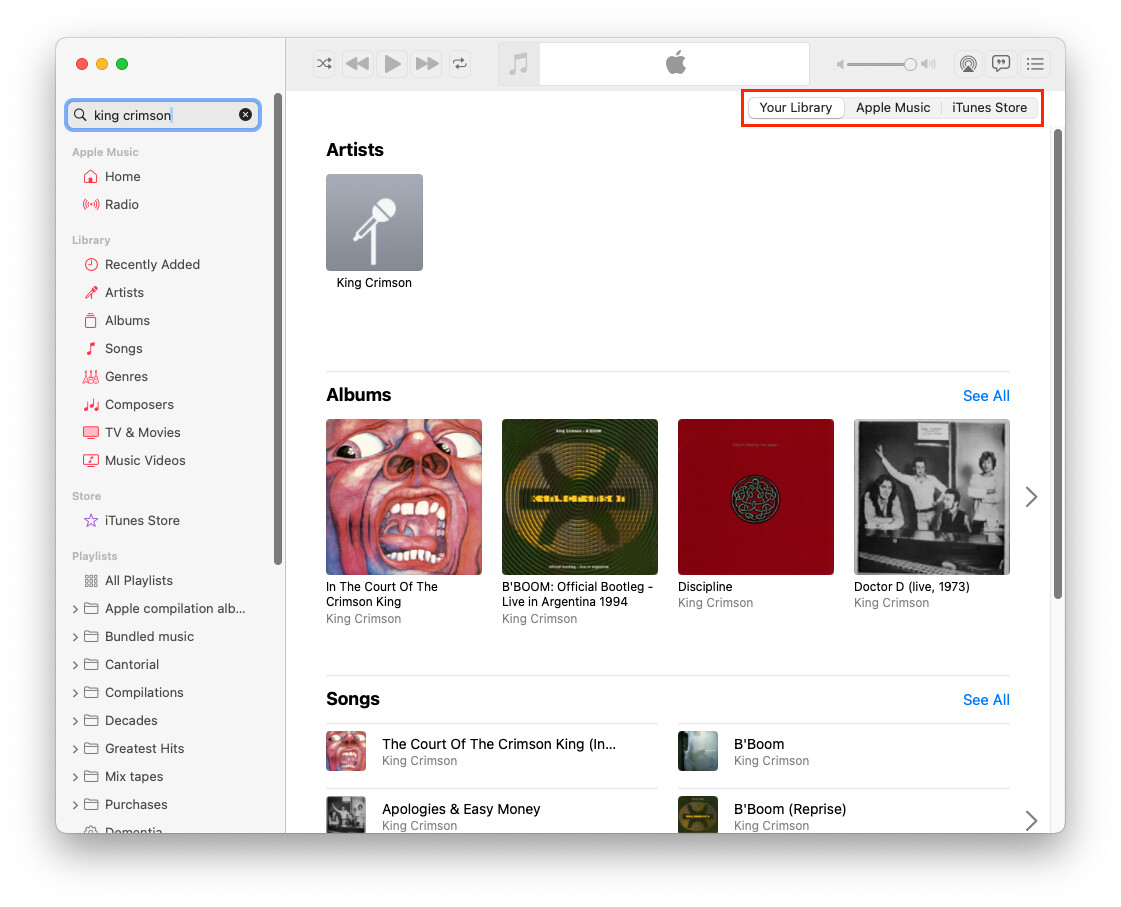
Once you pick a location to search, the app should remember that location for subsequent searches.
The magnifying-glass icon in the upper-right corner is different. It’s a “filter” button for narrowing the scope of what you see in whatever category you’ve selected from the left-sidebar.
Any method of manually managing metadata (artwork or otherwise) is time consuming. My manual scans of covers for my various databases has taken a very long time. I completed scans for my books and movies, but am only halfway through the alphabet for music.
It doesn’t help that my database requires me to type in all kinds of other metadata from the album’s literature, including year of recording, track list, media type, genre(s), etc.
But once that initial scanning is done, it’s must less inconvenient to just scan new titles as you purchase them.
It’s been my experience that content you download from Apple’s servers just put the artwork in the Library database, but not in the individual tracks. I assume this is to save space on your storage media. They should transfer fine to another IOS device (iPod, iPhone, etc.) and display in your car when playing those devices, but they will not transport if you manually copy the files to another storage device (e.g. a USB thumb drive) for external playback.
I’ve found that when I drag/drop artwork to tracks’ info from within iTunes/Music, it will embed the image to each file, even if I’m editing multiple tracks’ info at once.
Doug’s AppleScripts has some scripts that you can use to remedy this situation, including:
- Tracks Without Embedded Artwork (20 track limit until registered for $2) will show you all the tracks that could support, but do not have, embedded artwork.
- Re-Embed Artwork (free, donation requested) will export/import tracks’ artwork, forcing Music to embed the image in the tracks’ files. Best used in conjunction with the “Tracks Without Embedded Artwork” script so you don’t waste time re-embedding artwork on tracks that already have it.
2 Likes
Sorry if this was already stated, but note that the Finder will display cover art for tracks in your music library folders where the artwork is not embedded, but Music has assigned artwork. That cover art isn’t portable, of course.
The way to tell is to copy the file to some other folder. If it still has cover art, then it was embedded.
Also, not all music file formats allow for embedded artwork. I don’t remember which ones don’t. Maybe WAV files?
This is one issue as having art in the database does not necessarily transfer over in some cases for proper display.
I don’t bother with CarPlay and use the car’s infotainment system so it’s imperative to have the art embedded. That is one reason I am bringing this issue up again since a lot of these problems are because the art is not embedded in each individual file and it seems that a lot of problems can be avoided if that is done.
The portability issue is a key one as when some people tire of iTunes or Music and decide to go to another app, they will find the art is not displaying as the tracks were not embedded in the first place.
1 Like
There are times I get both buttons and neither work. And sometimes it just refuses to search. The left one needs to be album or artist selected. It gives me Apple music choices when even I don’t sub to music and have it hidden in the prefs. It’s a confusing mess and needs a redesign. The store and library need to be separate apps. I appreciate your explanation. The Artwork problem is really a pain. I’ve had my own selections replaced with Apple’s wrong ones, and whole artist catalogs replaced with one greatest hit collection image. Big metadata fail.
I’ll just say that this depends on your car and what device you’re playing from.
My car (a 2012 Honda Civic) does not have CarPlay, but I connect an iPod Touch via USB in order to use the radio’s iPod interface and it displays whatever artwork the iPod provides - which does not have to be embedded.
This would, of course, be different, if I was instead copying the AAC files to a flash drive, using its generic USB-storage interface.
But, as I wrote, there are things you can do (and automate via scripts) to force Music to embed artwork in the files.
Which is why I make sure to never enable the option to automatically update artwork and why I will never subscribe to Match. Because mistakes like this are well known and have always been a problem with those services.
Even if you disable automatic artwork updating, you can choose to manually update a single album’s artwork, for those cases where you can’t or don’t want to track down the image on your own.
The exact location for this option has changed over the years, but if you right-click on an album’s artwork (e.g. when viewing the album), there is a menu option for “Get Album Artwork”:

This could also go wrong, but it’s a one-time operation, so using it won’t risk mangling all your music’s artwork the way the auto-download preference can.
But that’s my point: you’re still using in iOS device so it works differently just as when someone decides to use another app that is not Apple’s and runs into problems with art that was not embedded properly.
I realize that space was an issue maybe 15-20 years ago so that argument is not valid today but for an iPod with limited capacity, I can see the advantage of not having every file embedded.
I always thought it was a stupid interface decision to put the search box on the far left but the buttons defining the search scope on the far right. Related controls should be near each other, especially closely related controls like these.
But then, I think that the search scope should default to what you have displayed at the time (Library or iTunes Store) rather than what you last searched. If I’m looking at the iTunes Store, I’m more likely to want to search the store than my Library. And vice versa.
3 Likes