David -
You’ve given me an amazing amount of data to study. Fortunately, this install was just to get a feel for the new system. I’m hanging onto Mojave for as long as I can - I have my Adobe CS6 still running (even have the installer disks) and a few other apps that will not run past Mojave.
As for booting Monterey - it is not shown as a startup disk option, but if I reboot and hold down the shift key, it is shown there as an option but I did not go any further in trying to boot it that way after installing it yesterday.
Even though I see Monterey in my software updates on Mojave - I did not start from there, because the button says upgrade now and I did not want to accidentally upgrade Mojave. So I went to the app store and took Mojave from there, but when I started to run it, I thought I saw activity from the software update panel.
Maybe I did not port enough over during Migration? I unchecked apps, but definitely kept Other Files & Folders checked on as well as System & Network. I only checked a few things off from my user folder as I wanted to keep the migration as slim as possible.
I’m going to erase the drive and try again over the weekend. I’ll keep notes on what steps I took and let you know the outcome. Again, I cannot express my gratitude enough for all your help!
I noticed in one of your previous posts that your Monterey startup disk is a Samsung T7, correct? There was a previous thread where someone had the same issue related to that same model. The following post is the first but there are many to look at after that:
Thanks for pointing me to that post. There’s a lot of reading there for me to peruse today. And I thought I did all my homework before starting this installation
I think that installing Monterey on an external device might be the issue or the Samsung T7 is part of that. However, as mentioned in that thread I did install Catalina on a T7 with no issues but there have been changes since Catalina so it’s difficult to say.
Hi David-
Well, I tried re-installing Monterey from the installer in my apps folder that I had previously downloaded and just as before all seemed to go well (i even installed the Monterey update while I was booted up in it), but when booting back to Mojave, I have the Monterey - Data drive and the Update drive on my desktop as before.
As you can see from the other responses it’s been pointed out to me that the Samsung drive could be the culprit. I suppose I could return the drive to Amazon but I just don’t know how to proceed at this point. I suppose I could find another use for the Samsung and try finding a different disk for the install, but frankly I’m just not in a position right now to have to upgrade to Monterey that I want to shell out more money for another drive when I don’t know where the problem really stems from.
This is very strange, especially since the installation seems to have succeeded. You said you were able to boot from the volume, yes? So whatever is going on, it doesn’t seem to have broken your installation.
There must be something else going on, but I don’t know enough to diagnose it further.
For all I know, Apple changed or broke something with the latest update. Or maybe Mojave simply has no clue what to make of what it sees when it investigates the Monterey volumes and is displaying whatever it can make of what it sees.
What happens if you boot into Monterey and run those exact same commands (diskutil list and diskutil apfs list) from there? Do you see the same thing you see when booted from Mojave or does it look different?
David - I’m not real good at reading these, so I’ll post the new results - I don’t want to burden you but I’m sure you could assess them faster.
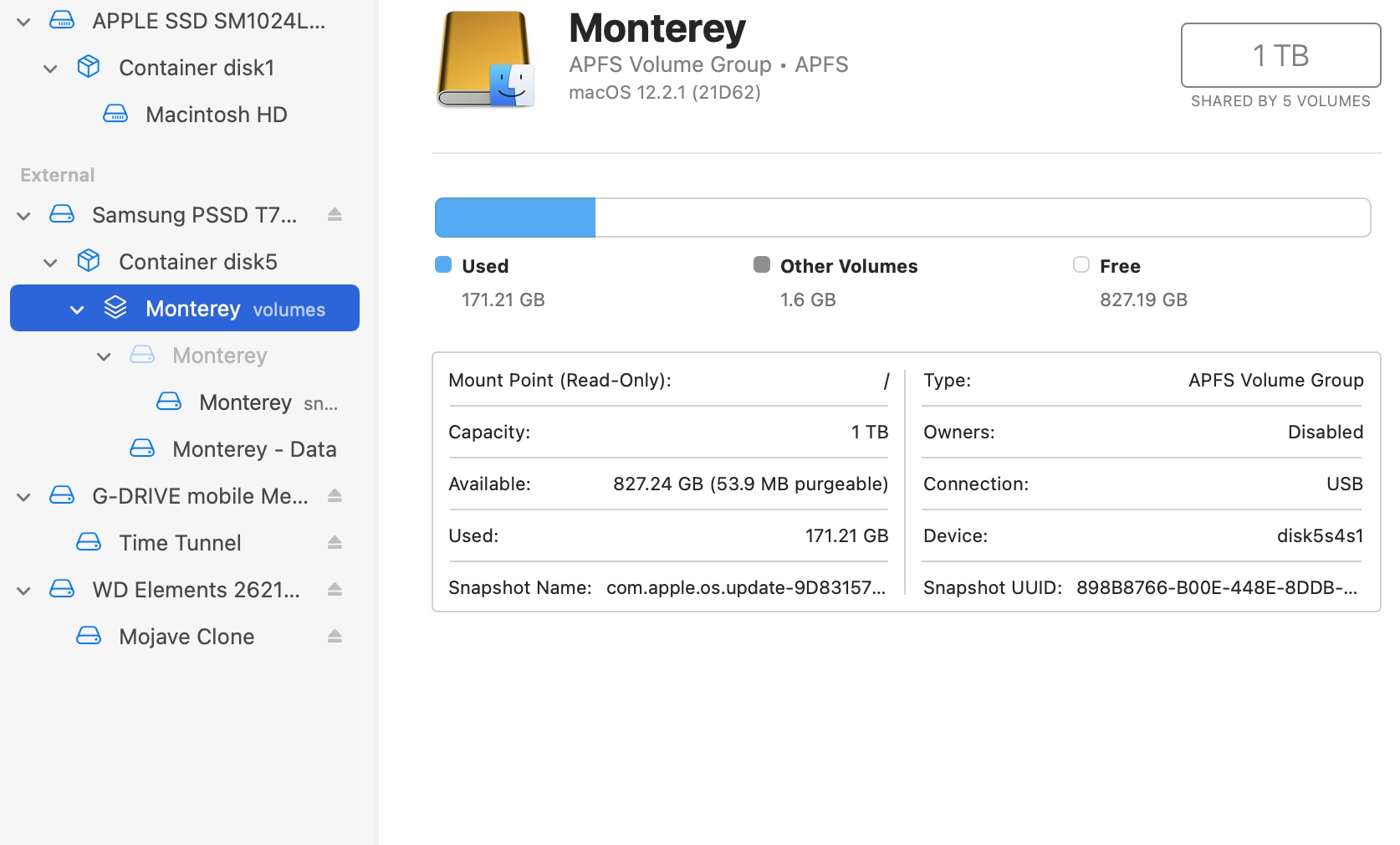
I should mention, when I opened Terminal on Monterey I got the message: The default interactive shell is now zsh. To update your account to use zsh, please run chsh -s /bin/zsh. I did that first. Also, I neglected to mention that as with the first install, when I boot back into Mojave, I always get a notification alert stating: Incompatible disk - this disk uses features that are not supported on this version of the MacOS. Whether it’s referring to my Mojave drive or the mounted Monterey drive I have no idea. Here are the results when booted into Monterey. Oh - and a snapshot of the disk utility containers. And just for the heck of it, while in Monterey I ran disk first aid on all of the Monterey containers and no errors were reported.
JimDs-iMac-2:~ jimd57$ diskutil list
/dev/disk0 (internal, physical):
   #:                       TYPE NAME                    SIZE       IDENTIFIER
   0:      GUID_partition_scheme                        *1.0 TB     disk0
   1:                        EFI <U+2068>EFI<U+2069>                     314.6 MB   disk0s1
   2:                 Apple_APFS <U+2068>Container disk1<U+2069>         1.0 TB     disk0s2

/dev/disk1 (synthesized):
   #:                       TYPE NAME                    SIZE       IDENTIFIER
   0:      APFS Container Scheme -                      +1.0 TB     disk1
                                 Physical Store disk0s2
   1:                APFS Volume <U+2068>Macintosh HD<U+2069>            236.1 GB   disk1s1
   2:                APFS Volume <U+2068>Preboot<U+2069>                 44.5 MB    disk1s2
   3:                APFS Volume <U+2068>Recovery<U+2069>                510.6 MB   disk1s3
   4:                APFS Volume <U+2068>VM<U+2069>                      2.1 GB     disk1s4

/dev/disk2 (external, physical):
   #:                       TYPE NAME                    SIZE       IDENTIFIER
   0:      GUID_partition_scheme                        *1.0 TB     disk2
   1:                        EFI <U+2068>EFI<U+2069>                     209.7 MB   disk2s1
   2:                 Apple_APFS <U+2068>Container disk5<U+2069>         1000.0 GB  disk2s2

/dev/disk3 (external, physical):
   #:                       TYPE NAME                    SIZE       IDENTIFIER
   0:      GUID_partition_scheme                        *4.0 TB     disk3
   1:                        EFI <U+2068>EFI<U+2069>                     209.7 MB   disk3s1
   2:                  Apple_HFS <U+2068>Time Tunnel<U+2069>             4.0 TB     disk3s2

/dev/disk4 (external, physical):
   #:                       TYPE NAME                    SIZE       IDENTIFIER
   0:      GUID_partition_scheme                        *4.0 TB     disk4
   1:                        EFI <U+2068>EFI<U+2069>                     209.7 MB   disk4s1
   2:                  Apple_HFS <U+2068>Mojave Clone<U+2069>            4.0 TB     disk4s2
   3:                 Apple_Boot <U+2068>Recovery HD<U+2069>             650.0 MB   disk4s3

/dev/disk5 (synthesized):
   #:                       TYPE NAME                    SIZE       IDENTIFIER
   0:      APFS Container Scheme -                      +1000.0 GB  disk5
                                 Physical Store disk2s2
   1:                APFS Volume <U+2068>Monterey - Data<U+2069>         155.5 GB   disk5s1
   2:                APFS Volume <U+2068>Preboot<U+2069>                 294.2 MB   disk5s2
   3:                APFS Volume <U+2068>Recovery<U+2069>                1.1 GB     disk5s3
   4:                APFS Volume <U+2068>Monterey<U+2069>                15.8 GB    disk5s4
   5:              APFS Snapshot <U+2068>com.apple.os.update-...<U+2069> 15.8 GB    disk5s4s1
   6:                APFS Volume <U+2068>VM<U+2069>                      1.1 MB     disk5s6

JimDs-iMac-2:~ jimd57$

JimDs-iMac-2:~ jimd57$ diskutil apfs list
APFS Containers (2 found)
|
+-- Container disk1 76B1F8AC-EA5C-4446-A0A3-6F4636F0FD2F
|   ====================================================
|   APFS Container Reference:     disk1
|   Size (Capacity Ceiling):      1000240963584 B (1.0 TB)
|   Capacity In Use By Volumes:   239010058240 B (239.0 GB) (23.9% used)
|   Capacity Not Allocated:       761230905344 B (761.2 GB) (76.1% free)
|   |
|   +-< Physical Store disk0s2 AF0F632C-01E6-4499-B783-CF74D1203A75
|   |   -----------------------------------------------------------
|   |   APFS Physical Store Disk:   disk0s2
|   |   Size:                       1000240963584 B (1.0 TB)
|   |
|   +-> Volume disk1s1 1DC55CF1-1211-4FB0-906C-E2E4DF967811
|   |   ---------------------------------------------------
|   |   APFS Volume Disk (Role):   disk1s1 (No specific role)
|   |   Name:                      Macintosh HD (Case-insensitive)
|   |   Mount Point:               /Volumes/Macintosh HD
|   |   Capacity Consumed:         236099633152 B (236.1 GB)
|   |   Sealed:                    No
|   |   FileVault:                 Yes (Unlocked)
|   |
|   +-> Volume disk1s2 E49E5963-518E-4EE1-A5CB-6039D3E2035A
|   |   ---------------------------------------------------
|   |   APFS Volume Disk (Role):   disk1s2 (Preboot)
|   |   Name:                      Preboot (Case-insensitive)
|   |   Mount Point:               Not Mounted
|   |   Capacity Consumed:         44531712 B (44.5 MB)
|   |   Sealed:                    No
|   |   FileVault:                 No
|   |
|   +-> Volume disk1s3 40350D23-C62F-4A30-8D0A-9D363A2C7C07
|   |   ---------------------------------------------------
|   |   APFS Volume Disk (Role):   disk1s3 (Recovery)
|   |   Name:                      Recovery (Case-insensitive)
|   |   Mount Point:               Not Mounted
|   |   Capacity Consumed:         510562304 B (510.6 MB)
|   |   Sealed:                    No
|   |   FileVault:                 No
|   |
|   +-> Volume disk1s4 C48FD628-B65A-4B63-A242-88CEF3F4DC6C
|       ---------------------------------------------------
|       APFS Volume Disk (Role):   disk1s4 (VM)
|       Name:                      VM (Case-insensitive)
|       Mount Point:               Not Mounted
|       Capacity Consumed:         2147504128 B (2.1 GB)
|       Sealed:                    No
|       FileVault:                 No
|
+-- Container disk5 88278466-5206-41F2-B2C6-1DE5ABF84340
    ====================================================
    APFS Container Reference:     disk5
    Size (Capacity Ceiling):      999995129856 B (1000.0 GB)
    Capacity In Use By Volumes:   172832030720 B (172.8 GB) (17.3% used)
    Capacity Not Allocated:       827163099136 B (827.2 GB) (82.7% free)
    |
    +-< Physical Store disk2s2 71F5A450-1AE6-4018-8362-5FE6F42E1ADB
    |   -----------------------------------------------------------
    |   APFS Physical Store Disk:   disk2s2
    |   Size:                       999995129856 B (1000.0 GB)
    |
    +-> Volume disk5s1 F88DDBF1-5F22-4287-9A4C-057AF18AFD89
    |   ---------------------------------------------------
    |   APFS Volume Disk (Role):   disk5s1 (Data)
    |   Name:                      Monterey - Data (Case-insensitive)
    |   Mount Point:               /System/Volumes/Data
    |   Capacity Consumed:         155482169344 B (155.5 GB)
    |   Sealed:                    No
    |   FileVault:                 No
    |
    +-> Volume disk5s2 3EBAD96B-F153-4804-9309-2AEC8E466E99
    |   ---------------------------------------------------
    |   APFS Volume Disk (Role):   disk5s2 (Preboot)
    |   Name:                      Preboot (Case-insensitive)
    |   Mount Point:               /System/Volumes/Preboot
    |   Capacity Consumed:         294182912 B (294.2 MB)
    |   Sealed:                    No
    |   FileVault:                 No
    |
    +-> Volume disk5s3 5312E3C4-4143-469D-9B24-882C532A519E
    |   ---------------------------------------------------
    |   APFS Volume Disk (Role):   disk5s3 (Recovery)
    |   Name:                      Recovery (Case-insensitive)
    |   Mount Point:               Not Mounted
    |   Capacity Consumed:         1095479296 B (1.1 GB)
    |   Sealed:                    No
    |   FileVault:                 No
    |
    +-> Volume disk5s4 4AA41AB1-FE93-4412-96B6-6083C1438CCB
    |   ---------------------------------------------------
    |   APFS Volume Disk (Role):   disk5s4 (System)
    |   Name:                      Monterey (Case-insensitive)
    |   Mount Point:               Not Mounted
    |   Capacity Consumed:         15750037504 B (15.8 GB)
    |   Sealed:                    Yes
    |   FileVault:                 No
    |   |
    |   Snapshot:                  898B8766-B00E-448E-8DDB-52B436CF0BFF
    |   Snapshot Disk:             disk5s4s1
    |   Snapshot Mount Point:      /
    |   Snapshot Sealed:           Yes
    |
    +-> Volume disk5s6 6570DF0D-320F-4FDB-994F-D2071F15B16F
        ---------------------------------------------------
        APFS Volume Disk (Role):   disk5s6 (VM)
        Name:                      VM (Case-insensitive)
        Mount Point:               /System/Volumes/VM
        Capacity Consumed:         1069056 B (1.1 MB)
        Sealed:                    No
        FileVault:                 No
JimDs-iMac-2:~ jimd57$
When you’re in Mojave, you’re going to see the Monterey data drive as well as the regular Monterey partition similar to what I see from my Catalina installation as that is when the new system folder/hard drive “division” (I’m sure David can explain it better) started but you don’t see that it in Catalina or Monterey I presume. I don’t recall ever seeing an Update partition so that is a mystery. I don’t think the T7 is defective because you said you were able to run Monterey and update it even. The only other thing you could do is try to install Monterey on a regular external spinning drive if you have an extra, not an SSD and see what happens.
jk2gs -
That is a helpful suggestion. I have a USB drive I bought recently to back up some course files on, but I could move those off and try using that. Or would it have to be a SATA drive?
Something else - The SSD came with 2 cables: C to C and C to A. I used the C to C. I’m wondering if using the C to A be worth a try?
My other last resort was going to be to install Mojave on the SSD, boot from that and install Monterey over it, but I worry about the possibility of making things worse doing that - possibly not having my machine boot?
I would try installing on the USB drive as long as it is a 3.0 one as older 2.0 models are really slow. As for the cables, it shouldn’t matter but as I mentioned in a previous post, I had received one cable with the T7 that was a bit off as when I moved it just a bit, the connection cut out. This was the C to A cable. But if you had a cable problem, I don’t think you would have gotten as far as you did with the installation.
My final answer is that something between a 2013 mini and a T7 prevents booting…it installs and both Sys Prefs and option boot give it as a startup disk option it wo t boot from it. Not a power available issue. Boots my 2019 iMac just fine and my M1 Pro MBP…but not the mini.
The article is on a fairly high technical level and I’m not sure the whole thing is required reading, only the part where the author says not to tamper with the Update volume.
I see the Update volume on my external (bootable 1tb Samsung t7). I assumed that volume was related to 32bit apps. As with most things these days with all the new OS changes (and life in general) - if it ain’t broke, I don’t try to fix it. Monterey runs just fine from that external, with just a few things migrated. The update volume does not appear on Monterey fully installed over Mojave to internal drive. I have read enough to know that new OS has major structure changes and not to fuss with hidden volumes even if we did so in the good old days. My advice to you Jim, from fellow Mac traveler left in the recent dust, is to relax. Yes, try to understand if it interests you, but don’t worry if system works. Just my 2 cents,
David -
I must apologize for sending you that 2nd set of diskutils commands that I ran while booted in Monterey without asking you first if you wouldn’t mind checking those like you did the first batch. I want to let you know that I do not need you to evaluate them as I have decided to abandon any attempts at this time of trying to install Monterey. Once again, I cannot thank you enough for the help you provided.
jk2gs-
I want to thank you for your suggestions, but I’m afraid I am going to abandon any attempt at this time of trying install Monterey. I just spent hours trying to install it on a reformatted USB 3.0 and it was painfully slow - although it afforded me time to get a little further in a book I’m reading while waiting! I gave up when after finally getting to the login screen and logging in, the cursor kept spinning with seemingly no end in sight. I gave it about 40 minutes then decided to power off and reboot into Mojave. Maybe in another week or two I’ll give it another go, but that remains to be seen. Anyway, I just want to say thanks again for your time.