Can someone please tell me how configure macOS 15 so that clicking on a mailto: link will be handled by Gmail within the Safari browser?
Thank you.
Can someone please tell me how configure macOS 15 so that clicking on a mailto: link will be handled by Gmail within the Safari browser?
Thank you.
For Safari, I’m pretty sure you need to download a third party extension. Other browsers, including Firefox, have a dedicated Setting.
(note: if you want an AI assist in finding detailed guidance, I recommend Perplexity)
This app is the only way I can find to set an email handler within Safari:
Do you know of any other way to set an email handler for Safari?
I don’t necessarily have a problem using this app but I don’t want to overlook another app/extension/setting that might have any advantage over this app.
Thank you.
I purchased this app from the Mac App Store and installed it.
The configuration and testing instructions were very clear; the app works: mailto links open my Gmail account within the Safari browser.
I could NOT find another way to configure a mail handler to do this within either Safari or Mail. More specifically, I could NOT find alternative to using the app Open in Webmail.
Please post a reply if you know of another way to make mailto open Gmail within the Safari browser.
Thank you.
I haven’t tried it but YoJam can be used to preprocess and forward mailto links:
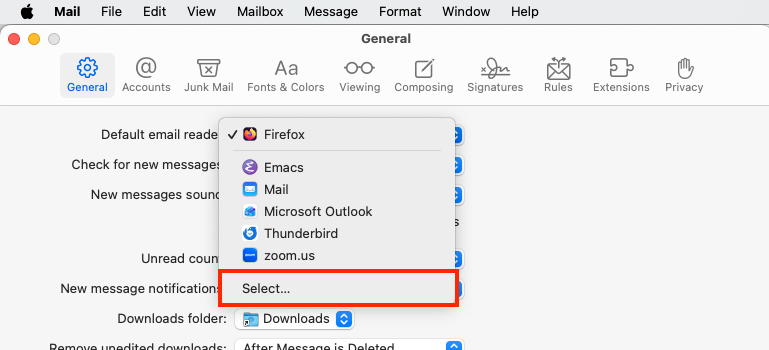
In Mail.app in the general settings you can choose the standard mail app. I have Thunderbird selected. Not sure if/how this works, if you select a browser as mail app.
This GitHub link is more specific (use at your own risk):
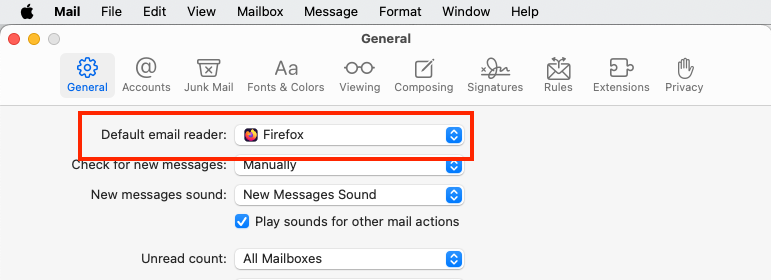
I use Firefox, but I was able to set my default e-mail reader (configurable from within Mail) to Firefox:
From there, Firefox’s configuration takes me to the GMail page.
So, if you have a suitable extension in Safari, can you then set Safari to be your default e-mail reader? You should be able to pick any app you want: