I don’t find the news that the lowest level of RAM specced for the M3 MacBookPro is insufficient. That’s been generally true for all Mac models since multiple versions have been available. The only time I’ve bought t a Mac with the base amount of RAM was when it was easy for the user to add more (ancient MacBooks and the 27-inch iMac). I usually ordered the additional RAM from a 3rd party at the same time I ordered the Mac so that I could install it immediately.
In general, I’ve found that if a consumer product is available at several price levels, the lowest one is a loss leader, either deficient in some way or needs some vital options.
I fully agree there’s been consensus that 8GB is only sufficient for basic work. But I also think previously in most people’s minds this was linked to capacity (“mem pressure”).
I suppose the actual news here is that it also has such a strong impact on performance. With the heavily integrated and high-b/w flash in our systems since M1, there has been this notion that swap results in less of a penalty than it used to on Intel Macs. This data shows that even so, you don’t want to skimp on RAM if you care anything about not bottlenecking M3’s performance. It’s a $200 upsell, but likely one that makes sense for most any buyer that’s in the market for MBP over MBA.
This is probably true. I’ve heard it from far too many reliable sources.
But even if there is zero performance penalty, it’s still a bad idea, because large amounts of swapping means large amounts of writing to the file system. I wouldn’t want to burn through my SSD’s precious write because of swapping.
I don’t have a problem with Apple selling base models with only 8GB RAM, but it is really frustrating that if you want any more (without moving up to a much larger CPU), it has to be a BTO option. There are no stock configurations of an otherwise baseline model with 16GB RAM, meaning you can’t get that capacity from a retail store (e.g. Costco or Best Buy) for any amount of money.
Howard Oakley today has an excellent summary of changes going from M1 Pro to M3 Pro. Including a very simple way to help judge if perhaps the jump could be worth it. Despite all the interesting details he manages to get across, he’s truly a master at making the complicated simple.
The biggest surprise to me is that background tasks on a lightly loaded M3 Pro could run slower than on M1 Pro (E core min frequency dropped), but that on a heavily loaded system, background tasks running on the E cores can actually still complete faster than on M1 Pro because the entire cluster runs at the same clock and the max freq for E cores on M3 Pro has actually been increased.
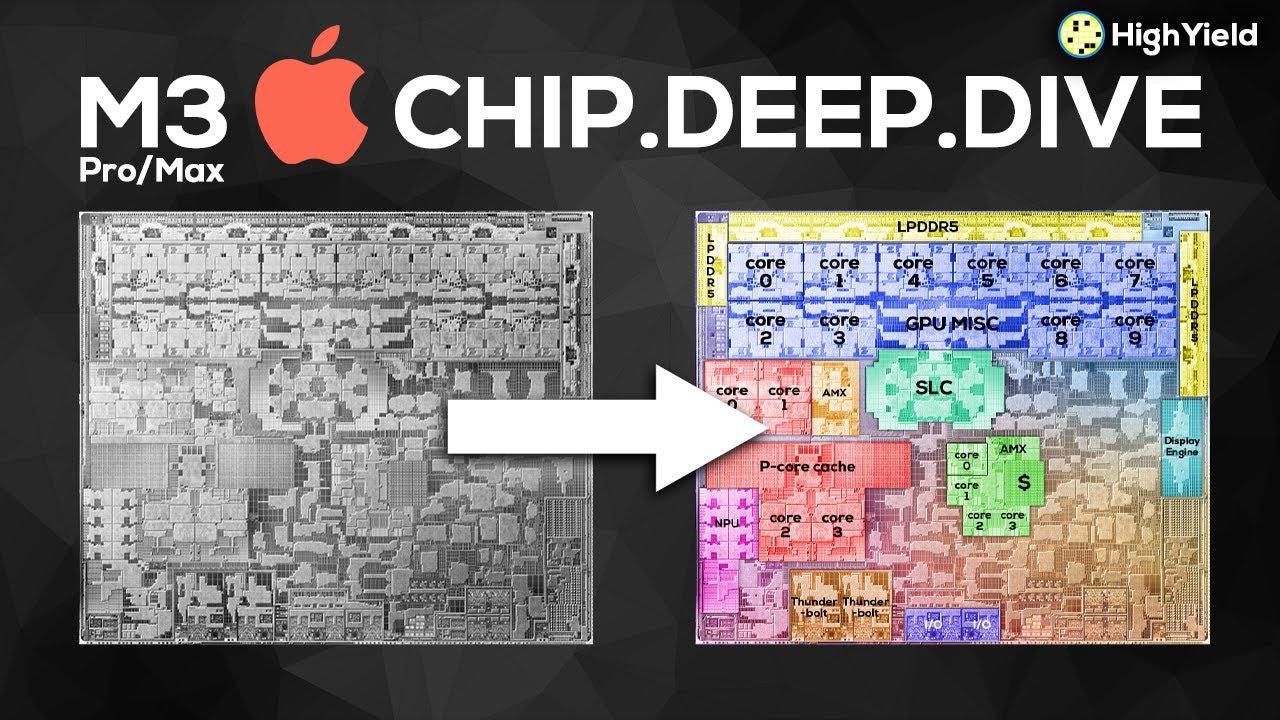
For those of you who are interested in the hardware details of the M3 family, I thought this was a very interesting video. Two issues stuck out to me:
While M1 and M2 were basically two chips designs (M1 vs. M1 Max/Pro/Ultra), M3 now is based on 3 separate designs (M3 vs. M3 Pro vs. M3 Max/Ultra) which is what has resulted in many early reviewers regarding M3 Pro as a “downgrade” compared to M1/2 Pro.
The M3 GPU is entirely new and its dynamic shared cache system could be considered a game changer.
More excellent analysis by Howard Oakley on the M3 Pro here. The first is mainly about efficiency and energy use. The second discusses different numbers of cores M1 vs. M3 and how that affects virtualization as well as Game Mode.