I am in the same, or similar, boat. I do subscribe to Apple Music and everything I download there seems to sync between devices fine. But I have NO idea how to get my Mac to sync music I’ve either ripped from CDs or downloaded from the web to my iPhone, which I use as my portable music box. Any helpful suggestions would be hugely appreciated! Thanks!
What was not clear from the O is whether you are trying to play music you already own. I have a huge library of music I converted to digital over the course of some years. Just being lazy, I play them in the fruit’s Music app on my phone.
How to GET that music onto my phone is another story. For my previous 6s phone I had to d/l some “software” via an OS prompt, after instaing that I could copy the music. Oh, I do NOT want to sync as I only want a subset of my library (currently I have 80G on the comouter and 30G on the phone). For my new/refurb 12, I get the prompt but it fails with a “network” error. My guess is the fruit will provide zero help.
So I got clever. I dual boot my cMP. I created a partition on one of my drives, form,atted it to FAT, copied my library there and then used the win10 version of iTunes to choose and move what I wanted on the phone. Oh, the other caveat is that due to my GTX 980 GPU my Mac side is stick on High Sierra. That 980 is still a pretty decent GPU for win10 games.
What commands were you executing at that prompt? I’ve never done that.
If you don’t want or can’t sync your entire library, the normal solution is to sync selected content (artists, albums, playlists, etc.)
On my older iPod nano (which could only hold a tiny fraction of my music collection), I made a smart playlist that selected random tracks that had not been played recently, up to the limit of the iPod’s capacity. I configured my system to sync that playlist. So every time I connected the iPod and clicked “Sync”, it would update my play counts, re-generate the smart playlist, and then sync that playlist, removing played tracks and replacing them with new ones that were not recently played.
David, it was an OS prompt when I plugged the phone into the computer. I remember it failed a few times for my 6s, but at one point, no network error and I could copy stuff to my phone. I’m way over a dozen tries to get my 12 recognized, but every one has failed with that “network error.” Some error trapping!
Sad that functionality I USED to have on my Mac (my first Mac arrived May, 1984) now dictates I use win10 to do something vaguely similar.
I used to do amazing things with smart playlists back in the day. One was exactly as you described. I don’t think they track “plays” any more as I do not see such data when I look in iToonz win10, and that was the key. Still, given I have way more room on the phone than my 1G Shuffle, I hardly need such.
OK. I misunderstood. I thought your were executing some commands from a terminal to transfer music.
The popup you refer to is not unusual. Every time you install a new version of iOS on a device, you usually see this popup the first time you try to sync that device. The text it presents is pretty vague, but what it is actually doing is installing/updating a device driver needed to sync content with the iOS device. Once installed, the sync should “just work” via iTunes or the Finder (for macOS releases that use Music).
If it fails to install with a network error, then you may want to check your network settings. Especially firewalls (including third-party ones like Little Snitch). If you’re blocking access to the content distribution network (CDN) that Apple uses to deliver that driver, then you won’t be able to install it and you won’t be able to sync content.
I still see the “play count” field in the “Get Info” box on Music and the “Plays” column in Song view. And it updates when I play a track (specifically, when the track plays to its completion - if you stop/skip before the end, the count doesn’t increment).
I use the following smart playlist for the core of how I sync small devices:
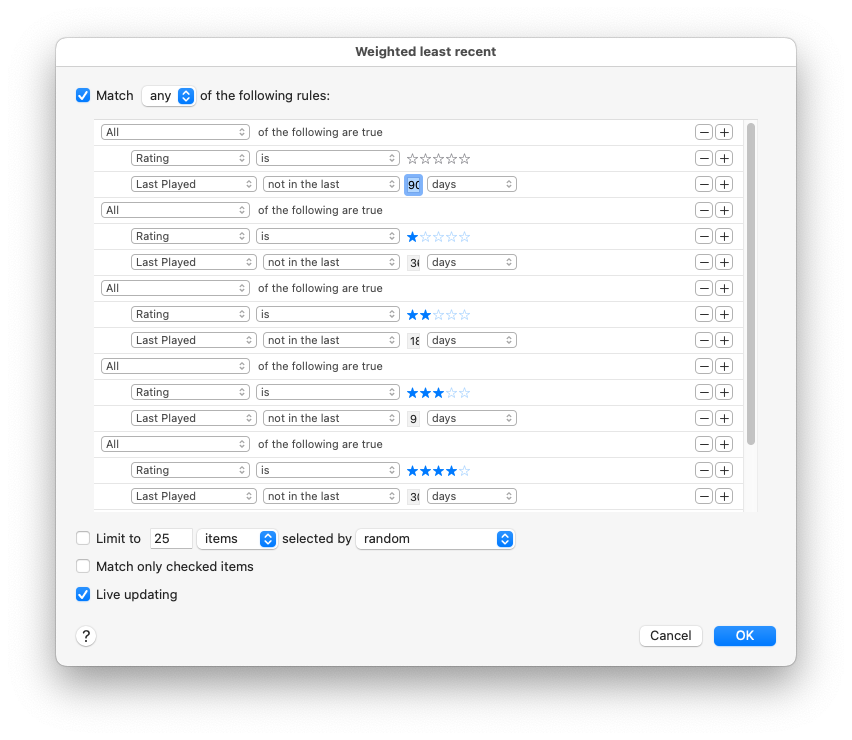
- Match any of the following rules:
- All of the following are true
- Rating is (no stars)
- Last played not in the last 90 days
- All of the following are true
- Rating is (one star)
- Last played not in the last 360 days
- All of the following are true
- Rating is (two stars)
- Last played not in the last 180 days
- All of the following are true
- Rating is (three stars)
- Last played not in the last 90 days
- All of the following are true
- Rating is (four stars)
- Last played not in the last 30 days
- All of the following are true
- Rating is (five stars)
- Last played not in the last 10 days
- All of the following are true
- Live Updating
I then make a second smart playlist, which uses the above as the basis, selecting a random xxx MB of content, sized for the device’s storage. And I configure my device to sync only that playlist.
@Shamino I like your smart playlist idea, but I can’t figure out how to make a playlist that in the form of ANY OF (condition a AND condition b) OR (condition x AND condition y).
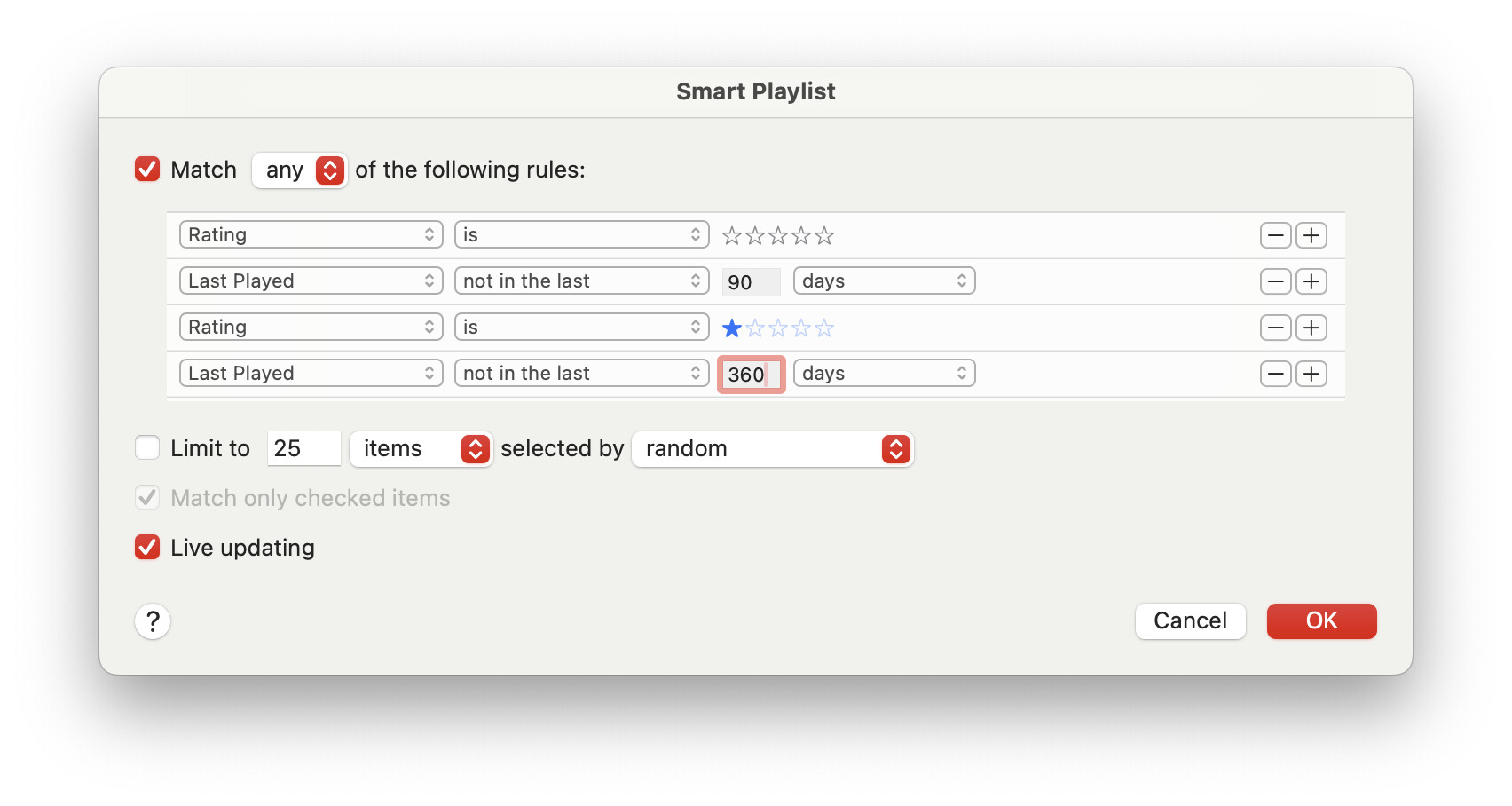
What am I missing?
To get the nesting rules, hold down Option. The “+” button will change to a “…” button that creates a nested block of rules. For example, this is what I use:
This is documented on the help page for editing a smart playlist. Click the “?” button in the lower-left and scroll down a bit.
1 Like
Thanks @Shamino! I guess I should have clicked that ? icon! 
Hi, that seems a bit strange because if you are subscribing to Apple Music and you activate Cloud storage any of your own files will either be matched with the same file in Apple Music or uploaded. I believe I can access all my ripped CDs from my iPhone. I find that to be one major advantage over Spotify that would be the normal streaming service in Sweden.
I can’t give you a good link to Apple support pages on the topic because it just directs me to the Swedish support page. But search for Apple Music and iCloud and you should be able to find information.
I’m looking for Mac and iOS music players that support left-right channel balance (not necessarily free). Can’t find anything but equalization in Music on either platform.
Thanks.
I think you will find a system level balance control in the hearing accessibility settings of iOS. That control can be added to the top level control center for quick access. Apple is just being Apple by hiding controls in odd places.
On Mac, there is a balance feature in the Sound panel.
I can’t find it in Sequoia…? “System Settings / Sound Panel?”
Yes:
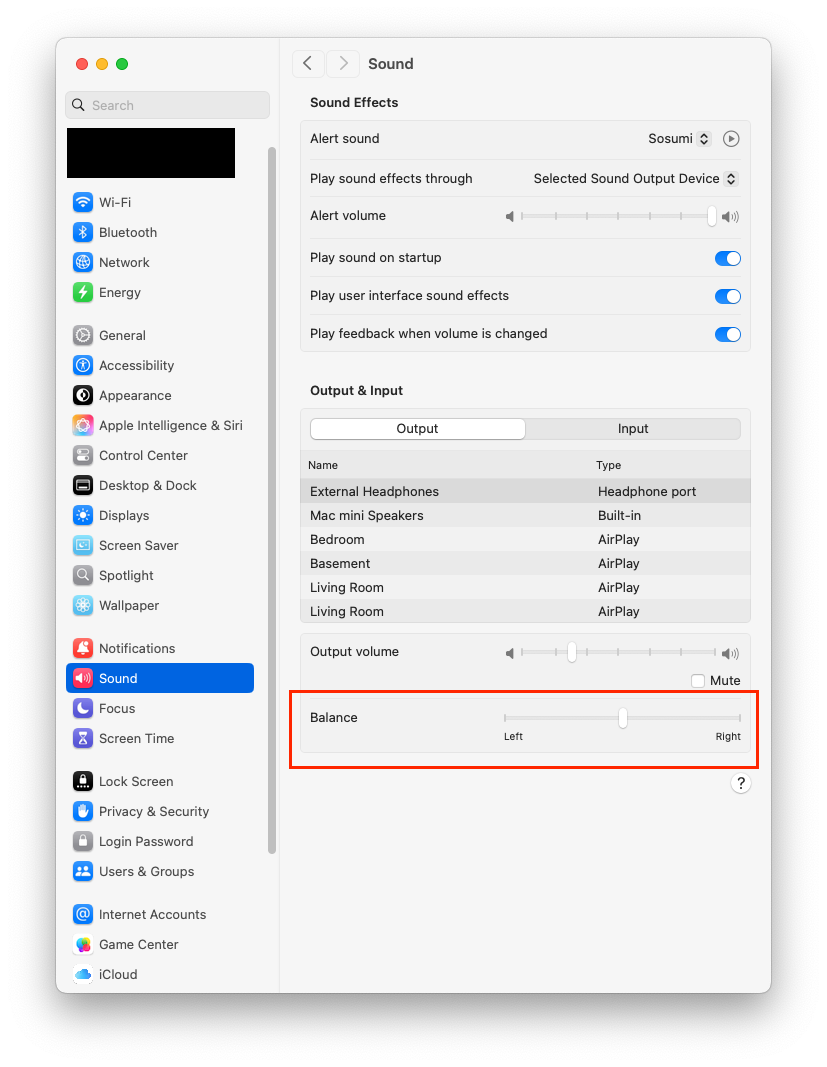
But if your selected output device is not stereo (e.g. the Mac’s internal speaker), the balance control won’t be present.
1 Like
Doesn’t work for AirPlay devices.
I added it to Control Center, but tapping it didn’t seem to do anything except toggle the display of the button’s graphic.
Thanks, though, folks.
Does your amplifier have a balance control or does your setup not use one?
My receiver is at the opposite end of the room, and I want the balance feature for frequently cutting one or the other channel completely, not simply adjusting for my listening position.
(I have some “music minus one” book/CD’s that I got several years ago, took a look at them and realized I wasn’t ready for them. Found them buried today, and realized I am at last “ready for them” … :-)
1 Like
The balance control that William Trent mentioned does work for AirPlay on my iPhone using either the Music app or the Onkyo HF Player which I usually use as it has EQ functions but Mac OS does not have balance for Airplay as you mentioned.
Airfoil (for macOS) has a balance control.