It’s not the choice of the NVMe SSD in the Envoy Express, it’s the controller. The Envoy Express is a “crippled” TB3 device that’s not able to use the max TB3 40Gbps bandwidth because the Intel chipset in the enclosure (Intel Alpine Ridge) uses 2 PCIe lanes instead of 4. It evidently was a design decision made when they first came out with this bus-powered TB3 device. it looks like newer Intel TB bridges (such as the Titan Ridge in the Envoy Pro FX) can support 4 PCIe lanes for a bus-powered enclosure – hence the improved speeds.
5 Likes
That’s good information to know, thanks. And it is a very good point. I was thinking too much about short term (connecting to Intel Mac right now), instead of the future (connecting to a Mac Studio, probably next year). And it doesn’t really matter if a ASM2464PD drive is slower than the Envoy Express, because I still have the Express. I could just keep using it as the primary, and make the new drive the backup, until I get the new Mac.
But I’m wondering what the price and specs will be on the just-announced OWC Envoy Ultra Thunderbolt 5 drive. I amazed that people would pre-order it blind, with no specifications at all.
1 Like
Almost. Most of the “new” TB4 features don’t violate the TB3 spec. But those features were optional in TB3 and are mandatory in TB4.
There’s no technical reason why a TB3 port can’t support a many-to-one downstream interface, but I don’t think any TB3 chipsets actually implemented support for the capability. Or put otherwise, when the companies decided to add in these optional capabilities, they decided to go all the way and market the chip as TB4.
I bought a OWC Express 1M2 USB4 drive on Black Friday. (I should have waited until today (Cyber Monday), the sale is much better.)
What surprised me was that when I connected it to my 2013 MacBook Pro, with 3 TB4/USB4 ports, it connected to the USB 3.1 bus!
But only the first time. After I dismounted it and tried again, it connected to the TB4 bus. And every time after that.
One change was I reversed the cable.
UPDATE: I know what happened:
- I plugged the drive in for the first time.
- macOS popped up the dialog asking if I wanted to allow a connection to this device
- I wasn’t fast enough, and that dialog vanished, but…
- macOS popped up the dialog asking if I wanted to allow a connection to this device.
- I approved it.
- (notice that it connected to USB 3.1 bus, disconnected drive)
- I plugged the drive in for the 2nd time.
- macOS popped up the dialog asking if I wanted to allow a connection to this device.
- I approved it.
- (notice that it is connected as USB4)
Can you see what happened?
The first dialog was asking to approve the Thunderbolt / USB4 connection. This dialog timed out, and then the drive tried to connect with USB 3.1. That was approved.
On the second connect, the reason it asked me again, was it was trying for TB/USB4 again – which I hadn’t approved the first time. So this time when I approved, it, it connected as USB4. And that’s why I didn’t see any more connection dialogs after that.
3 Likes
What I do appreciate about OWC is that they are very clear about what to expect for anybody who connects to TB3: they’ll see USB 3.1’s 10 Gbps performance. If you want 3.2 GB/s you need TB4 or USB4.
Not many manufacturers are that forthcoming and instead label things as if it’s clear that if it works with TB4, it will also work with TB3. While that is technically true (or close enough), the real question is how well it works. For somebody with a 2020 Intel Mac and TB3 ports, this tells them that rather than spend $95 on this enclosure, they could get the same throughput with a $15 USB3 enclosure (not saying there aren’t other benefits to TB - there clearly are).
Kudos to OWC for being 100% straight about this.
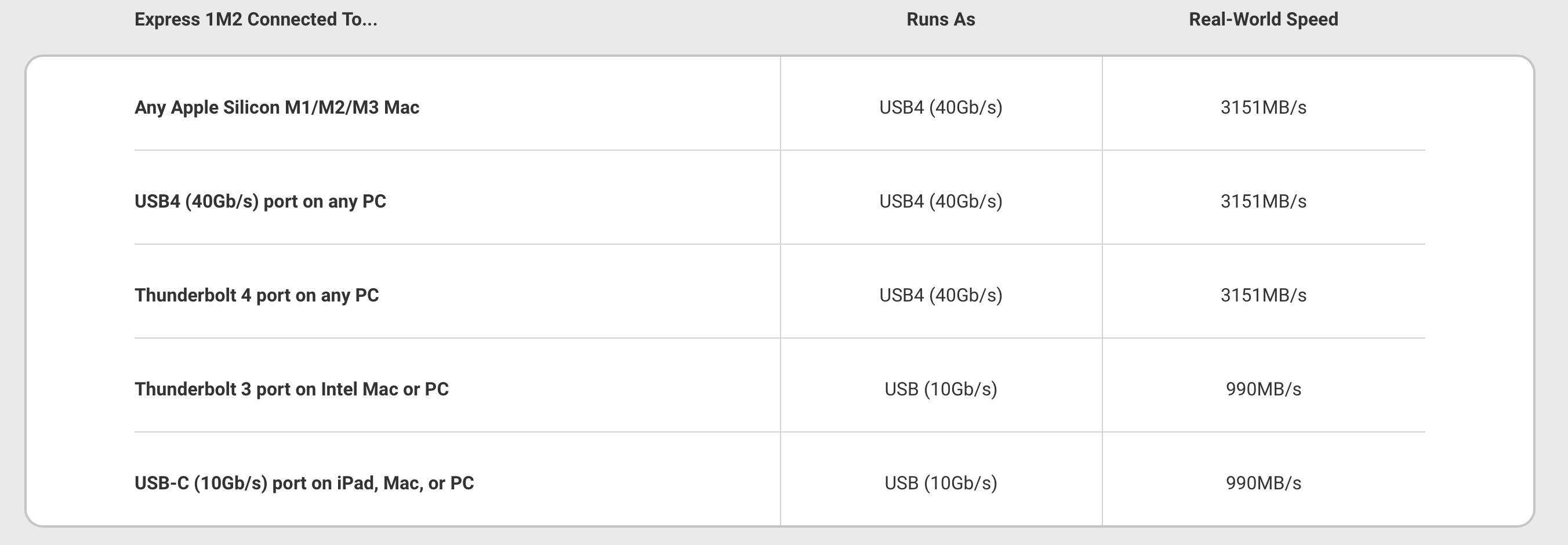
2 Likes
This chart is not surprising given that the chipset in the Express 1M2 is the ASMedia ASM2464PD USB4 chip. I also give OWC kudos for clearly stating that this is a USB4 device, not a Thunderbolt device. Once you know that the chip is connecting over USB protocols, the chart makes 100% sense.
1 Like
Well, yes, the bridge chipset is ASM2464PD. But there are enclosures that include both a great USB controller like the ASM2464PD as well a dedicated TB3 controller (most commonly Titan Ridge) so the enclosure can always bridge to the best possible protocol available regardless of Mac or Windows, or Intel or Apple silicon.
This is certainly not strictly necessary, but if you do go for only one or the other, it’s highly desirable to make clear exactly what people will get when they connect to a specific device. I know of very few enclosures that advertise the bridge performance as openly as OWC. I’m not a huge fan of OWC myself, but this I think makes them stand out in a really good way and IMHO deserves praise considering how so many other enclosures are being marketed. There’s a lot of confusion out there and at times it feels like that’s being borderline exploited.
Got my Orico SSD enclosure and 4Tb Samsung M.2 SDD yesterday.
This replaces a USB3 external hard disk that has been used for Time Machine, photos and data backups. That drive was becoming unreliable and I had to erase the TM partition and start a new TM backup of about 400Gb. That took several hours and during that time I ordered the Orico and SSD.
Plugged the SSD into my M2 Macbook Air USB-c port and started a new TM backup. I couldn’t believe the speed - it took less than 20 minutes.
This morning I started a TM backup@ after adding photos to the Photos library and it was finished before the MBA could calculate the time remaining!
So thank you to the above posters for the tips about M.2 SSDs.
@ I use TimeMachineEditor.app to schedule my backups. This is partly because the old hard disk would take ages to complete hourly backups.
BTW - could Adam or @mschmitt consider editing the title to mention SSDs e.g “Looking for an M.2 enclosure for an external SSD”
1 Like
To distinguish between that and M.2 to U.2 or SATA III adapters?
No - just that “M.2 Enclosure” meant nothing to me when searching for this discussion. Luckily I remembered the word Orico.
Thank you for updating the title.
Would “Looking for an enclosure for an M.2 SSD” be better? Enclosure implies external, and M.2 describes the SSD, no?
 Either is fine with me.
I’m officially changing my opinion on this one. I’ve bought two of these. One of them hasn’t had any problems.
The second has a USB-C connector that doesn’t always make good contact. The result is that if I so much as touch the device while its in use, Windows (the computer using it) will disconnect it from USB causing the VM running off of it to crash.
Additionally, they get hot. When in use, both get uncomfortably warm.
A few weeks ago, after getting frustrated with the flaky USB-C connector, I moved that SSD into this enclosure:
Amazon: SABRENT USB-C NVMe Enclosure & Reader, M.2 PCIe SSD..
This enclosure costs a little more ($20 vs. $14 at this moment), but the USB connection has been rock-solid and the enclosure is much cooler. I’ve noticed it is cold (vs. room temperature) to the touch when not powered, so its heat-sink clearly does a better job than the one used by the Orico enclosure.
They also make a $30 version that also supports M.2 SATA SSDs, but there’s no need to get this unless you have an M.2 SATA SSD (maybe from an old computer) that you need to re-home into a USB enclosure.
2 Likes
I am trying out Ugreen enclosures after also having intermittent connection issues with Orico ones. They include a stick-on patch that seems to be to transfer heat from the SSD to the aluminium case.
Sabrent, Ugreen, and OWC are my preferences for external SSD enclosures.
1 Like