What I meant was Apple should have made iWorks version 7 of AppleWorks by having Pages/Numbers/Keynote replace the WP, SS & presentation modules of AW but with AW’s tight integration. Then Bento could have replaced the DB module. As for the drawing & painting modules, I don’t know what could have replaced them as Apple never even tried when they released iWorks.
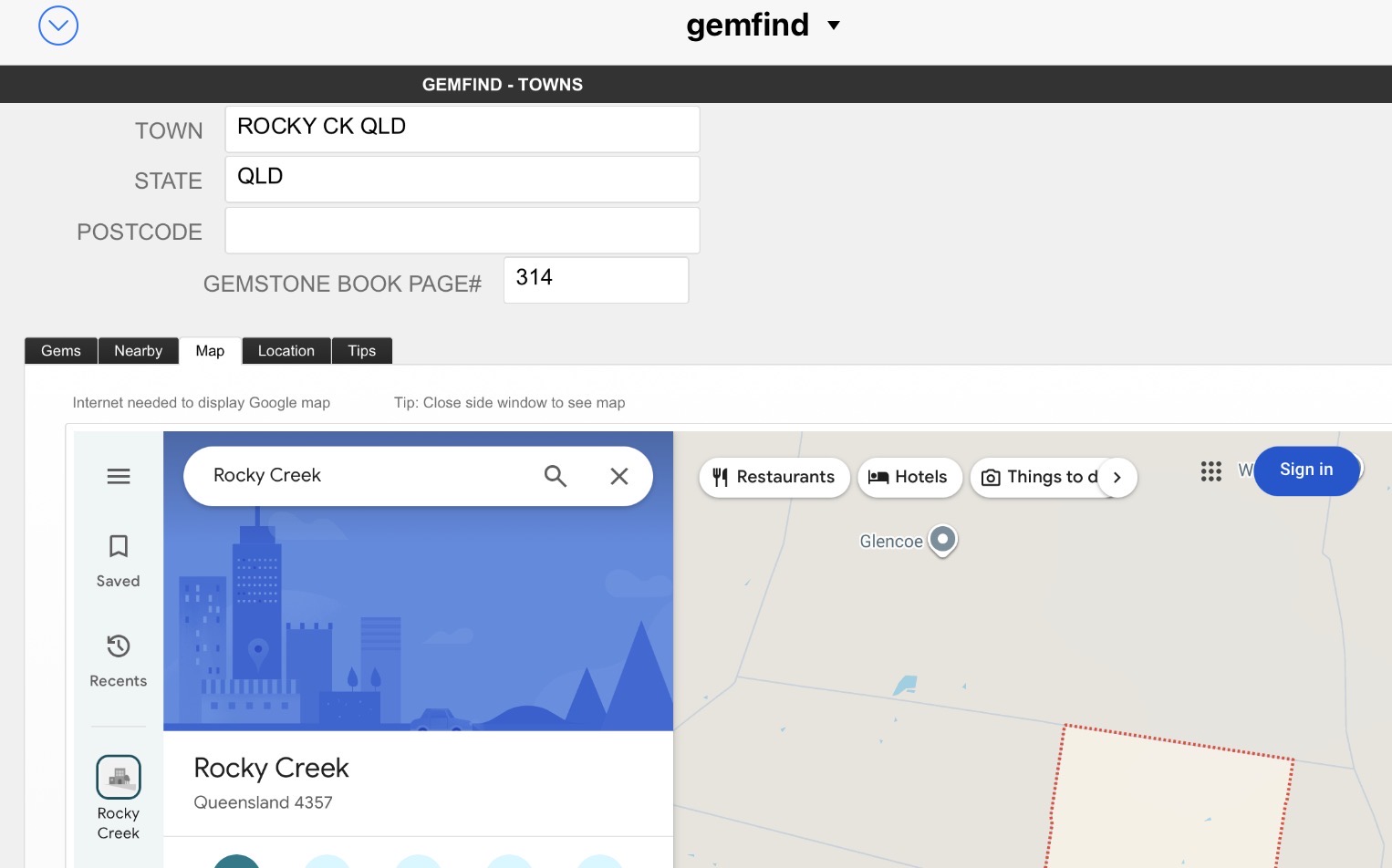
I still manage to use Filemaker (15 - before subscriptions were introduced = ) on my latest Mac running Sequoia. I can also run some of the smaller databases (created on the Mac) on an iPad with FileMaker Go (19). I even managed to incorporate Google Maps into one database that I developed to locate gemstone towns around Australia:
Note = Since 2016 I have migrated version 15 the app through successive Macs and OS without issues. I found that the extra “features” of later versions were of no great use to me. A caution is that I miss out on security updates. However my database projects only use local data access (other than the Google Maps example above)
I agree. But I have to say I rarely use Pages and Keynote but I sometimes use Numbers, which I find rather inferior to the dreaded Excel, a necessary inconvenience. Given my limited eyesight Pages is very hard to work with and nowhere near the capable WP as the now abandoned Nisus Writer Pro or the Mellel, which would be my new go to WP if it had a better table process. Nisus makes table creation so easy with the ability to set up items separated by a tab, then highlight all the items and turn them into a chart. Mellel makes the user have to set up the columns and rows in advance and then fill them individually which is a real pain. For example I have a document that lists all the Audible books I have by simply copying the items from my Audible selections online, pasting the titles etc. as a text file, cleaning that all up and separating the title, author, date of purchase by tabs, then creating a table, duplicating the table and using one table for listing by authors and the other as a listing by title. Using bookmarks and table of contents with links to each table I can print a document that easily allows me to click between the tables. If I had to enter each item into a predefined table it would take forever. Oh the loss of Nisus hurts
It would be nice if Apple had a database. One app that offers a similar excellent interface and ability of design is TapForms Pro developed by Brendan Duddridge, who BTW is very responsive whenever there is a question or problem. I highly recommend the app but it is not a WP.
Oh yes, I forgot. I used FileMaker for years but then it gout out of hand $$$$. Fortunately I had TapForms to fall back on. It allowed me to export my work as well as have it synch with my iOS devices so all turned out well. I recall I was able to access a version of FileMaker some time ago that was low cost but my mind is foggy on how that worked. It was not a very good version of it. Thanks for the reminder.
Haven’t used MS apps for many years - maybe 20, although my wife does for work. I get the occasional Word doc from friends. I always convert the data that I need into Apple’s Pages and before that AppleWorks, ClarisWorks or whatever it was. I also use Numbers frequently. But, I’m not a power user on either … just personal use.
Anybody else remember MindWrite from 1986-87? It seemed like a good idea when I started finding MacWrite1 inadequate for some purposes I now forget but eventually it faded away. Then I tried Write Now. At that point I sent news stories I wrote as text files over various wire services, which limited the choices in compatible.
My biggest text-conversion mess came in the 90s when I wrote a 600-page textbook on fiber optics in WordPerfect 3.5 for Prentice Hall. That went through two more editions and I was never able to find anything that could convert the equations and math stuff from World Perfect into a usable form, leaving me without a master editable manuscript for revisions.
Though this won’t be a solution for everyone, I’ve been surprised to find that 98% of my databasing needs are met by Andy Brice’s Hyper Plan, with occasional help from a CSV editor like Easy CSV Editor or Modern CSV. For those who don’t know it, Hyper Plan is a single-table database app with pretty basic table and form views, but its marquee feature is a Kanban-style interface in which the two actively manipulable grid dimensions are mappable to selected fields (“Properties” in HP parlance), and various additional passively displayable attributes (fields visible, record colour, sort order, &c.) to other fields.
I used to be all in on Ninox, which is brilliant in so many ways but such at a high cost in frictionality that even a simple relationship requires some quite fussy scripting, and it turns out that most of my day-to-day database operations are about data views and populating fields from a list of values, with HP’s lack of relational lookup usually workable around – including via Andy’s own flagship table-munging app Easy Data Transform – and offset by the sheer fluidity and versatility of its UI.
I saw the first half of this post in my email, so I logged on here to mention Panorama, since it is my app. However, now that I can see your entire post I see that you already discovered it. We’ve picked up quite a few former FileMaker users over the years, I hope you’ll take a close look!
I should note that I am heavily reliant on macros, and I’ve created my own ribbons to maximize efficiency in my editing work. Also customized keystrokes for many of those macros. The VBA macros are what keep me with Word.
That seems reasonable, if something is getting repetitive. (Also, your house, your rules.)
But it makes me think about the benefits of consumers voicing their frustrations, not just voting with their wallets. It seems like sometimes it makes a difference.
I’m still fuming that Apple discontinued Bento. It was absolutely PERFECT for my needs - and apologies to no one - FileMaker Pro is way too much program for me. I kept using Bento for as long as I could, then a new version of MacOS would no longer even open it.