Today I’m seeing failures in sync of iPhone 13 mini on 26 to MacOS 26, as well as iPhone 11 Pro on 18 to a Mac on Monterey.
Iphone 6 and 7 sync to Monterey Mac fine. Cables swapped to the 11, didn’t help.
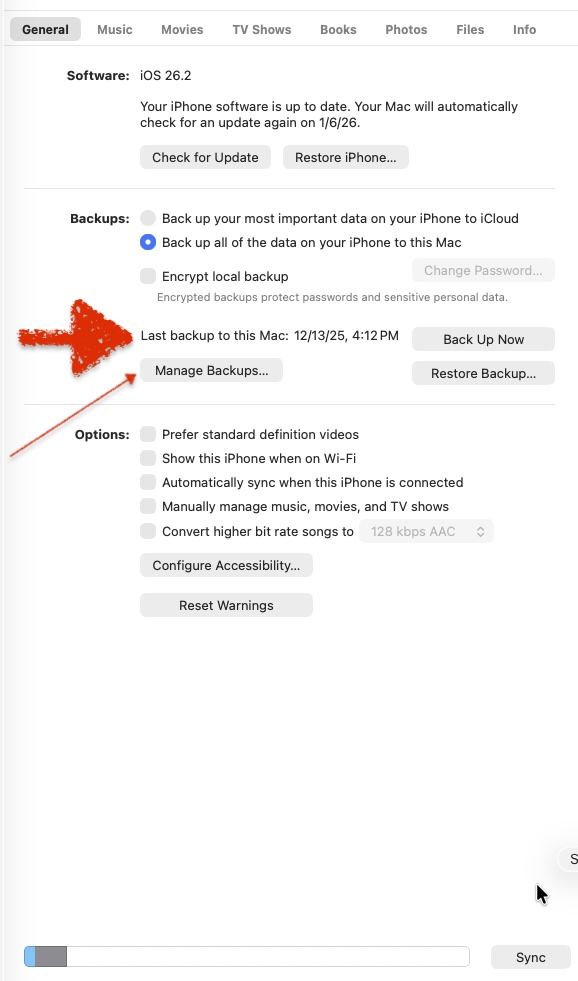
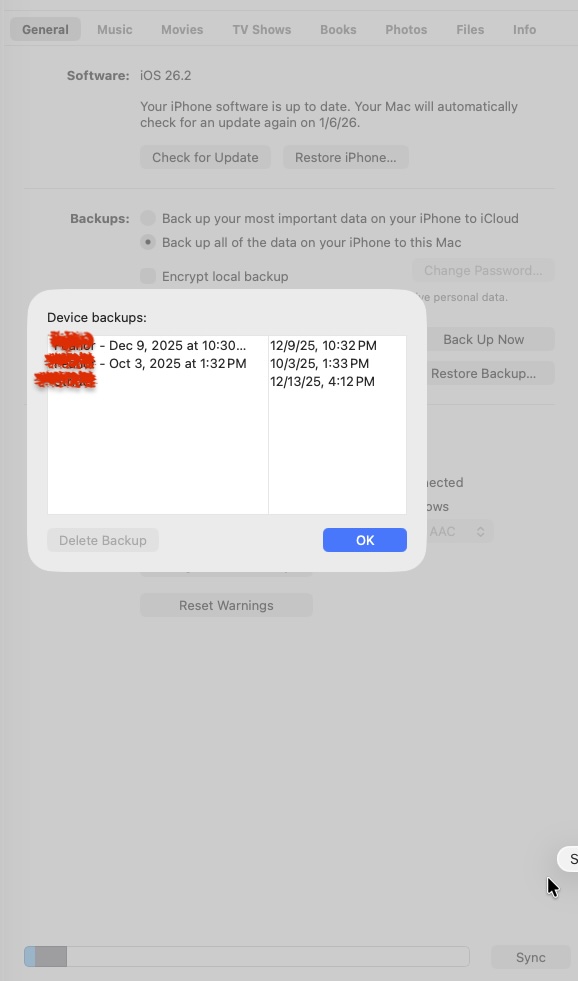
When simply trying to Backup, on either setup, the 13 and 11 go through the motions but the time/date in the Finder window doesn’t update. I go to Manage Backups… and today’s backups show.
In syncing, I do the multiple approvals of using cable, unlocking, and approving connecting iphone to Mac. I click Sync, then the barber pole thing spins for many minutes and when I go back to the Mac, they Sync has stopped and the iPhone has been ejected. No failure messages on Mac or iPhones.
Weird! older phones work ok but the newer ones don’t, same cables, across multiple variations of OSes.
I haven’t restarted the Macs yet but what else might jigger things into working? Or is the Sync working as expected (I don’t see any indication other than ‘Manage Backups’, which is not the same as syncing (the backup step occurs on both setups but the date in Finder’s ‘most recent backup’ doesn’t change).
Try rebooting those iPhones and Mac that don’t sync properly. I had no problems with old school local USB sync with iPhones (11 Pro Max and 13) in an 2020 13" Intel MBP with macOS Sequoia v15.7.3. Each iPhone has its own macOS user account to avoid conflicts since MBP is a shared family computer.
@Will_B , I tend to do both. I plug in the iPhone to Mac with usb cable and when it appears in Finder, I’ll usually first click Sync (which displays that it is doing a backup step) and when that is done I click the Backup button up in the middle of its Finder window to make sure I have a backup, as the Sync button process does not update the time/date shown for most recent backup.
And now even the Backup button is not adjusting the time/date shown, even when Manage Backups… window and Finder show a more recent Backup.
I don’t use Calendar or Contacts so don’t sync them.
It also occurs to me that I can’t find out when the latest Sync was performed. It isn’t shown in the iPhone’s Finder window and I’m not sure where they’re stored.
Thanks, @Will_B , that is the Backup view I was referring to, right on. But as I understand it, that is backup only, and Sync (button lower right in Finder window) goes through more steps. I don’t see where the last Sync is located.
The “Sync” button refers to syncing and backup. It syncs the various media in the row of buttons at the top of the screen according to settings offered when you click on the buttons. If you click on “Info” you can setup Calendar, Contacts, (and allegedly Reminders) syncing.
The “Sync” button triggers both backup and sync. Where as the “Back Up Now” button only backs up. The dates I labeled refer to both processes. So, I suppose if you only used the Back Up Now button, the actual syncing could get behind, but since you aren’t using Calendar and Contacts, you’re probably not missing anything.
I did restart the M2 MBAir and synced iPhone on 26 and it worked, and the date was updated, so it seems the Mac got tired or something and was not quite up to the task til restart. Tad disappointing, but there you are.