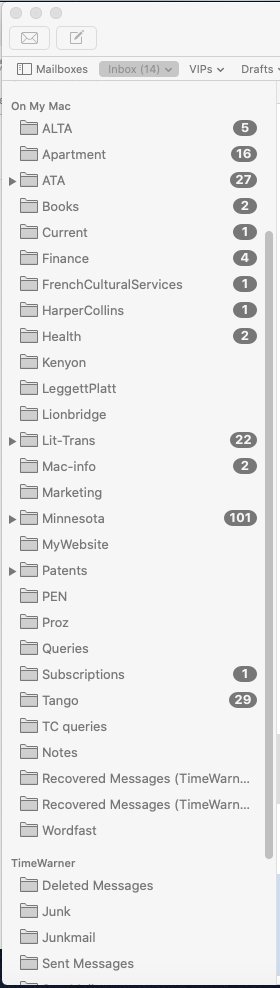
That will copy them to the Time Warner section. You also need to change your rules to point to the new mailboxes in the Time Warner section.
Once you’re confident that everything is working, you can delete the On My Mac mailboxes.
That will copy them to the Time Warner section. You also need to change your rules to point to the new mailboxes in the Time Warner section.
Once you’re confident that everything is working, you can delete the On My Mac mailboxes.
This is my User/Library. Also, the only thing I did there was to take a screen shot of the contents. Otherwise, everything is done in Mail.
May try that. The thing is, these folders were probably in place from an earlier version of OSX and carried over to a newer version at some point. The Time-Warner sections appeared only when I switched to Time-Warner cable. I did not put them there manually. For what it’s worth, it looks like this now:
Try it with a few mailboxes and see if it works for them: copy those mailboxes by dragging, and update their rules for them. If that works, you can move them all (and then delete the On My Mac ones).
I tried it with one smaller mailbox. It works. Now I need to decide if I actually want to store everything in the T-W section and not “on my Mac.” I’m reconsidering the idea of doing away with separate submailboxes and just dumping everything into the Inbox with different colors for different categories.
There wouldn’t be that much difference - everything would be in the TWC inbox (or still in “the T-W section” as you put it rather than “On my Mac”). But either way it would be accessible to mail clients on other devices.
Also, fwiw, color coding on a Mac is something else that does not sync to other devices.
OK. Thank you for the information. One way or another, I’ll figure out how to arrange all these mailboxes and messages.
Thanks Doug for that note about editing the iOS and iPad OS Mail Mailboxes. I do 99% of my Mail reading and editing on my Macs but sometimes I use the iPad or my iPhone. I was baffled about the “Mobile Me” mailboxes I had. I removed them and Mail should work as I want. (I also had the iPad OS and iOS Mail set to move deleted mail to the Archive (!) folder. That setting is hidden in the iCloud submenus and I put the deleted mail in trash now.) Thanks again!
My solution to this same issue was for my rule to copy the mail to the folder on my Mac rather than to move it. The mail won’t be sorted on your phone, but you’ll see it if you are out and about, which was my primary concern as a freelancer.
Interesting. The problem with that method is that you wind up with a lot of duplicate messages. I’m wondering if it might not be better to simply keep all mail messages in one big Inbox and abandon the subfolders I use to organize everything. Of course, finding specific messages in the future becomes a lot more difficult that way.
In my case, I really just wanted to make sure I wouldn’t miss any customer inquiries for a translation job. Once the job was moved to my folder I didn’t need it in my main email anymore.
What language? I have been a FR>EN translator for 35 years.
DE-EN, but my business is pretty much completely dried up. I’ve had 4 jobs all year, and all were MTPE :-(.
Same. I know the feeling. MT and now AI have decimated the industry.
If this isn’t solved yet, here’s the principle at work: You can have folders (mailboxes) on your device (mac, iphone, etc) to store mail, but mostly you get and store mail on folders within an imap account. (The messages are stored in a special format, so the mailbox “folders” aren’t like Finder folders.) The latter folders are physically on the imap server, and will be visible on any imap mail client - mail.app, thunderbird, outlook, even web mail. You can move messages among any of these folders, manually or using mail.app rules or using AppleScript. For example, I have a script that moves a selected message in any account, into a specific folder in gmail. To make a folder in an imap account from mail.app, just click the + sign next to the account in the mailbox list, tell it where to put the folder, and give it a name. Within minutes, it will appear on any device connected to that imap account.
Thanks, that explains it quite clearly. I suppose the question for me now is whether or not to move all those messages to folders in my imap account. But that’s something I’ll have to decide.