Hi friends, last night while using my iPhone 16 Pro Max with iOS 26.0.1, I was on the phone and another call came in. I had absolutely no idea how to place the first call on hold to answer the 2nd. Unlike previous versions of iOS, where there was a hold and merge button, I saw nothing like that at all! Later in the evening, I even had my girlfriend call me from her personal phone, and then from her work phone, so that I could explore the options, but I didn’t see any way to accept the new, incoming call. I just had the option to either answer or decline. I didn’t actually try answering to see what happened, though I should have done so in my testing.
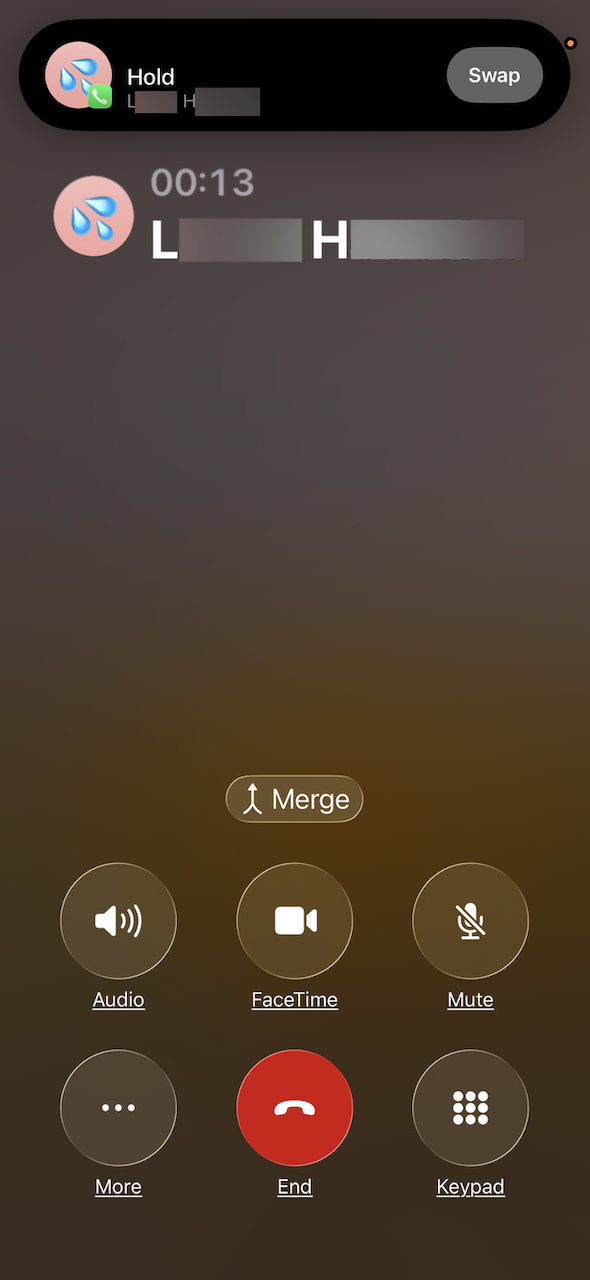
Ok, I played around with it a bit more by having my girlfriend call from her personal phone and while connected, call from her work phone. I was presented with an “Answer” or “Decline” option, and in selecting “Answer”, the first call was placed on hold. I was then shown options to “Swap” or “Merge” the calls. I don’t know what would have happened if I’d hung up the first call, but I assume that the 2nd call would have continued to ring, allowing me to answer. This is the same functionality as with earlier iOS versions, but the buttons don’t appear until you’ve answered the 2nd call.
2 Likes
Tell the person you’re talking to that you’re gonna answer the second call and as soon as you click to answer it, the other person automatically goes on hold. At least that works for me.