Hidden Setting Controls What Happens When You Tap a Call in the Phone App

Originally published at: Hidden Setting Controls What Happens When You Tap a Call in the Phone App - TidBITS

In “Comparing the Classic and Unified Views in iOS 26’s Phone App” (10 November 2025), I wrote about the Classic view’s Recents screen:

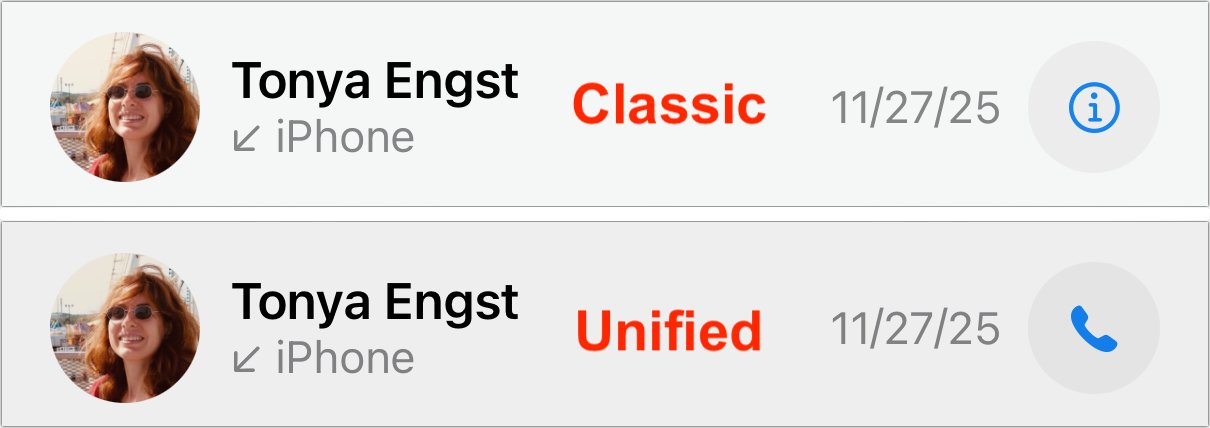
Tapping a recent call dials it, whereas tapping the ⓘ button to the right opens the contact card associated with the call.

In contrast, Unified view’s Calls screen displays a different behavior:

Tapping a recent call shows the associated contact; to redial the call, you must tap the blue phone or camera (for FaceTime) button to the right.

The only visual difference is the button to the right, which lets you override what happens when you tap anywhere else on the call. In Classic view, it’s an info ⓘ icon, whereas in Unified view, it’s a phone icon.
Image

I have strong opinions about this tap-a-call interface. As I wrote in the previous article:

I have hated this interface with a burning passion for years because it’s far too easy for a stray tap to start an unwanted phone call that I must then frantically cancel and often explain in a message to the accidental recipient so they don’t call me back.

Put simply, an interface shouldn’t make it too easy to perform a destructive action or create more work for you, and inadvertent calls can easily create more work. You may prefer a different behavior than I do, but I hope we can all agree that it’s good to have a choice of whether a tap on a recent call initiates a callback or opens its associated contact.

But isn’t it weird that the way you toggle the tap-a-call behavior is by switching the Phone app’s view? What if you like Unified view but prefer that tapping a recent call starts a callback rather than opening a contact?

Playing Hide and Seek with Settings

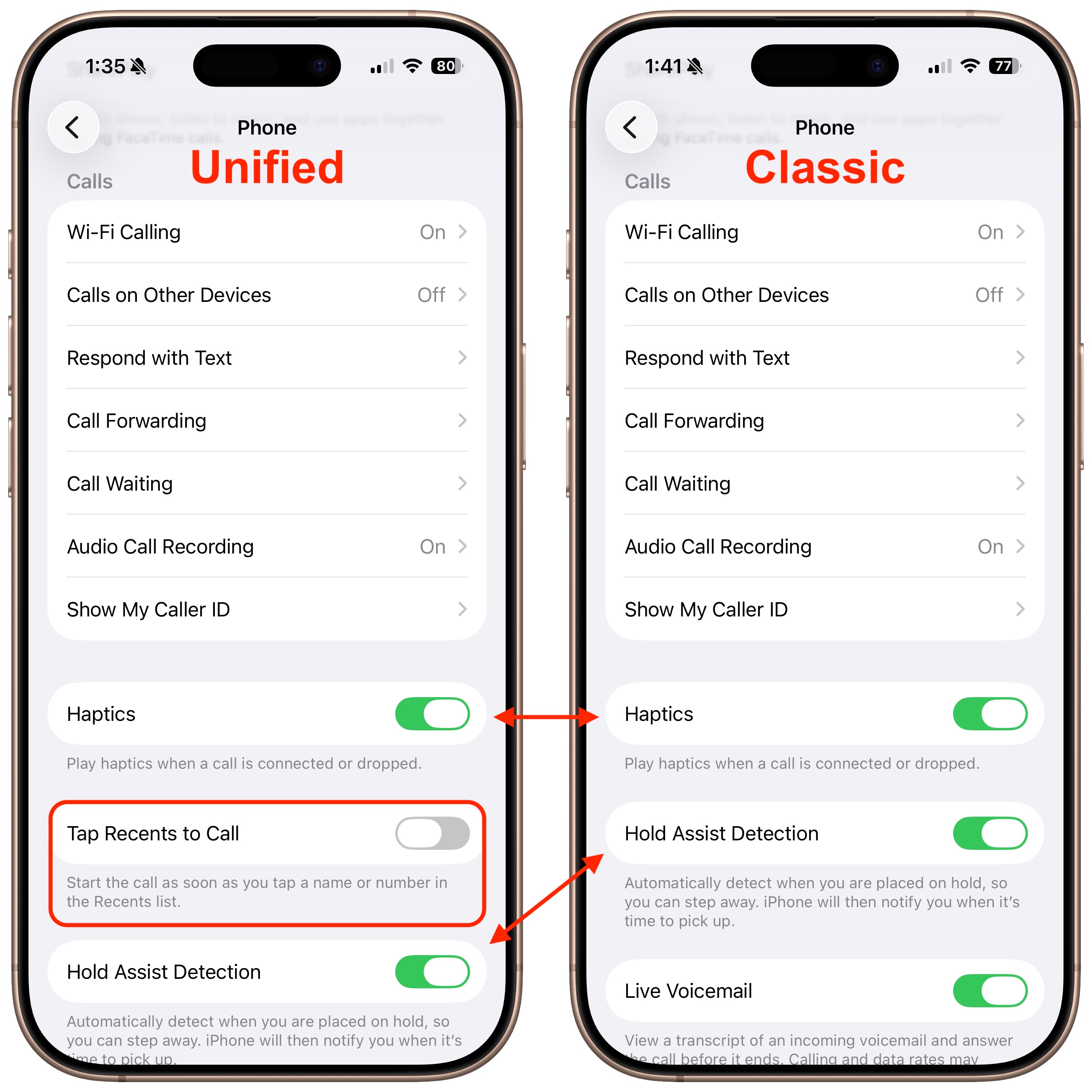
In an example of a poorly designed, nearly undiscoverable interface, Apple actually provides a setting for this, but it’s accessible only when the Phone app is set to Unified view—props to Paul Kafasis of Rogue Amoeba for alerting me to this train wreck of an interface.

To find it, make sure the Phone app is in Unified view, open Settings > Apps > Phone, and scroll down past Calls to where you’ll see Tap Recents to Call. Here’s the odd part: if you switch the Phone app to Classic view and then return to Settings, the Tap Recents to Call switch disappears, and Hold Assist Detection slides up. Switch Phone back to Unified and return to Settings again, and you’ll see Tap Recents to Call reappear, pushing Hold Assist Detection down. (If you’re unlucky, Settings will crash instead—I saw several crashes while exploring the feature.)
Image

Interfaces Should Be Predictable

This is deeply wrong. “User interface elements should not come and go based on settings adjusted elsewhere,” said Paul Kafasis, while holding his nose and fanning the air with his hand, in an exaggerated gesture of disgust aimed at Apple. (Hey, tip me off to a hidden interface atrocity, and you too can write your own quote.)

A basic tenet of interface design is predictability: controls must look and work the same way every time, or people lose trust in their ability to use the system. The most egregious example of a changeable interface (outside games, where unpredictability may be the point) came in Microsoft Word 4, where Microsoft had a brief fling with “short menus,” a mode that hid menu items for less common features. Thirty-five years ago, I criticized Word 4’s short menus in “Word 5.0 Wishes” (4 March 1991):

Another major contributor to the interface headaches is the “Short Menus” feature (I’ve heard an instructor in a class once say that Short Menus is a bug, not a feature.). With Short Menus turned on, most of the menu items disappear, resulting in complete and utter confusion when the user wants to perform an action whose menu item no longer exists.

But this is 2025, not 1991, and the unpredictability of the Phone settings is entirely unnecessary. If we agree that the default behavior for tapping a call should be user-configurable, why should that be true only in the Unified view? There’s no reason to prevent those who prefer Classic view from changing the tap-a-call behavior.

I have suggested to Apple that this tap-a-call option apply to Classic view as well, and I’ve reported that the Settings app crashes while toggling the option. We’ll see if anything changes in future versions of iOS.

10 Likes

Thanks, Adam — I’ve bookmarked this for future reference, as I’ve yet to update to iOS 26. (Holding off until 26.2 to see what changes Apple make.)

2 Likes

I too have been annoyed at the Tap=Call function with no confirmation. Now, I only gingerly tap the (i) button in the hope I don’t make a call…

2 Likes

Your articles seem to be ever increasingly critical of and anti Apple maybe it’s time to unsubscribe after so many years.

@mikesan how are you finding the Apple eco-system at the moment?

There’s lots in the press (more than here) about Liquid Glass, Apple Execs, and more I’m curious how much if any of it you’ve heard of? If you unsubscribe will you not see it elsewhere?

Hi Matt
I have been an Apple user since 1985 the company I worked for were the Apple distributors before they had Apple stores. I am happy with the eco system right now and only a fool would change it for any other out there, I am and always have been an earlier adopter I am also a shareholder for more than twenty years an investment that has secured my retirement and helped my children and grand children I have the greatest respect for Tim Cook and I am confident that whatever apparent problems whether real or imagined exist he will deal with them.
I subscribe to many newsletters and keep myself well up to date with what is happening not only at Apple but in the wider techno sphere I am 87 years old and have a .Mac email address which is where I receive my Tidbits newsletter.
My comment was a long time coming as the trend I refer to has been dripping into comments lately, we are all getting polder and maybe a wee bit grumpier but that should not affect our professionalism, I have to date enjoyed Adam’s reviews and comments and have used Tidbits articles to support my own case on occasions.
I rest my case
Regards
Michael

Michael Sanders
mikesan@mac.com

1 Like

I think we are all entitled to different views, and we don’t need to take offence on this forum - if we all had the same opinions, the world would be a very dull place.

p.s. I’m 71 and have also been an Apple user since time memorial - I remember having six disk drives stacked on top of each other, exchanging floppy disks.

4 Likes

I agree Adam is critical and, in my opinion, rightly so, but I do not think his comments are anti Apple, on the contrary.

I (too) think Apple software has declined in usability over te years and Apple would do right to listen to criticisms like those from Adam. It would make their products better if they gave usability more priority over eye candy.

5 Likes

Um, what does “make sure the Phone app is in unified view” mean?

Update: ok, got it — from the “calls” tab, it’s the upper right “filter” icon. (But leaving the post in case I’m not the only one who can’t remember…)

3 Likes

This may be due to the inability of the classic view to work without tap-to-call. In other words, in order to support not calling with a tap, the classic view would need to be changed in a way that Apple has not done.

You could argue that the option should be there, but grayed-out, but perhaps Apple worries about support calls from people asking why they have an option that cannot be turned on.

Since the default with iOS 26 is the new interface, and the classic view isn’t exactly easy to turn on (rather than an option in settings, it’s hidden in a control in the phone app), perhaps Apple is aware that 90%+ of users will never find it and won’t switch to classic view, and that users who do will want it to work the way it always did.

But I’m guessing it’s just that Apple never changed the classic view option to work that way.

1 Like

Which would be consistent with Apple’s approach of “hide if not available” which they’ve used in a lot of their development.

As a long-time user of Apple hardware (Apple II onwards) and its software, I can quite confidently say that Apple design standards have declined to a very low point. There’s nothing much brilliant coming out of Apple these days with many developments being half-baked in comparison to its competitors. Apple deserves to be criticised.Like Adam, I want Apple to get is act together and to reduce its run of failures. There is nothing wrong in having high standards.

3 Likes

Adam says what needs to be said. Apple has become over-confident in its actions, and seems to think that uses will telepathically understand and adapt every change they make. I only started using an iPhone a year ago, switching after my flip phone died because my wife had a spare iPhone. I’ve been a Mac user since 1985, but the iPhone’s controls have never made sense to me. If I try to check where a call came from I end up calling a spammer. Speaking as a newcomer to the iPhone, I find the whole iPhone control system clumsy, non-intuitive and painfully limited by the size of the screen. I am sure much of my reaction comes from my aging eyes problems with tiny type on a tiny screen but my iPhone has become a frustration.

1 Like

Totally agree. I’ve made unintended calls in the Classic phone interface and it’s extremely annoying, which is one reason I’m sticking with the new Unified view. Maybe Apple left the Classic view as it was to “encourage” people to use the Unified view. :wink:

1 Like

Just wanted to hit the like button for Adam’s article, but too many good comments here to let this go by. I was at Apple when we bought Next. Jobs felt that making all options easily discoverable limited what the Mac could do. I knew we were in trouble when we let Bruce Tognazzini and Don Norman go from the Human Interface Group.

4 Likes

I am a little late to the party on this one. I was all excited and went in to make the changes. As an aside, I have settled on the Unified view. I followed Adams instructions, as best I could, but I do not get the change in the preferences. I’m running with 26.2 and would be interested to know if this feature has changed already since it was highlighted in Tidbits? Or am I not doing it right?

Very interesting history! As another old-timer, I view the increasing use of hide-and-seek interfaces with conflicting feelings. On the one hand, it makes Apple stuff harder to use, especially for newbies. On the other hand, as an independent Apple consultant, it added to my job security.

3 Likes

For many years I have said that Apple succeeds in spite of some of its efforts, not because of them. I have not changed my mind. That said, it still works better than the other things I have tried over the years.

Trying to complete a Health Fund application sent to me on my phone was painful today - keyboard covering the box where i had to type the details - this is basic UI - very poor testing from Apple.

Are you sure what they sent you was intended for use on a phone?