A.I. can mean a lot of things to a lot of different people. I’m not sure how valuable it is to speak of A.I. without being more specific about use cases.
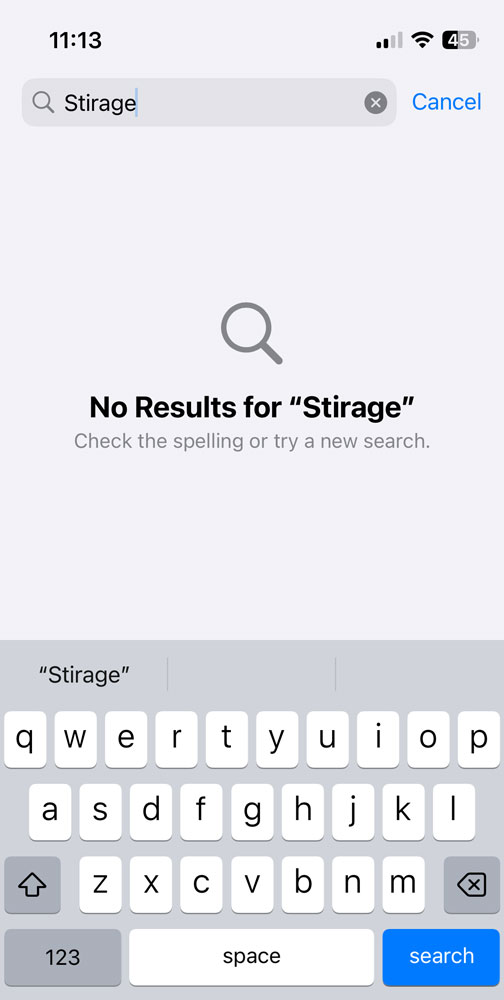
A.I. or not, it is very annoying that in 2025 my iPhone is unable to suggest “storage” when I mistype it as “stirage” in the Settings app’s search bar. Maybe I have some setting disabled somewhere that is preventing it, but I’d need a genuine A.I. to find it.
Thanks for the tip, but I don’t think that auto-suggesting an alternative to a single character misspelling of a common word is something that a system should need to be trained on, especially when the word refers to a significant function of the app in which you are searching. Approximate string matching is old technology that shouldn’t tax a modern iPhone in the slightest.
PS. To be fair, maybe I’m quibbling about an interface issue. Of course, I can highlight the word to see suggested spellings, but if the interface can indicate in large, bold type that “No Results for ‘Stirage’” were found, it seems easy enough to ask “Did you mean…” immediately below without requiring the user to know that you can highlight the misspelled word to see suggestions.
It was a random typo that I made yesterday, not a common one. There are ways around the problem, but it demonstrates the jumble today’s macOS UX has become.
You (or iPhone, depending on your point of view) have added the misspelling to the keyboard dictionary at some point, so it keeps being suggested because it’s been told it its a word to keep suggesting.
As I mentioned you can retrain it to forget it (slow, but it can be sped up if you do it a handful of times one after another right here right now) or reset the dictionary (instant, but will remove other custom spellings or words you perhaps do want to it to suggest). I tend to find I need to reset my dictionary about once a year.
In my full sentence, I said it’s not something it should need to be trained on. It was a one-off typo. While I can’t rule out making the same mistake at some previous point (“i” is next to “o” on my keyboard), it certainly is not something I have done often enough to train a well-implemented system that I prefer “stirage” over “storage”.
Regardless of the underlying mechanism for detecting and correcting an error, there is ample space for the device to suggest alternatives immediately without having to type additional characters or select the misspelled word, but I guess that would interfere with the presumed elegance of the screen.
Apologies for excluding the negative in my earlier quote of yours.
Accepting the misspelling once is enough for it to go into the dictionary.
How is it accepted? It’s as simple as pressing space.
As you type, predictions that complete the word or phrase you’re typing appear inline in gray text. Tap the Space bar to accept the prediction for the word or phrase; keep typing to reject it.
If you accept an inline prediction and then change your mind, tap the Delete key, then tap the word you were in the process of typing.
IMHO, I agree with you, the problem is that the interface for accepting/declining word suggestions does not make it clear what is about to happen or has just happened. It’s inscrutable. And of course there being no way to manually prune the dictionary in any reasonable way is a crime of modern software.
Third party replacement software keyboards offer some way to forget misspellings by long pressing on a bad word in the suggestion bar.
Accepting the misspelling once is enough for it to go into the dictionary.
How is it accepted? It’s as simple as pressing space.
I find that incredibly annoying. I find that I mistype by hitting an adjacent letter all the time and I rarely figure it out before pressing space at least once. Now you’re telling me I have a dictionary full of typing mistakes. I think that’s worse than useless; I’d be better off without a dictionary at all. Is there a way to turn the dictionary off altogether? (hint: almost certainly not) Bleh!
As it says above, you can use delete/backspace to undo the operation. But once you type the next word it becomes trickier. (Third party keyboard to remove specific suggestions, reset dictionary to use the hammer).
I frequently mistype “from” on my iPhone’s annoying, teensy virtual keyboard as “ftom”. Autocorrect has never, ever been able to figure out whether I mean “from” or “atom”, so context doesn’t seem to matter.