I think I have put names to most of my photos. So the question “I am looking for pictures with Uncle Ben” should give me the answer I need. But will it?
Is there a way to locate all photos with Uncle Ben which do not carry his name? Like “Show me all photos without Uncle Ben”? And then work on those i.e. mark them “Uncle Ben” when he is on the picture but his name is not.
If you identify 3 or 4 photos as uncle Ben, after a short while Photos will offer you some more photos that might contain uncle Ben. After you confirm or deny the photos it will start offering more. Eventually it will look through your entire collection identifying all those that have uncle Ben in them.
I have found that it works very well, it identified my daughter in a photo on the wall that had been taken about 25 years ago when she was about eight.
Like any system, it will make mistakes but accepting or denying helps it learn and after a while it will easily distinguish between siblings .
2 Likes
The ‘People and Pets’ collection in Apple Photos will group all pics of people (and pets) it finds, working away in the background. You have to name them initially. I just checked my wife and it has found 6,383 photos of her in my 86,000 pic library. Many of these she is one of a group or in the background.
It works pretty well but makes mistakes, which can be corrected, and it sometimes treats someone as two different people and you can merge them. I do not name any photos so it does not rely on that…it all works by facial recognition. It can take a while depending on size of Library and how much time the machine is on and Photos app not in use. If you use iCloud, People and Pets are sync’d across devices
1 Like
The ‘mistakes’ are often a fun way to spot a gene pool in operation…
1 Like
I have tried that suggestion but to no avail. It seems all relevant pictures have already been identified.
Haven’t found that one.
Haven’t found that one.
This is where it appears in Photos in Sequoia:-
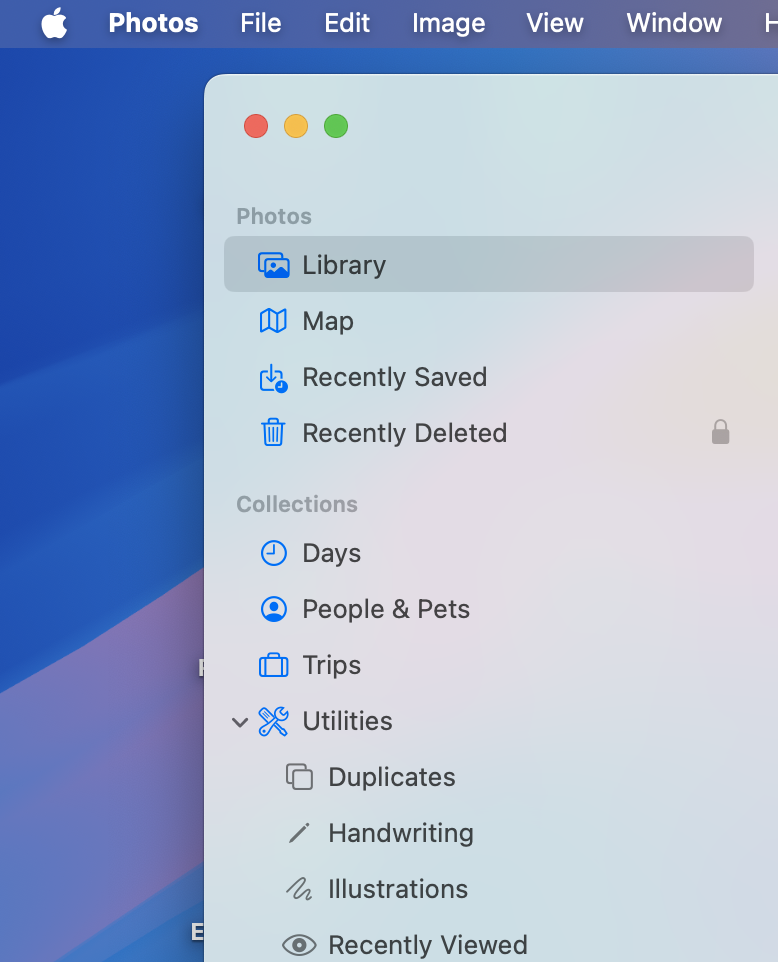
Or try Menubar > View > Collections > People and Pets:
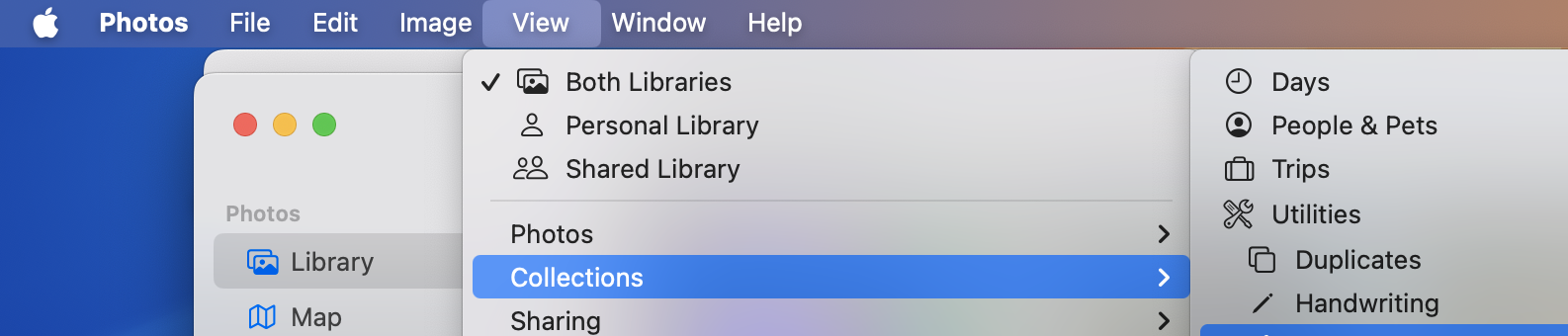
More in this Apple article:
https://support.apple.com/en-gb/guide/photos/phtad9d981ab/mac
Yep - got it. Thanks for that. No more uncle Bens to be found. Looks like this is it.
This question can be answered at several levels of thoroughness, with the maximum taking several pages and several days to write. Photos is a technology and user interface development device for Apple, only superficially resembling other photo databases.
All photo databases store and index photos. In Photos, Apple creates a complex index system by machine learning/AI, which has been under development for many years. The Photos user interface enlists many hours of user input to enhance and verify the ML/AI function. This highly developed, and developing, AI analysis of your personal data happens only on your device, so no privacy issues. The ability to conduct such complex calculation locally requires computation power only available via Apple Silicon, creating an economic mote competitors are unlikely to breach in the foreseeable future.
Responding to setbacks due to theft of intellectual property, Steve said, “We will innovate our way out of this.” He envisioned innovations more likely to change the world than updated versions of Phil Schiller’s backside. Photos development will change the significance of users’ personal data as much as MacWrite and MacPaint changed personal computing, or more.
So it’s talk about your photos and Uncle Ben.
Processing in the background using AI, Photos will analyze your photos for parts of the image that appears to represent a person, then sort the photos into a groups suggested to contain each person, based on similarities among the putative people detected. Similarities used in grouping can include an ever-growing assortment of metadata such as date, time and location the photo was recorded, and much more. Then your input confirms or rejects these initial findings, giving names to people you recognize. Naming the person validates the photos grouping of that person, plus adds extensive metadata supplied through Contacts (and probably other similar sources). This AI processing creates a model for each person, named or unnamed. This computational process training Photos on the data in your photos, supplemented by information that you have supplied, is iterative. Each pass over each individual photo refines and strengthens the model used to evaluate all your database. Iterative evaluation of known data in your library is the training part of Photos’ AI model.
In its predictive operation, Photos applies the models created by its training to suggest images of people in new photos, as well as in not yet define parts of previously examined photos. If the newly found image of a person is predicted strongly enough to be a known named person, the name will be automatically added.
Adding new named images changes the database from which the model of that named person is derived, and thus changes the trained model. At some point in this complex series of iterative calculations this newly trained model will be applied as a predictive operation to revaluate the entire photos image database.
One of Photo’s NamedPeople is probably you, and info in Contacts probably informs Photos that Ben is your uncle.
All this happens as a more or less continuous ongoing process. Data is continually developed by each part of the process, and the newly developed data feeds into other AI calculations.
3 Likes
This premise is not true.
Face recognition was introduced in iPhoto '09 (that is, 2009), smack in the middle of the Intel era. These algorithms were run in software, using whatever acceleration hardware (vector math, GPU, etc.) was available.
Apple Silicon hardware is designed to accelerate these kinds of processing tasks, but it is far from the only option. Any PC with a GPU, which today means all of them, has more than enough processing power to run large ML models locally. Machines with high-end GPUs (e.g. gaming systems) can run it faster than machines with less powerful hardware.
Apple is far from the only company making computers with hardware acceleration of ML models. They’re not even the fastest, as anyone with a high-end NVIDIA GPU can demonstrate. Apple may have been first to cram all this into low cost, low-power devices, but they’re not the only one in that market either. Even if their marketing department claims otherwise.
Apple has good equipment, but it is hardly a lock on the ability to perform ML processing on-device.
The reason mainstream apps in the Windows/Android ecosystem does all this on the cloud is because Microsoft and Google want to sell cloud services and spy on your data. There’s no technical reason why they couldn’t do this work on-device. They simply don’t want to.
1 Like
Did I open Pandora’s Box?
Thanks for your effort and the in-depth comment!
The issues involved, both technical and economic, are complex and deep. I believe a broad view from long in the past to however far in the future can be guessed helps understand current events. Looking into the future requires speculation, and thus may be somewhat inappropriate for TidBits discussions. Maybe TidBits prohibition against rumor and speculation does not apply to interpreting current events in light of established long term trends, that we speculate will more or less continue.
Photos seems to demonstrate many of Apple’s strengths. Much public discussion of Photos appears to miss many of the points discussed. The goblins potentially released while clarifying the discussions are not so dangerous if you listen to what they are saying.
Isn’t dealing with and learning from goblins why we all read TidBITS? So let’s open Pandora’s Photos Box and see what we find.
The model used to find Uncle Ben changes through time, hopefully becoming more sensitive/accurate. As the model improves it may find more instances of Uncle Ben.
You can get Photos to improve its ability to find Uncle Ben by training it on known examples. The known examples are the photos in which Ben’s face is labeled. Photos can be trained by running images of Ben, labeled with his name, through its ANN AI. “Image of Ben” includes the subset of the total photo image which includes Ben’s face, tagged with whatever metadata is applicable, which can be extensive. What I think happens is Photos examines a photo for elements matching its given model for Person, creating a list of putative Persons in the photo. WindowServer then feeds these elements of the photo to Photos, as known examples for training. Each time Photos trains on a known example, its ability to detect that known entity becomes a little stronger.
So to improve Photos ability to recognize Uncle Ben, look at (open to induce rescanning) photos in which Ben’s face is labeled with his name. This process of improving Photos recognition of Ben can be automated by viewing a Slide Show of photos of Ben.
Note that Photos will more strongly recognize all named Persons in the photos used for training. If some Persons in the training photos are incorrectly named, those errors will become part of the model Photos uses to search, leading to inaccuracies. So before you run the Slide Show of Uncle Ben, manually examine each photo to ensure all Persons indicated by a face circle are labeled with the correct name. A face circle for which the name is “unknown” can be left as is, or if you recognize the person you can add the name.
This process of improving Photos training illustrates the genius of Apple’s approach to AI. AI/ANN requires human supervision during training. Supervision requires examining how well the AI processes the information in each data example. AI/ANN works better the larger the data set, so Photos is expected to work with hundreds of thousands of photos. That means hundreds of thousands of photos should each be examined by a human for accurate labeling, and this level of work is for each Photo library. Of course, the human input comes from the likes of Hartmut, who is happy to make sure Uncle Ben is properly labeled.
I have observed Photos to continue finding additional examples of people long after its first pass examination. Finding new examples of Uncle Ben requires examining the entire Photos library with Photos’ model for Uncle Ben. Photos incorporates new examples found into its training, slightly changing its model of Uncle Ben. Then the library will be re-examined with the improved model. Iterate, iterate, iterate. For each named Person.
Apple says, “Leave your computer on, plugged in to power, with Photos running in the background.”
Users say, “What in the world is Photos doing, constantly using so many cpu cycles?”
Check later (a week or more?) and see if any more people have been identified.
3 Likes
OK - off we go! I‘ll give it a shot.
Early methods for face detection used rule-based AI. About 2016 the advantages of Artificial Neural Network (ANN) AI seemed to be suddenly recognized by the AI community. This led to a large shift in the fundamental methods used to develop AI.
Rule-based AI creates a decision tree lookup table, designed through human knowledge, to index existing knowledge. Some advantages are very rapid and precise retrieval of information, compact size, and minimal use of compute resources. Disadvantages include the rules must be created by human expertise, and the system can be fragile.
ANN-based AI creates a decision tree lookup table through iterative refinement of a series of vector operations which map input information to output information. In the iterative refinement (“training”), the vector operations are refined to more closely map input to known output. In training, examples with known input and output are processed by the vector operations, and the operations adjusted so that the calculated output the most closely matches the known result. Adjustment of the vector operations is calculated automatically based on the extent to which the calculated value deviates from the known value (“the error”). The calculated adjustment is intended to reduce the error. Different (input, known output) elements in the training data set will produce different adjustments to the vector operations. Repeated processing of all the elements of the training set will lead to smaller and smaller adjustments to the processing vector operations. This is how an ANN is trained.
A trained ANN can predict the presence of the entity for which the ANN was trained. Process the input through the trained series of vector operations. How closely does the calculated output match the output for which the ANN was trained?
Reality is analog, computed AI processes digital input. What analog to digital mapping allows computer AI to process reality?
The “reality” processed by Large Language Model (LLM) ANN AI systems is text character strings. Digitizing character strings is relatively simple. Analog to digital conversion occurred when the text string was created.
The “reality” processed by Apple Photos ANN AI is digital representations of persons. This may include, in addition to the digitized photo itself, information created through analysis of the photo by techniques such as face recognition, plus geographic location, age, genealogy, medical history, and much more. Adding descriptors to the person vector increases the compute power needed for processing.
The mathematics of ANN AI analysis of the world’s literature, and of your personal data, are similar. The implications of the results are different. As you note, Microsoft and Google and many others will process your data “for free” because they want to spy on you. Their reason to spy is to gain some form of economic or political control. Apple software processes your data on your hardware, hopefully leaving you with much more agency for your political and economic choices. This could be done on hardware from other vendors, but that would conflict with what seem to be the corporate goals of the other vendors.
So these ANN AI calculations could be done locally on hardware not from Apple, but generally are not, because local ANN processing is not in the interest of these other vendors. But if it were done locally on non-Apple hardware, and if the software were amenable, I suspect that would mean a fairly high end energy hungry GPU card would be needed.
Stock Apple Silicon is about competitive against high end add-on GPUs now. The development trajectory of Apple Silicon suggests Apple may pull ahead soon, but that is just speculation. I guess we will see what happens.
My problem with Apple’s implementation of face recognition in iPhoto/ Photos is that it has historically ignored a lot of available context. If I have a bunch of photos marked as taken in the same location within a relatively small time window, it’s quite likely that they will feature many of the same people, and that the non-facial features of those people will be consistent. So if I take five consecutive photos of a group of seven people, and in the first photo Uncle Ben is the guy on the left in the red shirt, then it’s pretty likely that the guy on the left in the red shirt is Uncle Ben in all the other photos, even if he may have turned his head differently. (And even if Uncle Ben and Cousin Steve look a lot alike, it’s highly unlikely that the third photo in the set of five will have Cousin Steve in the position where Uncle Ben was in the other four photos, especially if Cousin Steve does not appear in any of the other photos I took that day.)
This is off-topic to your question, so apologies for this non-answer.
I’ve successfully used OSXPhotos to extract photos from iPhoto/Photos databases.
The blurb for OSXPhotos on Github is “OSXPhotos provides the ability to interact with and query Apple’s Photos.app library on macOS and Linux. You can query the Photos library database — for example, file name, file path, and metadata such as keywords/tags, persons/faces, albums, etc. You can also easily export both the original and edited photos. OSXPhotos also works with iPhoto libraries though some features are available only for Photos.”
In theory you could do some SQL queries on the sqlite database(s) in the photo library to provide a sort of answer to your question if (for example) Uncle Ben was at events you could easily identify.
So, while the following might report on all “Uncle Ben” photos, you’ll probably have to extend the query yourself to find photos where Ben should be listed but isn’t.
osxphotos query --person "Uncle Ben" --json --library ~/Pictures/Photos\ Library.photoslibrary >results.json
Anyhow, I found osxphotos useful for other use cases. I thought I’d mention it.
1 Like
This sort of result is surprisingly common, and very frustrating.
Talking with Apple tech support about Photos issues, and continuing to work with Photos, especially face identification, leads me to suspect something changed in the recent point updates of macOS 15 leads to improved recognition. I wonder if some combination of re-scanning forced by opening and closing photos with unidentified persons, and strengthening Photos model for. each of those persons by reviewing their example photos extensively, would achieve recognition.
This level of manual input should not be needed, and I suspect would not be needed if bugs in past versions of Photos had not led to errors, which now have become established in Photos self-generated model(s) as well as your library. In my library Photos running in the background has found additional people, and cleaned up a lot of errors, but that takes a long time. Photos has many processes which interact in many ways to analyze many photos for many people, iteratively. Optimization of this long-running complex interdependent group of processes probably requires varying levels of priorities. I suspect analysis of newer photos receives higher priority than analysis of older photos. The older photos will probably be corrected eventually, but if you are tired of waiting manual correction works.
What hardware you are running makes difference. I have a MacPro7,1 which has a 12 core Xeon processor, with an AMD Radeon Pro Vega II GPU. Apple Silicon will process the ANN AI faster. Activity Monitor will give you an idea of what is going on with your library. Photo is involved of course, but also related processes such as mediaanalysisd, photoanalysisd, and others. WindowServer seems to play a big part, and in recent versions of Photos and macOS crashes a lot less. High levels of cpu use by any of these processes tells you Photos is working, analyzing your known examples to improve its models of known persons, or using those models to search for new examples of persons.
Let Photos run and run and run, and eventually the analysis of your library will be better. Or, if you get tired of waiting, consider buying a new Mac with a faster processor. Yes, just when you were thinking why would anyone ever want a computer with a faster processor, Apple has created a good reason to want an upgrade.
Pleased to see expert knowledge in this thread! Perhaps you can help my related ‘Uncle Ben’ issue.
Ref my post earlier in thread, Photos has been doing a great job of finding people in my 87,000 pic library, but it seems to be missing some people I know exist in library and have for some time, and not finding new people. People &Pets shows 229 people and has for some time. However new pics I add of existing people are being added, quite quickly, so it is working.
At the bottom of the People & Pets window there is a small icon captioned “Finding people” with an info tag saying it finds people when you are not using the app. My M3 MBA is plugged in and turned on 24/7 and always is.
Is there a way of kick starting or resetting? Though I don’t want to lose what is a done.
Thanks
Sounds to me like you are doing things as Apple intended, and getting good results.
One option is to continue, Mac plugged in to power, Photos running in the background. The “Finding People” note at the bottom is Apple telling you Photos is still at work, and more analysis of your library will occur.
I have discussed pretty much this same question with Apple support. If I understood what they told me, and now remember correctly, they were also frustrated because the search never completed. Many people were found, but some never were, and the background processing continued endlessly. Self-correcting iterative processes, such as the ANN-AI used by Photos, are said to “converge” as corrections become smaller and smaller with successive rounds of training. Details of how error observed in training are fed back to modify the ANN (“propagation of error”) affect the rate of convergence, and are far beyond the scope of this discussion. Generally speaking, stronger adjustment through feedback can result in faster convergence, but strong adjustment can overshoot the desired result, producing errors “in the other direction”. This error can then be propagated back to adjust the ANN parameters in the other direction. Even with endpoint overshoot, continued training iterations can still converge to zero error if the errors eventually trend smaller. In other cases the backpropagation of error can lead to cyclical overshoot in alternating directions, and the calculation will oscillate and never converge. In yet other cases, the calculated error can increase in successive iterations, so rather than the desired convergence, the calculated error increases without limit. No need to dwell on the details, the take home lesson is this complex calculation can converge, explode, or oscillate, depending on how its parameters are set. The result observed by me, you, Apple and probably many others is the calculation seems to never end. This tells us that current parameters for back propagation of error in Photos ANN result in either too slow convergence, or oscillation. Apple can use this information in adjusting the complex parameters related to Photos analysis of your library. I think Apple did this in later versions of macOS 15, because Photos seemed to find people in my library better.
So a slight addition to the “just let it run” solution. Update to the most recent version of macOS/Photos, then just let it run.
I think there is a more direct answer to your kickstart question. My guess is only informed speculation, so I will give my reasoning.
Photos processes a bewildering mass of data in many ways. Apple prioritizes these diverse calculations to provide results more relevant to the current user, based on input from the user.
One type of user input is direct data entry such as adding a name. Another is merging the name as used by Photos, with the same person’s name as used in Contacts. Another is marking a photo, or Person, as a Favorite.
A different type of user input is how you use Photos. How often, and for how long, do you look at any one photo? Which set of photos gathered as a Person do you open and review? Which sets do you ignore? Within a set of photos showing a Person, have you selected a Key photo? What content is in photos you have marked as Favorites? Which Memories do you run? And so on. I think whenever you use, look at or interact with in whatever way a photo or Photos data structure, that entity gets a little bump in priority, even if only in that it gets calculated another time.
An origin story may provide insight. Current Photos data processing methods use ANN AI. ANNs are a mathematical representation originating in physiological models proposed to enable thought. Eyesight is one model system. Light activates a pattern of neurons in the retina. The extent of activation is conveyed by a network of neurons to the brain. The pattern stimulated in the brain is a “thought”. Similar neural networks connect other brain parts. About 1948, Hebb proposed that activation of a neuron led to growth or strengthening of the neuron and its connections. Repeated exposure to the same stimulus pattern would lead to greater development of the neural network involved in its recognition. Thus learning.
The function of Artificial Neural Networks is similar to Physiological Neural Networks. (In environmental response, not in underlying mechanism.) Use strengthens, neglect weakens.
I think your input can direct Photos to analysis of photos you choose. Look at your photos, choose favorites, run Memories, and so on.
Photos may assign lower priority to unnamed people. If you do not want to use real names, using Person1, Person2, … might help. At least choose a Key Photo for each person.
I suspect Photos may be set to automatically ignore a Person who never receives any user validation. For most users that would probably be the preferred way to respond to unknown persons.