As far I know “Apple Account” is a recent change of name from “Apple ID”. They are the same thing. Signing out of iCloud is same as signing out of Apple Account.
If you ever feel like learning about this stuff you could start with Take Control of iCloud.
BTW using iCloud does not mean your data is not locally back-uppable!
Yes, but the message is telling you that if you do not remove the content from the device when you log out of the Apple Account, anyone who knows the passcode to the device will be able to see the data - because it will remain on the device. If you are signing out of the Apple Account to prevent someone else from seeing private data in iCloud, this is telling you that you are in danger of exposing that private data.
It doesn’t. But signing out of your Apple Account and not removing the data (“Sign Out But Don’t Erase”) keeps the private data on the device, so you are being warned that if you keep the data on the device, private data in the Health app, Wallet passes, contact data, photos, app data, bookmarks in Safari, plus other data, remain on the device are are visible to anyone who knows the passcode to the device (“Anyone with access to this device will be able to see its data, such as..”).
For me, and the roughly twenty clients and friends that currently use it, sync problems may now happen for one of them maybe every couple of years? Are you aware you can turn-off individual iCloud services (like the ones that irritate you) in Settings so you don’t need to log in or out all the time?
I do. Mostly. . . .
Your Apple Account (formerly Apple Id) is the umbrella account for everything that you do with Apple’s services and stores. If you buy products from Apple on the web: computers, iTunes Store, Apple TV Store and so on, you’ll need an Apple Account. Just like if you buy on Amazon, you need an Amazon account. Or subscribe to the New York Times, a NYT account.
You can see what your Apple Account encompasses by visiting the website:
iCloud is a now huge set of services which are free unless you want more cloud file storage. The vast majority of them are synchronisation services that keep all your Macs, iPhones, and iPads up to date: photos, contacts, calendars, phone history, and on and on. Here is a list (!) of all the iCloud services:
You log in to use iCloud services with your Apple Account just like when you want to buy some music you login to the iTunes store.
You can run your laptop or workstation without being logged-in to iCloud (that’s commonly done for production workstations where 50 of them are all just there to compute Fourier transforms and they have no internet access at all) and that may well be just the ticket for you. But if you have an iPhone or an iPad and a couple Macs in daily use, it makes real sense to stay logged in to iCloud and forget about it. I, myself, vastly prefer entering a new contact on my Mac, rather than laboriously tapping away on that tiny iPhone screen, and then watch it miraculously appear on the iPhone a few seconds later.
@Dafuki . Thanks for your detailed answer to the question. The key thing is that there is no separate login for “iCloud” and “Apple Account”.
However, one exception I am not fully clear about is signing in to the App Store. My macs are always signed in with my Apple Account/iCloud, but sometimes when I buy an app I am asked to sign in the App Store, even though I am already signed in to my Apple Account. I just sign in to the Store again with my Apple Account credentials, but I believe some people sign in to the App Store with a different Apple Account from the one the machine is signed in with. I think it is a way of getting apps not available in the region the main Apple Account is registered in.
Slightly off topic, but…back in the olden days, an iTunes Store account (today’s Apple Store account) and an iTools/.Mac/MobileMe/iCloud account were two different things. Over time, these were merged into a single Apple ID concept, but it took a while. Under the surface, the actual implementation of Apple ID has a lot of complexity because of this history, and it can manifest in genuine quirks for people who had started with both types of accounts.
I don’t buy all that much from the various Apple stores so I go a long period with no transactions. As I recall, being logged into iCloud has absolutely no effect on the store logins and it seems to me that you are automatically logged out of a store after some mysterious amount of time.
Correct. Though the idea of an Apple Account has gotten unified, for most users that is slightly misleading. Although all of Apple’s services appear to be united under a single Apple Account, the reality is that many of them are independent systems. That is why you can be signed into one Apple Account for iCloud, but signed into a different Apple Account account for the Apple Store. When you sign into iCloud and the Apple Store using the same Apple Account, your credentials may be the same, but you are independently logged into two different platforms.
Sure, as long as some of it is local. I think Mr. Kissell recently updated his TCO iCloud ebook, I might have even downloaded it, but not likely to read it as I am reducing use to bare minimum.
iCloud use makes knowing where your data is more difficult and losing it by mistake much easier in my experience. Apple makes a mess of things, too, by turning on iCloud items the user has turned off, when logging back in to AA/iC.
Of course, yes, you are correct and I’ve acknowledged that. What is disturbing is that Apple is mixing these things up. I went to sign out of my AA/iC and I get a warning in that context about something that is already, ahem, obvious and not related to the action I have taken. I take that as a direct intent by Apple to confuse and scare users into not signing out of AA/iC. It makes me very suspicious of their intents when they go this far to scare people into not signing out.
Exactly! This is ALWAYS the case that “anyone with access to the device AND ITS PASSCODE, IF ONE EXISTS” has access to everything on the iPad.
This fact has NOTHING to do with a user’s attempt to sign out of AA/iC. Which is why I was so taken aback to see it.
I’m sorry I didn’t make this plainer from the beginning, and apologize to all posters in this Topic who have been trying to help. I’ll spend more time on minimizing my devices and less on posting.
Yes indeed, thank you for that. But I only now have Find My Mac turned on, and it doesn’t even work despite lengthy troubleshooting. Well frequently when I go to iCloud See All Settings, Apple frequently has turned things back on that I had turned off. Just now I went to see and found Photos turned on, which if I ever used it was many many years ago.
Excellent description, thank you very much! Very kind of you to write this, I’ll bookmark it now!
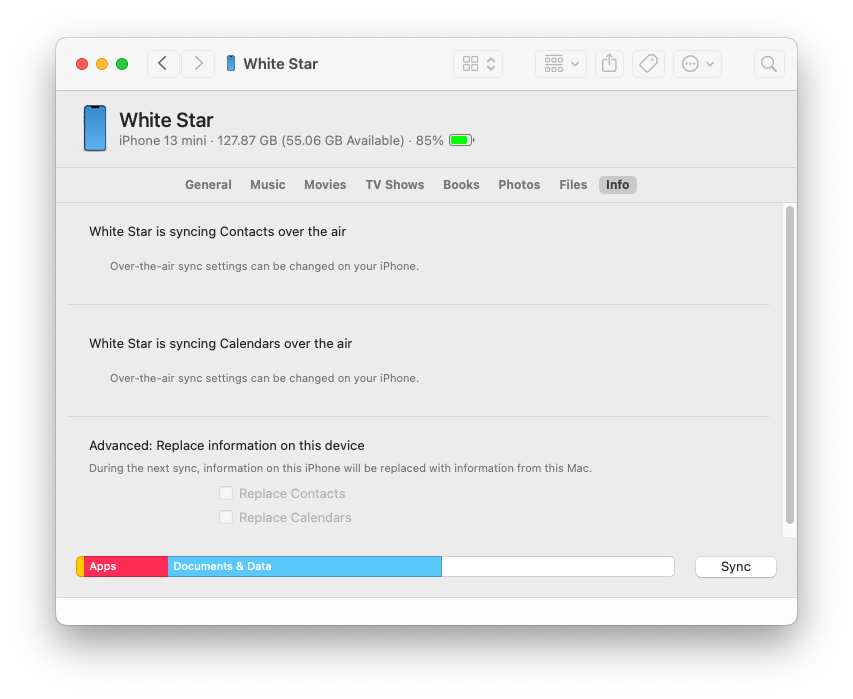
For instance, if you have your iPhone configured to use iCloud for your Contacts or Calendars, then they don’t get sync’ed over USB or Wi-Fi to your Mac:
Of course, in this case, the data is on a server (via CalDAV, CardDAV or other related protocol), which may have web access, and it will sync to the corresponding desktop apps. But it does mean that your backup of this data is not going to be managed in the same way as other non-cloud data is backed up.
To close out this topic I must first apologize to TBT for not doing my homework before writing, but I was so shocked by the AA logout dialogs that I turned first to the friendly and knowledgable TBTers.
I seem to be more and more not only an edge case Apple user but hanging off the end of fraying threads case, but it is the right usage for me so I need to figure out how to do it.
I’m truly surprised to see how many TBTers are full time logged in and successfully using so many of the available services, and how many services there are! I congratulate you on mastering the many intricacies of Apple’s interwoven settings. That was already years ago over my head and needs.
Anyone who wants to discuss using Apple products in a very minimal way, I would welcome PM exchanges.
 Mostly. . . .