I pretty much only use Launchpad when I inadvertently end up with it on my display. Thus “occasionally,” but really never because I set out to use it.
1 Like
LaunchPad is indeed cumbersome — but then, being a Mac OS V.9 holdout I’ve always disliked the Dock also (left side, hidden is where I keep that). Guess like many here I’d use Spotlight if I didn’t have Launch Bar — but Launch Bar beats everything, IMO. 
Didn’t even know it existed. In the past I bought the Take Control books each fall that cover the new features but I have stopped because I often don’t read the eBooks carefully and often forget what I have read. It’s pretty rare to find something new that I actually use.
I find Launchpad a little ridiculous. It’s very difficult to keep organized–I actually had to find an app called “Launchpad Manager” just to be able to move apps into containers with something like ease. (If the container is at the beginning or the end of a row, it’ll jump out of the way if you try to drag something into it.) I launch it once every few weeks to see if the unfamiliar interface will remind me of some app I’ve neglected, and to check on how badly it’s gotten messed up since the last time I looked at it.
1 Like
I use it occasionally, for instance when I can’t remember whether a particular app is my Mac or not - or what the name of an app is - which makes it more difficult to look for it with Spotlight or Alfred 
As a long time Mac user, I forged my app launching habits well before Launchpad was introduced, so I never use it. Nevertheless, I do notice my younger collegues, friends and children use it, typically those who grew up with iOS and who rarely use keyboard shortcuts.
But I must say, it remains the best way to appreciate the details of the app icons…
3 Likes
Alfred. It’s all I ever need to open an app. Get and learn the PowerPack and you’ll enjoy using your Mac more than ever. Clipboards, disk ejects, custom web searches… are just the start.
1 Like
I think I chimed in earlier but I just got through the rest of the thread.
I used to put my most used apps in the dock - they are all still there. But I have found for most of them it’s easier to use Spotlight for me. When I setup the Mini last year I don’t think I modified the dock at all but it’s not my daily driver.
Calculator and Calendar are a little slower to bring up that way. I have a couple of apps whose names I always stumble on and I will click them in the dock.
I also use favorites in the Finder for my most used folders and a couple of shortcuts.
I had some most-used folders in the dock but because they are icons based on what’s in the folder it’s a little harder to see than the name in Favorites.
Diane
Me too…although it was ProSl back in my ][GS days and DragThing or FinderPop after that… ut I’ve been on LB since v1.something.
Launchpad has exactly two uses for me, both unattainable otherwise to my knowledge:
- Get installation progress (very rough) of App Store installations, good after a fresh install.
- Uninstall App Store apps correctly and cleanly.
Like much functionality in Dock, it’s only partially accessible with VoiceOver and, in particular, rearranging apps is still completely broken with VoiceOver AFAICT.
It is a horrible interface & a wonder why is is still present. It fills the entire screen blocking what you’re doing or concentrating on, the icons/apps are not in alpha order, frequency of use order, or even install date order. Just a random placement. And not even all of them, there is a second page to dig through.
I reverted to the former method. Dragged a copy of the app folder to the dock, similar to the downloads folder. One click and you see nearly all of it on one corner of the screen.
1 Like
On my regular computer, I use the Dock which I keep hidden until needed to launch my most used apps.
But I have two older computers connected to televisions which have good quality audio systems and I use those to listen to music using iTunes as well as other media. Launchpad allows you to easily set up just the icons you want by dragging those desired onto the first page and the rest can go into an “others” folder. I then used AppleScript to allow specific playlists to launch using iTunes and also start a visualizer called CoverFlow which looks great on a large set. I use a different icon for each playlist I have on Launchpad as well as other scripts which will start a specific app. I use an old mouse based remote control to just click on the icon desired to start the process. A script brings up Launchpad after the computer boots up automatically.
As someone posted earlier, it is similar to At Ease under System 9 which was used quite a lot in school settings and was simply point and click so iOS if anything took a cue from that older technology.
1 Like
I remember trying it when it was brand new, and I was unimpressed. It just sits on my iWhatevers and takes up space.
I have the Dock set up so only active apps are showing. That lets me see quickly what is up and running – and any notification badges. To switch or launch new apps, I pop open an Alfred window and type the name of the app. It (feels) faster and more convenient – I don’t have to take my hands from the keyboard.
(tl;dr: No, I don’t use Launchpad)
I use Launchbar instead. Quick and intuitive.
I’m the same, except that since the dock is hidden, I don’t really care what’s in it, and I use Butler rather than Alfred. I also have single hot keys configured for the apps I use all the time - Word, Safari, Mail, 4D, Chrome and a couple of others. I don’t think Launchpad has anything to offer me.
1 Like
Why would I want to pop open another modal window that only has a subset of apps in scrambled order on the screen? I suppose I could type to search, but I can just do that in Spotlight.
Much easier to just put the Application folder in the Dock and open from a nice popup alpha list from there. You can also create a few folders with links to favorite groups either within the Applications folder or in the Dock.
1 Like
The “trick” of adding Applications to the dock (I use list view) still astonishes me in its simplicity. Why doesn’t Apple just endorse that?
1 Like
Just the opposite for me. When I accidentally tap the F4 key and Launchpad comes up, I see a bewildering grid of app icons that seem randomly ordered. It would take me months to move those icons around in a way that makes sense to me.
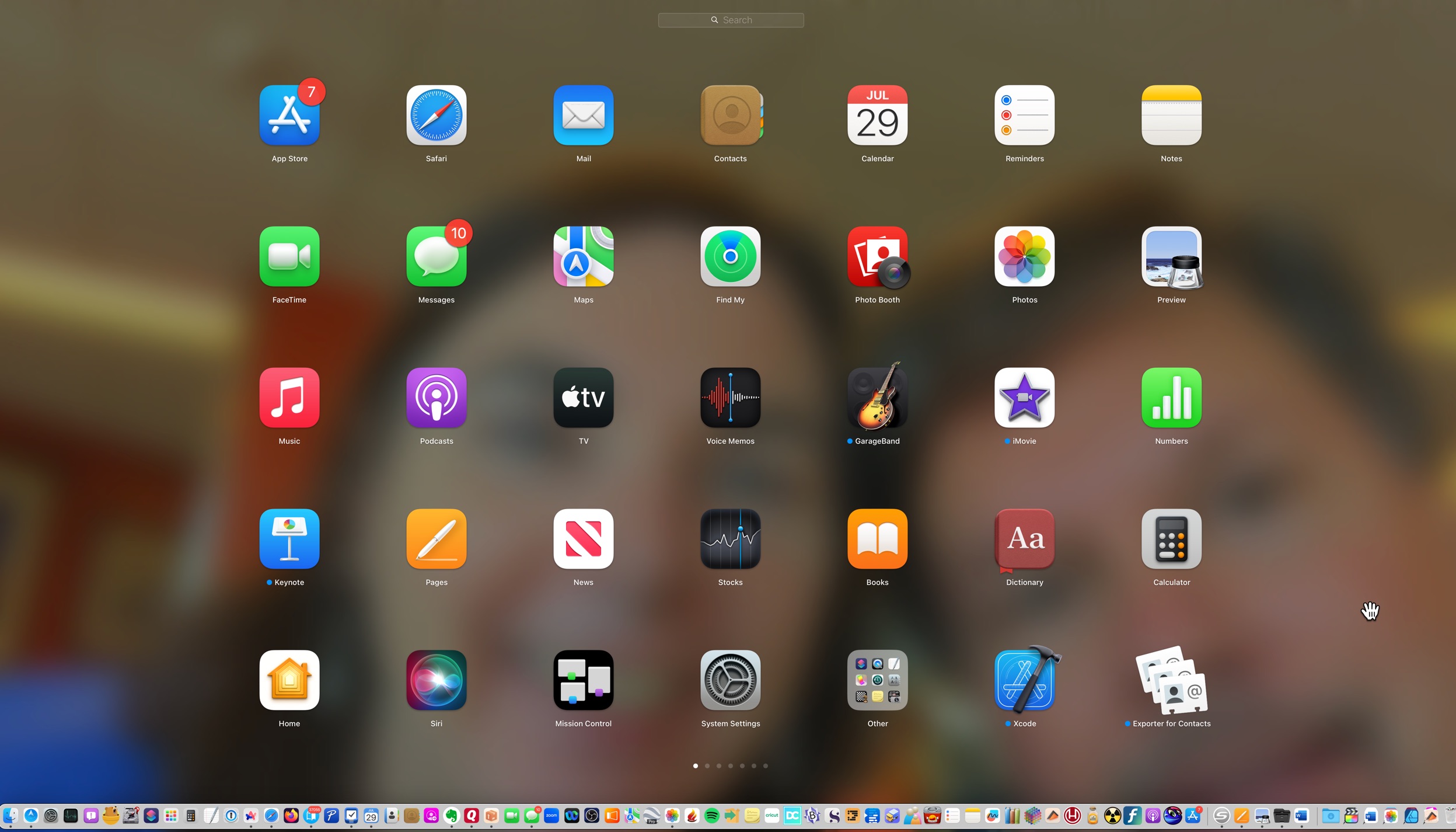
This is the first screen (what I’d think as the home screen on iPhone). Most of the items there are apps I never use, or Apple’s “default apps,” which on iPhone I throw into an Unused Items folder on the last screen. Can’t do that here.
It feels like the opposite of a useful view…though I’ll also say that my view could be skewed by having (1) a large screen, and (2) way too many apps installed.
I use Alfred or the Dock to launch, AppCleaner to uninstall. Never use Launchpad.
3 Likes