My wife and I (both with MacBook Airs ruining Sonoma 14.2.1) are experiencing the same issue: Often we find a message stating that our external drives (Time Machine and another SSD for backup) were not ejected properly. Often we see this first thing in the morning after the computers have put themselves to sleep for the night. All drives are plugged into external USB hubs. All three are fairly new (having been replaced recently). This problem has been persisting for several years and with several different drives.
I have had that issue. For me, it was the hub. It would “burp” or something to momentarily disrupt the USB connection resulting in the “you didn’t eject properly” message. I had to get different hubs. Made sure they were externally powered too.
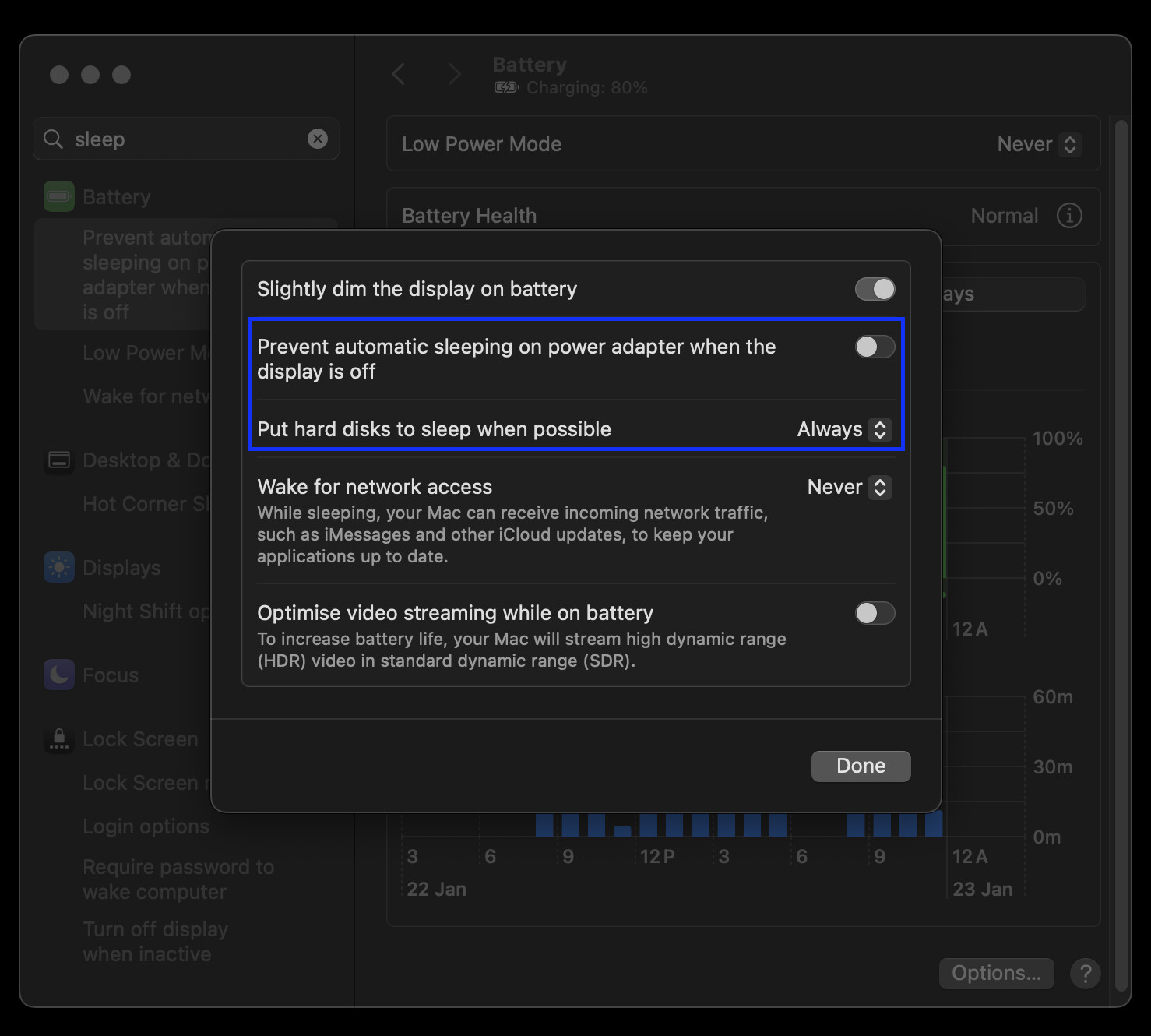
I am not sure if this will help in this particular case, but I recall having this same issue some time ago and have had to change some settings under “Energy Saver” (now under “Battery”):
“Put hard disks to sleep when possible”: Set to “Never”
If the above does not work - “Prevent automatic sleeping on power adapter…”: Set to On
I cannot remember if this successfully resolved the issue though, but I hope that helps in your case.
I had this issue intermittently on an M1 iMac running macOS 12.4, connected directly to a OWC Mercury Elite Pro Quad storage enclosure (which uses USB 3.2 Gen 2).
To resolve it, I eventually found that I needed to both:
Turn on System Preferences > Energy Saver > Power > “Prevent your Mac from automatically sleeping when the display is off”, and
Use a 1 metre long USB cable, rather than a 2 metre one. (I tested with two cables of the same brand and type, only the length varying, and found the 2m one intermittently gave the “Disk Not Ejected Properly” error. I found some sources [1][2] explaining that, with this particular variety of USB, the maximum length of a (passive) cable is 1 metre. This is not mentioned in the Amazon product listings for the cables.)
Thanks to everyone for the ideas. I’m going through them to the best of my time and ability.
But…
Except for the messages, there doesn’t seem to be any problems with the disks. I’m loathe to spend money and time to try to fix an issue that may not exist.
For me, it was not the hub itself, it was a device I connected to my Thunderbolt 4 hub (the hub charged and connected my MacBook Pro to two USB disk drives, Ethernet, an external monitor, and, for a while, the problematic device). My guess is that the device made the hub reset which caused the attached disks to eject.
The device that caused the problems was a Widex Sound Assist 027052, which sends sound from my MBP via Bluetooth to my hearing aids via Bluetooth (bad sound, which is another story). After I connected it to the hub, I started getting the “disk not ejected properly” problems, first overnight once every few nights, then more frequently, and finally several times a day, while I was working. I disconnected the Sound Assist and the problem went away. Reconnected it to a different port on the hub and the problem came back; disconnected it and the problem hasn’t happened for months.
I should have been more clear. Something about the hub—the hub itself, the cables attached to it, the devices at the end of the cables—was driving the “burb”. I didn’t do a scientific process of elimination to figure out which one but whole attachment redesign that fixed my problem.