DarkSword Exploit Threatens iPhones Still Running iOS 18

Originally published at: DarkSword Exploit Threatens iPhones Still Running iOS 18 - TidBITS

Security researchers at Google, iVerify, and Lookout have jointly revealed the discovery of a sophisticated iPhone hacking toolkit called DarkSword, which multiple threat actors are using to compromise devices running iOS 18. Unlike highly targeted spyware attacks of the past, DarkSword has been deployed via compromised legitimate websites, raising the risk that everyday iPhone users could fall victim.

The proliferation of DarkSword suggests a market where exploit brokers sell such tools to multiple buyers. Even worse, a group of Russian hackers left the complete, unobfuscated DarkSword code—including helpful comments explaining each component—available on the compromised sites, where it could have been copied and reused.

What Is DarkSword?

DarkSword is a full exploit chain—a sequence of vulnerabilities chained together to bypass iOS’s multiple security layers—built entirely in JavaScript that can silently compromise an iPhone when a user simply visits an infected website using Safari. No additional clicks, downloads, or interaction beyond visiting the page are required. The attack works against iOS versions 18.4 through 18.6.2, with some variants also targeting iOS 18.7.

Once a device is compromised, researchers say DarkSword can rapidly harvest alarming amounts of data, including:

  • Passwords stored in the keychain
  • iMessage, WhatsApp, and Telegram message histories
  • Photos and screenshots
  • Call logs and contacts
  • Safari browsing history and cookies
  • Calendar and Notes data
  • Location history
  • Health app data
  • Cryptocurrency wallet credentials

Rather than installing persistent spyware, DarkSword takes a smash-and-grab approach: it collects and exfiltrates data quickly, then disengages. Researchers say the DarkSword chain lacks a persistence mechanism, but by that point, the data may already have been stolen.

Who’s at Risk from DarkSword?

Not you, if you’ve installed iOS updates as they’ve been made available. Apple addressed the vulnerabilities that DarkSword exploits starting in the iOS 18.7.2 and 18.7.3 security updates late last year. What about iOS 26? Researchers say they have no evidence that DarkSword has been used against iOS 26 devices, but they note that some of the underlying vulnerabilities were not fully patched until iOS 26.3. None of the security reports even mentions the iPad, but the vulnerabilities are almost certainly the same.

To see what version of iOS you’re running, navigate to Settings > General > About and look next to iOS Version. If it’s between—or includes—iOS 18.4 and iOS 18.7.2, your device is vulnerable to DarkSword. If you’re running iOS 18.7.3 or later, you’re fine.

According to Apple’s App Store adoption rate numbers, 24% of all iPhones are still running iOS 18 today, though they don’t break out iOS 18 sub-versions. Although that could amount to hundreds of millions of iPhones, it seems likely that many fewer people stopped updating during the vulnerable window.

Regardless of the overall population, all that really matters is the version you and the people you support are using. Check now, I’ll wait.

Two Ways to Deflect DarkSword Attacks

Despite the sophistication of the DarkSword exploit chain, protecting vulnerable devices from it is simple. You have two choices:

  • Update: Every iPhone running a vulnerable version of iOS 18 has an update path, either to iOS 18.7.6 (the iPhone XR, XS, and XS Max) or to iOS 26.3.1 (everything else). The problem is that many people have stuck with iOS 18 to avoid iOS 26’s Liquid Glass. If your iPhone supports iOS 26, there is no longer any way to update to a version of iOS 18 later than iOS 18.7.3, and even that version may be available only to people who registered for the iOS 18 Public Beta or Developer Beta.
  • Enable Lockdown Mode: If you absolutely must stay on a vulnerable version of iOS 18, Apple says that Lockdown Mode will also block these attacks. It’s easily enabled from Settings > Privacy & Security > Lockdown Mode > Turn On Lockdown Mode. Unfortunately, Lockdown Mode will degrade your iPhone experience in various ways: it blocks most message attachment types, disables certain Web technologies, and limits incoming FaceTime calls, among other restrictions.

As much as I appreciate the trepidation many people have about Liquid Glass on the iPhone, much of the negative press—including mine—is aimed at pushing Apple to address relatively subtle problems because Liquid Glass is here to stay. I’ve been using Liquid Glass on my iPhone since the iOS 26 betas, and while I prefer the iOS 18 interface, Liquid Glass hasn’t prevented me from doing anything or slowed me down much, especially after changing a few key settings (see “How to Turn Liquid Glass into a Solid Interface,” 9 October 2025). Sure, I’d prefer a traditional Done button to Liquid Glass’s inscrutable blue checkmark, but iOS 26 also offers legitimate improvements that make life easier, such as how the Phone app’s new Unified view prevents accidental calls (see “Comparing the Classic and Unified Views in iOS 26’s Phone App,” 10 November 2025).

If you’re concerned about DarkSword, upgrading to iOS 26 is a better option than living in Lockdown Mode in iOS 18.

The Increasing Importance of Installing Updates

The appearance of two sophisticated iOS exploit chains—DarkSword and Coruna (see “Older iPhones and iPads Receive Critical Security Updates for Coruna Exploits,” 13 March 2026)—within weeks of each other signals a troubling shift. We have long thought of exploits like these as rare tools used only for highly targeted attacks against specific individuals, but they’re now being deployed more broadly against anyone who visits a compromised website.

As Lookout’s Justin Albrecht told Wired: “People assumed that it was just going to be journalists or activists or maybe an opposition politician that was targeted, and that this wasn’t a concern for a normal citizen. Now that we see iOS exploits being delivered through an unscrupulous broker, there’s a whole market here for this to get to cybercriminals.”

Of course, the proliferation of these tools doesn’t mean everyone will suddenly suffer data theft. DarkSword has to be installed on a website you visit, which means attackers have to compromise a site no one would expect to host malware. That’s not going to happen regularly or broadly, and Google has added known DarkSword delivery domains to Safe Browsing, so Safari may warn users before they visit compromised sites.

But the mere fact that such compromises do occur—remember the 2016 malvertising campaign that impacted high-profile sites like The New York Times?—means you need to take responsibility for your own protection.

So please—install those security updates when we write about them.

7 Likes

Apple should allow all iDevices to update to 18.7.6.

17 Likes

Just want to add some personal experience. If you like to read blogs, personal websites, and other stuff put online by individuals and small organizations, as I do, keep in mind that these sites can pickup malware via their publishing systems. For example, an outdoors blog I used to read got infected through a Wordpress exploit (fortunately, the Sophos on my iMac put up a warning and blocked anything from happening).

An additional risk is that unlike with big commercial publishers, a breach can go unnoticed or unfixed for a long time, especially if a website is run by volunteers or as a hobby.

2 Likes

Thanks for the detailed, plain language and sane report @ace !

If a user is not using Safari on iOS 18.x, are they at risk?

How can users know which sites are infected if not using Safari?

I need to research what this is some more, found a couple of sites saying Google is collecting user data as well, in the process of providing warning about known compromised urls…

Does simply turning off JavaScript disarm the Sword?

1 Like

I have two devices that are old with weak batteries. That is why they have not been upgraded to iOS 26.

One device (iPhone SE 2022) got a new battery installed a few days ago in anticipation of doing an upgrade. The other device (iPad Mini 5) has not been serviced yet so I put it into Lockdown Mode. I haven’t noticed much of an issue yet other than a few web fonts.

Let’s be entirely clear: all of this could be avoided if Apple didn’t try to strong-arm their paying customers into upgrading to 26. Just offer the patched 18.x to whoever wants it and be done with it.

17 Likes

This leaves me unsure whether my iPhone running version 18.7.2 is protected. Several statements in the article seem somewhat inconsistent with regard to 18.7.2.

Sounds like 18.7.2 is safe, being later than 18.7.

Also seems to indicate 18.7.2 is safe.

This tells me 18.7.2 is vulnerable!

1 Like

If you read the Google document that Adam linked, there were a couple of javascript exploits patched with 18.7.3, so I would suspect that 18.7.2 is vulnerable.

1 Like

Since all browsers in iOS are based on the Webkit engine, my guess is yes.

2 Likes

:person_facepalming: good point @silbey , thanks, I think I have read that somewhere, but also I thought I read last year there are now iOS browsers that are not required to use Webkit.

Would RSS readers be subject to DSword? I am not clear how they work under the hood, some include some kind of web browser for when a user wants to look at the originating page, but otherwise… Hm.

1 Like

I don’t think so.

2 Likes

Do you live in the EU?

I managed to get 18.7.3 on my iPhone 13 mini through the beta program. DarkSword is the first thing that has made me seriously consider downgrading to iOS 26.

5 Likes

I’ve been wondering about that also.

Here’s my understanding, based on reading the documents that Adam linked to. (Note I’m not a security expert and some of my statements below may be wrong.)

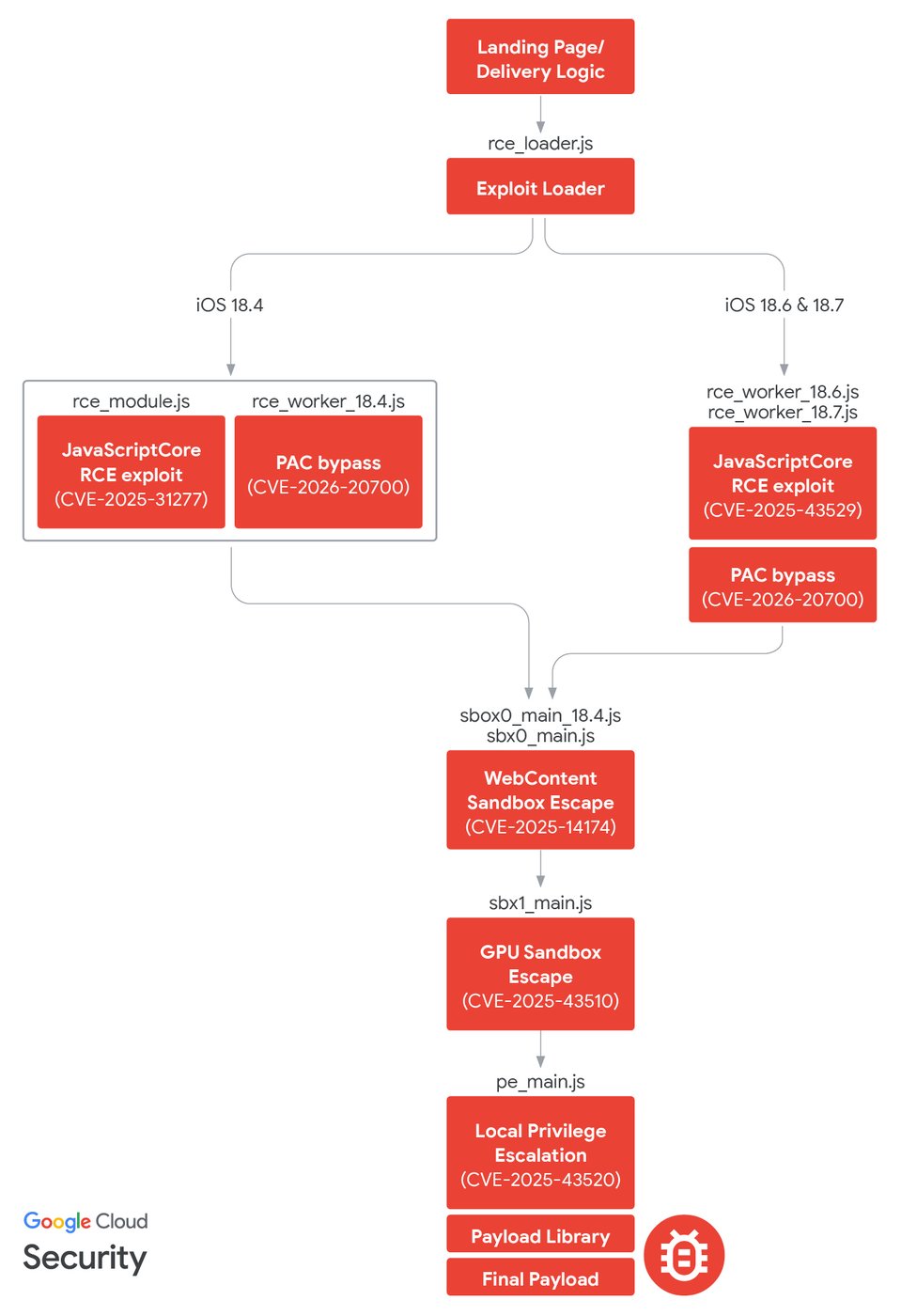
DarkSword is a chain of exploits. The Google document has a diagram (Figure 20) that shows the sequencing:

DarkSword infection chain (from the Google paper)

The process starts at the top when the user loads an infected page in the web browser. The information is stolen from the phone when the final “payload” steps at the bottom are run.

If I read the document correctly, in iOS 18.7.2, the vulnerabilities in the upper part of the diagram are present, but Apple fixed the security issues that allow the last two steps at the bottom of the diagram (GPU Sandbox Escape CVE-2025-43510 and Local Privilege Escalation CVE-2025-43520).

So I think there is a break in this complete chain of exploits on iOS 18.7.2, the final payload isn’t run, so data isn’t stolen from the device. But I’m not sure! (Corrections welcome.)

I don’t know if we should feel reassured by this analysis. Although this particular exploit chain may not be fully functional on iOS 18.7.2, clearly many other security flaws remain.

And, to me, the really bad news is the apparent shift from “sophisticated attacks that combine multiple exploits take significant time and expertise to develop and are typically the domain of nation states, used against targeted individuals” to “sophisticated attacks are now being sold to multiple groups that use them to attack indiscriminately for financial gain”. I’m not a journalist, activist or politician, so I thought my risk was relatively low. But if the attacks are no longer highly targeted, I need to reconsider. The iVerify page has an estimate that 270 million people may be running versions of iOS that are vulnerable to DarkSword.

Although I was hoping to avoid Liquid Glass for a while longer, I think I may update to iOS 26. I’m not happy about any of this, but I’m very grateful to Adam for the alert.

4 Likes

Ashley, I looked at the other two investigations linked by @ace.

Lookout has a complex and fragmented analysis without a clear conclusion regarding which systems are safe.

iVerify makes an unambiguous statement in their Final Word section that reads:

We strongly recommend updating to iOS 18.7.6 or iOS 26.3.1. This will mitigate all vulnerabilities that have been exploited in these attack chains. Furthermore, these exploits would not be effective without additional bypasses on devices where Lockdown Mode is active or on the iPhone 17 with Memory Integrity Enforcement (MIE) enabled.

Based on that, I am inclined to think it not wise to interpreted the info and chart from Google as possibly meaning 18.7.2 is safe. Rather, that 26.3+ is the only sure bet for any devices that can run iOS 26.

Hmmm, I wonder how long I could go without using Safari since that and browsing websites is the vector?

indeed. But I haven’t tried any of the new versions or app stores etc.

1 Like

Maybe a while if you have access to iPad or Mac or other OS devices (this seems to be iOS only).

I don’t browse much with iPhone but I might try turning off JavaScript and see if it interrupts what I’m browsing.

Another question occurred as I wrote, many Apps connect to internet for their functionality, are they also using WebKit such that this is not a Safari App issue so much as a WebKit or internet access issue…? I don’t know enough about the inner workings to know, am trying the gauge the threat in my use case…

1 Like

I think that’s consistent with what I’m trying to to say. iOS 26.3.1 fixes all vulnerabilities shown in the chart. However, iOS 18.7.2 fixes some of the vulnerabilities - the ones used in the final stages of the attack. One broken link in the sequence breaks the whole chain. So I think this exploit chain won’t run all the way to the end (and steal data) on iOS 18.7.2.

But the chain could be modified (your iVerify quote mentions “additional bypasses”).

So although I think DarkSword in this current form doesn’t work on my iPhone, I’m updating anyway, because I agree that the only sure bet is iOS 18.7.6 (sadly not available to my iPhone 13 mini) or iOS 26.3.1.

The DarkSword exploit chain is apparently now available on GitHub:

The files uploaded to GitHub are uncomplicated, just HTML and JavaScript, he said, meaning anyone can copy and paste them and host them on a server “in a couple minutes to hours.” “The exploits will work out of the box,” Frielingsdorf said. “There is no iOS expertise required.”

Yikes.

(From this TechCrunch article, via Nick Heer.)

3 Likes