I’m posting this to check if anyone has a clue about this strange behaviour, searches online so far didn’t bring any result.
Problem: I have a Mac Studio M1 Max from 2022 [bought in January that year].
I had an external drive LaCIE 5big thunderbolt2 attached. I noticed that every time I put my Mac to sleep for the first time after it booted, then woke it, the external drives would spin up as you would expect. But then after perhaps a minute would spin down… then after few min spin up again and down again, and it would go on forever.
I thought it might be a problem with the driver, with the thunderbolt TB2>4 adapter that I bought from apple, but couldn’t find anything.
Also tried the different Terminal commands for external drives sleep settings [Howard Oakley has an extensive article on that as well] but even with sleep settings completely disabled the problem persisted.
I also bought a standalone LaCIE external [single] drive to use as TimeMachine, that was connected via USB-C, and I got the same behaviour on that drive too, so the problem was not tied to thunderbolt or adapter.
My only solution since then is to never put my Mac to sleep. I always keep it running normally with only the display in sleepmode.
More recently I replaced the LaCIE 5Big with a QNAP DAS system. different HW, different drivers… but to no avail, the problem remains!
Even after many OS updates [that could also be the issue] the problem remains to this day.
I’m suspecting since a while it’s a problem related to my Mac Studio itself! Apple Care coverage has expired so that route is closed now.
Anyone else seen this strange behaviour with their external drives on their Mac Studio’s?
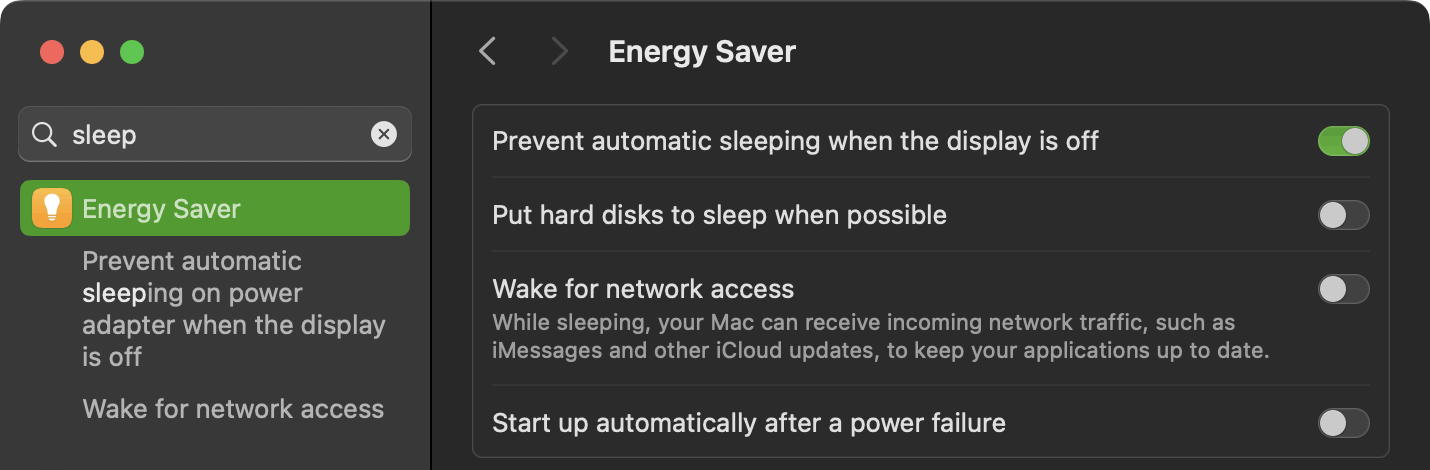
This is similar to a problem that appeared a couple of years ago with a setting that was more relevant to Macs that run on battery power. Try turning off the middle two Energy Saver settings (“Put hard disks to sleep” and “Wake for Network”). Does that help?
There is another thread in these discussions that discusses the issue of Time Machine saving numerous “snapshots” and keeping external hard disks working harder than expected.
Recently I have noticed that my Macbook refuses to go to sleep if I manually try to do this. I haven’t looked into it so far but it seems similar to your problem.
Thanks, but this does not help.
Both those settings are never enabled on my machines. As mentioned I also played with various setting in terminal PMSET commands which basically give more options than those exposed in the GUI. Nothing ever changed the behaviour:
As long as the Mac never enters into sleep mode, all works fine.
If you put it into sleep mode the first time, Mac enters into sleep as expected.
If mac then wakes from sleep that first time, external disks start to spin down and up and after ±1min down again and up … continously.
If you put the Mac into sleep again, the external drives keep doing this even with Mac in sleep mode!
Only solution out of this is to reboot! Then external drives behave normally again.
“talligent”, I feel your pain. I have the same problem with no solution so far.
2025 MacStudio. OS 26.2. Four ext. HDDs in an OWC Mercury Elite Pro USB3 enclosure. I’ve had that enclosure for almost seven years. OWC support told me its never released a firmware update. Maybe I need a newer enclosure.
Question: Do you need the computer to go to sleep? A modern Apple Silicon Mac (like a Studio) draws very little power when idle. So maybe configure it to just turn off your display when idle (to extend the life of the display), but don’t actually go to sleep.
FWIW, this is how I have always configured my desktop Macs (currently an M4 mini). I do it because I want to be able to remote-login from other devices, but unless you have a need to keep power consumption to an absolute minimum, you might want to use a similar configuration for yourself.
According to the power meter on my UPS, I have a power-draw of about 105W during normal operation. This is for the M4 mini, display, external HDD and some networking equipment (cable modem, router, etc.). When the display (an old LCD panel with a CCFL backlight) is turned off and the apps are idle, that power consumption drops to about 55W (again, noting that this includes things that never turn off - like my router and cable modem).
In other words, the load of the Mac, when idle and the display is off, is very low. Low enough, that I’m not really concerned about it. And it avoids all sleep-related system bugs, which (based on decades of reading posts from various users) always seem to exist in one form or another.
Hi Hib,
I still have the issue after several major updates [running latest Tahoe now] so it’s doesn’t seem OS related. I was thinking, hoping even, that is was pure hardware and a new model MacStudio would solve it. Your reply however doesn’t instil much confidence in that assumption.
In fact it makes me more nervous, you have this issue pop up on the latest to date macOS version in combination with a 2025 MacStudio?
It seems like this is not a widespread issue, otherwise it would have been addressed way sooner as in “Spin-up-Gate”. But an issue nonetheless, quite real when you have to deal with it.
PS: beginning of 2025 did a full clean reinstall of the OS and same exact issue… again what made me to believe it was solely HW related.
Hi David,
The reason I want my MacStudio to go to sleep is that I have a RAID-DAS connected and I want that to go to sleep too It makes noise, it draws more power than the MacStudio does [you’re absolutely correct in that the Macs these days use very little power if idle]. But I mainly want my DAS to sleep as well as my external [and also large] time machine drive.
What I do now is basically what you mention about letting the display go to sleep:
I use “Jettison” to put both enclosures to sleep and then sleep the display.
It works, only downside: I usually throughout the day have a lot of finder tabs open on my RAID. It has 48TB so lots of stuff on there and after remounting the drives have lost all those tabs. Not a biggie, just a nuisance I never had to deal with before.
Does it work if you check the “Put hard disks to sleep when possible” box in the Energy system setting panel? That might be simpler than unmounting the drives, if the DAS units properly respond to the command.
The same, rare, problem years apart, and most significant to me, a MacStudio in both cases (even if the models were three years apart). Careful diagnostics have been done, so I don’t think I have anything further to add here, other than to say it is probably a hardware problem with the MacStudio design.
It’s certainly worth contacting Apple support (this behavior must be worrisome and irritating), but before you do, I would suggest connecting that drive to another Mac and seeing what happens when it wakes from the first sleep after a reboot. I’m betting the drive is working just fine.
After a restart, the spin-down then up problem does not occur. If I sleep the Mac Studio, the problem does not occur while asleep. The problem starts upon wake from sleep and continues until the next restart.
Most importantly, it occurs with both the 2025 Mac Studio and my 2024 MacBook Pro both of which are on OS 26.2.
Also, I noticed a new possibly related issue. When I sleep either machine, they immediately wake. I have to sleep them a second time to get them to stay asleep.
Two possibilities strike me based on things I’ve seen before rather than any experience with Mac OS 26.2.
One is that you have accidentally set something in Settings that accidentally triggers this misbehavior. It may be an interaction between two or more different settings that have to do with sleep, starting up, or something else. The number and complexity of Settings can make it easy to make a mistake that could trigger a problem.
The other is that you have a malfunctioning app (or malware) on the machine that isn’t working properly that starts your drives to transfer data and spin. I had something like this happen with a MacPro G5 many years ago. I don’t remember the details, but it appeared to be an app looping and repeating some process endlessly.

 It makes noise, it draws more power than the MacStudio does [you’re absolutely correct in that the Macs these days use very little power if idle]. But I mainly want my DAS to sleep as well as my external [and also large] time machine drive.