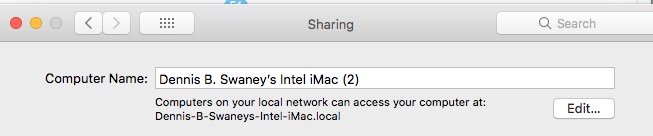
Recently when I logged in to my Apple Account and went to the Devices tab, I noticed a difference in how my iMac was identified. It read: First name Middle initial Last name Intel iMac (2)
Why is there a (2) behind the name? None of my other devices have a number in parenthesis behind their names so why does the iMac? Going to System Preferences > Sharing shows the (2) in the name there also but I never put it there. What will happen if I just deleted it in that location? Would that do any of the following:
Change it in the Devices tab of my Apple Account?
Cause a problem with my Carbon Copy Cloner night back up?
Usually, that happens if Bonjour detects some other device on your network with that name.
For instance, I have a HomePod Mini named “Living Room”.
When I set up an Apple TV in that room also named “Living Room”, it got renamed to “Living Room (2)”. Since I don’t like that, I renamed it to “Living Room ATV”.
I sometimes see it if a temporary glitch causes a device to see itself. For instance, if I change network settings on my laptop so that the IP address changes, it has occasionally seen a conflict with itself, not realizing that the name it detected on the old IP address is the same computer. This doesn’t happen often, but when it does, I just remove the (2) (or whatever numeric suffix was picked) from the name.
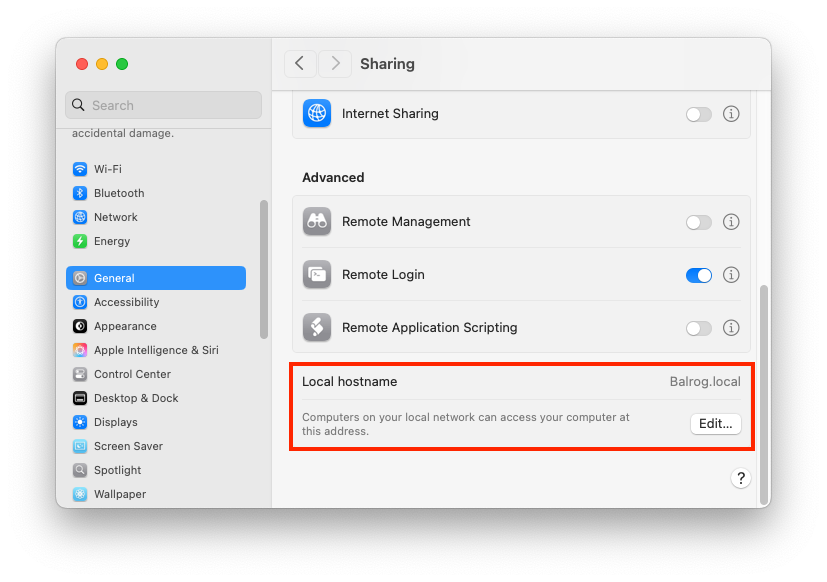
As for where to set it, it’s part of the Bonjour sharing. System Settings → General → Sharing → Local hostname → Edit…:
So if I just change it there it won’t cause any problems anywhere else like in the Devices section of my Apple Account or with my nightly scheduled CCC backup?
Clearly, you haven’t created another device with a name like that. So ti was probably a temporary network glitch. I’d just remove the (2), and be done with it.
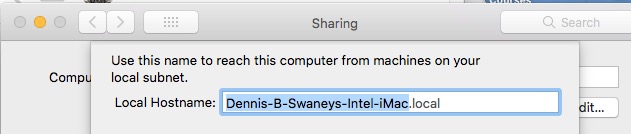
I noted that the (2) does not appear in the mDNS name. So if any software is using that name, it won’t be affected. I suspect (don’t know for sure) that these suffixes are always ignored, since I got an “invalid Bonjour name” error when I tried to manually append (2) to my computer’s sharing name.
I don’t think it should. I’ve renamed devices several times and the Devices section of my Apple account just changes the name of the device. I assume there’s some kind of UUID or other persistent identifier that tracks the computer independently of the name.
For your CCC backup, that might depend on what you’re doing:
If you’re making a backup to locally-attached storage, it shouldn’t affect anything (other than changes to the config file where the name is stored).
If you’re backing up to a remote network device, it also shouldn’t affect anything. CCC doesn’t track things by host name, but by saving files to a directory your specify.
If your Mac is acting as a file server for other computers to store their CCC backups, then you might have to double-check the hostname they’re using for the network connection. If you were using the mDNS hostname and it changed, then you’ll need to make sure the remotes have the new name. Buf if you’re using something else (like an IP address or DNS hostname, which won’t be affected by the sharing name), then even that shouldn’t matter.
That’s how it worked prior to Ventura.
Currently it should be Settings–>General–>About–>Name
Changing it with Sharing does not change the name saved in nvram while changing it in About does. See this discussion and the comment by etresoft and quoted below:
I found your reply generally useful to know, and I appreciate your response, sir. I bookmarked your post for its link to another discussion and told it to follow up next month – trying out that feature of Discourse.
No need to apologize, David. We just have to try and remember where Apple changes locations, names, and paths of settings. I consider most are being done just for change sake. Preferences and Settings describe the same thing/location so there was no need to change the name.