This is one of the few tasks I had to perform on my Mac. iOS and I assume iPadOS don’t display File suffixes no matter how nicely you ask. You’re just supposed to be open jaw amazed by the fact that the device just magically knows what your of file it is.
I decided to see if I could use shortcuts to at least append a new file suffix onto a file.
After about two hours of work, I finally came up with this Sharesheet shortcut:
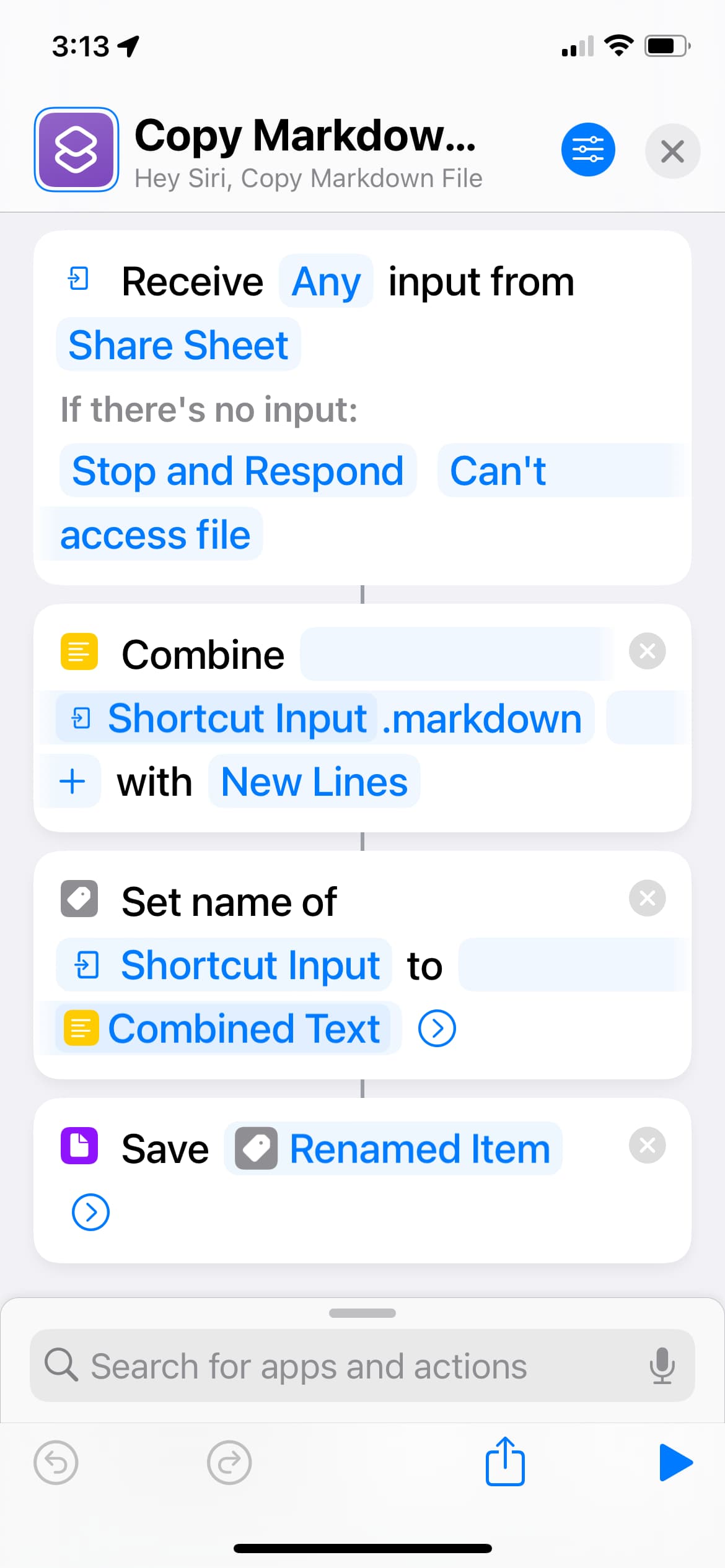
What fun! I was looking for a file copy action (couldn’t find) and a concatenation action. I finally found combine. That allowed me to append a .markdown suffix. (I originally tried .txt, but realized I don’t have an app that takes plain textiles as input).
My next struggle was referencing the contents of the file. I found an open file action, but they only allowed me to open a file on a particular app. My Markdown app wouldn’t open a file with an unknown suffix.
I tried the Get contents of URL, but that was too complex. I finally figured out Set Name Of could change the name of the file, and then I could save the file.
I’ve been a programmer for decades, and trying to write shortcuts is proving to be frustrating.